Turbo C++ 3.0 Windows 7 Free Download: Compiler with Instructions

Written by

on

in

, ,


🚀 Quick Summary

  • Download and extract Turbo C++ 3.0 directly to your C: drive.
  • Use TC.EXE (not the shortcut) to run the compiler.
  • Windows 7 64-bit users must use DOSBox to emulate a 32-bit environment.

Note for users of Windows 7 64-bit: You need to use DOSBox to emulate a 32-bit system because this compiler is not compatible with 64-bit. Install DOSBox, and mount your C: drive, or whichever drive you installed Turbo C in.

The download page for Turbo C++ 3.0 was one of the most popular pages in poochycat.com, my previous domain which had already expired.

(The rest of this post must be viewed to find the download links and installation instructions for turbo c++ 3.0 windows 7 free download)

Installation Instructions

Last Updated: November 2011

  1. Download the archive from the link(s) provided somewhere at the top of this post.
  2. Unzip it and place the contents of the archive into a folder inside your Drive C. (e.g., C:tcpp3)
  3. Please observe:
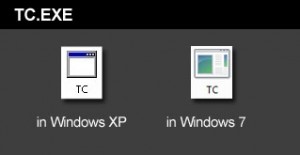
    Screenshot showing the TC.EXE executable file to run Turbo C++

    The above is the TC.EXE file that you MUST run.
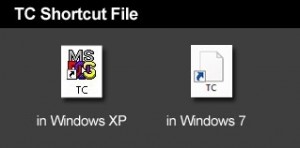
    Screenshot showing the incorrect TC shortcut file to avoid

    The above is the TC Shortcut file, don’t use it.

    The compiler is the file named TC.EXE. Don’t confuse it with the TC shortcut! Simply double click on that and the compiler will run.

  4. Just before you type your C program code, please make sure you have the correct path for the INCLUDE Directory and LIBRARY Directory. You can check by clicking on Options -> Directories…
  5. The path for the INCLUDE Directory must be C:YourFolderINCLUDE. For example, C:tcpp3INCLUDE. The file you downloaded uses tcpp3 as folder name, which is why I’m using the same folder name in my example. Please make sure you specify the correct path to the INCLUDE folder, this is crucial, or else it you would get errors. The INCLUDE folder should directly under tcpp3 folder, and tcpp3 folder is directly under your drive C folder.
  6. And the path for the LIBRARY Directory must be C:YourFolderLIB, for example C:tcpp3LIB. Again, check if you have the correct path to the LIB folder.
  7. Remember to change the YourFolder into the name of the folder you are using for your Turbo C++.
  8. You can now test a C program code. First, select File from the menu and choose new. Copy the sample codes at the end of this blog entry.
  9. After copying the codes, select Run from the menu, and choose Run. There should be an output of Hello World on the screen. The codes worked for me, please copy them carefully.

Hello World sample code for testing in C language

Hello World sample code for testing in C++ language


Related Posts

About the author:

Catzie Avatar

The homo sapiens behind these blog posts is “Catzie“

Explore my top blog posts:

Comments

261 responses to “Turbo C++ 3.0 Windows 7 Free Download: Compiler with Instructions”

  1. Yasir Avatar
    Yasir

    Can someone please help me solve twp C++ errors in my program?

    Here it is:

    #include
    #include
    #include
    #include
    #include
    #include
    struct customer
    {
    char name[20];
    char address[40];
    int phno;
    };
    class dominos
    {
    customer r;
    public:
    void getdata();
    void print();
    unsigned long int getno()
    {
    return(r.phno);}
    void modify();
    }s;
    void dominos::modify()
    {
    cout<<"Enter new details:";
    char na[20],add[40];
    long int pno;
    cout <<"tNew name : (enter '.' to retain old one) t";
    gets (na);
    cout << "tNew address : (enter '.'to retain old one) t";
    gets(add);
    cout <> pno;
    if(strcmp(na,”.”) !=0)
    strcpy(r.name,na);
    if(strcmp(add,”.”)!=0)
    strcpy(r.address,add);
    if(pno !=0)
    r.phno=pno;
    }
    void start();
    void mainmenu();
    void getdata();
    void add();
    void search();
    void menu();
    void system();
    void order();
    void display();
    void print();
    void delet(long);
    void modif(long);
    void count();
    void mainmenu()
    {
    clrscr();
    int ch;
    do
    {
    cout << "1. To add a new customer." << endl;
    cout << "2. To search a customer." << endl;
    cout << "3. To display the records." << endl;
    cout << "4. To take order." << endl;
    cout << "5. To count the records." << endl;
    cout << "6. To exit" << endl;
    cout << "Enter your choice(1/2/3/4/5/6):" <> ch;
    switch(ch)
    {
    case 1: add();
    break;
    case 2: search(); break;
    case 3: display(); break;
    case 4: menu();
    char ch;
    cout<> ch;
    if ((ch==’y’) || (ch==’Y’))
    order();
    else
    cout << "Thank you for visiting.";
    break;
    case 5: count(); break;
    case 6: exit(0); break;
    }
    while(ch!=6);
    cout << "Record not found.";
    getch();
    }
    void dominos :: getdata()
    {
    gotoxy(20,7);
    cout << "Enter name of customer:";
    gets(r.name);
    gotoxy(20,9);
    cout << "Enter address of customer:";
    gets(r.address);
    gotoxy(20,11);
    gotoxy(20,13);
    cout <> r.phno;
    }
    void add()
    {
    char ch; static int c=0;
    ofstream fo(“customer.dat”, ios::app);
    do
    {
    clrscr();
    s.getdata();
    fo. write ((char*) &s, sizeof(s)); c++;
    cout << c << "Customer details added." << "n";
    cout <> ch;
    }
    while (( ch==’y’) || (ch ==’Y’));
    fo.close();
    count();
    getch();
    clrscr();
    }
    void menu()
    {
    clrscr();
    cout << "Menu" << "n" << "n" << "n" <<"n";
    cout << "Pizza name:- cost(rs.)"<<"n"<<"n";
    cout << "1 Veggie Crunch(veg) 350" << "n";
    cout << "2 Veggie Lovers(veg) 425" << "n";
    cout << "3 Country Feast(veg) 450" << "n";
    cout << "4 Veggie Supreme(veg) 470" << "n";
    cout << "5 Exotica(veg) 470" << "n";
    cout << "6 Fiery Chicken(non veg) 350" << "n";
    cout << "7 Peproni(non veg) 485" << "/n";
    cout << "8 Chicken Supreme(non veg) 485" << "/n" << "/n";
    }
    void order()
    {
    int count=0, vat=0, totbill=0, choice;
    char more,confirm;
    x:
    cout <<"Which pizza would you like to order?" <> choice;
    switch(choice)
    {
    case 1: count=count+350; break;
    case 2: count=count+425; break;
    case 3: count=count+450; break;
    case 4: count=count+470; break;
    case 5: count=count+470; break;
    case 6: count=count+350; break;
    case 7: count=count+485; break;
    case 8: count=count+485; break;
    }
    cout << "Do you want to order more(y/n)?" <> more;
    if (more==’y’)
    goto x;
    vat=0.125*count;
    totbill=count+vat;
    cout << "Total bill amount=Rs." << totbill << "n";
    cout <> confirm;
    if ((confirm==’y’) || (confirm==’Y’))
    {
    cout <<"Your total amount is Rs." << count << "n" << "n";
    cout << "Value added tax(vat) Rs." << vat << "n" <<"n";
    cout << "Your total bill amount with taxes is Rs." << totbill << "n"<< "n";
    cout << "Your order shall be delivered to you in about 30 minutes." << "n" <<"n";
    cout << "Thank you for calling domino’s. . . . . .good times start with great pizzas." << "n" <<"n";
    getch();
    }
    if ((confirm=='n')||(confirm=='N'))
    menu();
    }
    void system()
    {
    start();
    mainmenu();
    }
    void display()
    {
    clrscr();int c=0;
    ifstream fi("customer.dat",ios::in);
    fi.seekg(0,ios::beg);
    while(!fi.eof())
    {
    fi.read ((char*) &s, sizeof(s));
    cout << c << ":";
    s.print();
    c++;
    cout<< "n" << "n";
    }
    fi.close();
    getch();
    }
    void dominos::print()
    {
    cout<<"Customer name :-"<<r.name<<"n"<<"Address:-"<<r.address<<"n"<<"Phone number:-"<<r.phno<<"n";
    }
    void main()
    {
    clrscr();
    system();
    }
    void delet(long pos)
    {
    ifstream fio("customer.dat",ios::in);
    ofstream fot("temp.dat",ios::out);
    long po;
    fio.seekg(0);
    while(!fio.eof())
    {
    fio.read((char*)&s,sizeof (s));
    po=fio.tellg();
    if(po == pos)
    continue;
    else
    fot.write((char*)&s,sizeof (s));
    }
    fio.close();
    fot.close();
    remove("customer.dat");
    rename("temp.dat","customer.dat"); fflush(0);
    }
    void modif(long pos)
    {
    cout << pos << endl;
    fstream fio("customer.dat",ios::out || ios::app); fflush(0);
    fio.seekp(0,ios::beg);
    s.modify();
    fio.seekp(pos,ios::beg);
    fio.write((char*)&s,sizeof (s));
    getch();
    }
    void start()
    { gotoxy(10,2);
    cout <<" xxx " ;
    gotoxy(10,3);
    cout << " xxxx " ;
    gotoxy(10,4);
    cout <<" xxxxxxxx " ;
    gotoxy(10,5);
    cout <<" xxxxxxxxxxxx " ;
    gotoxy(10,6);
    cout <<" xxxxxxxxxxxxxxxx " ;
    gotoxy(10,7);
    cout <<" xxxxxxxxxxxxxxxxxxxx " ;
    gotoxy(10,8);
    cout <<" xxxxxxxxxxxxxxxxxxxxxxxx " ;
    gotoxy(10,9);
    cout <<" xxxxxxxxxxxxxxxxxxxxxxxxxxxx ";
    gotoxy(10,10);
    cout <<" xxxxxxxxxxxxxxxxxxxxxxxxxxxxxxxx ";
    gotoxy(10,11);
    cout <<" xxxxxxxxxxxxxxxxxxxxxxxx ";
    gotoxy(10,12);
    cout <<" xx xxxxxxxxxxxxxxxxxxxxxx xx ";
    gotoxy(10,13);
    cout <<" xx xx ";
    gotoxy(10,14);
    cout <<" xxxxx xx xxxx xxxx xxx ";
    gotoxy(10,15);
    cout <<" xx x xx x x xx xx ";
    gotoxy(10,16);
    cout <<" xx x xx x x xxxxxxx ";
    gotoxy(10,17);
    cout <<" xx xx x x xx xx ";
    gotoxy(10,18);
    cout <<" xx xx xxxx xxxxxx xx ";
    gotoxy(10,19);
    cout <<" xx xx xx xx xxxxxx ";
    gotoxy(10,20);
    cout <<" xx xx xx xx xxxxxx ";
    gotoxy(10,21);
    cout <<" xxxxxxx xx xx xx ";
    gotoxy(10,22);
    cout <<" xx xx xx xx xx ";
    gotoxy(10,23);
    cout <<" xx xx xxxxxxxx xx ";
    gotoxy(10,24);
    cout <<" xx ";
    gotoxy(10,25);
    cout <<" xx xx ";
    gotoxy(10,26);
    cout <<" xx xx ";
    gotoxy(10,28);
    cout <<" xxxxxxxxxxxxxxxxxxxxxxxxxxxxxxxxx" ;
    gotoxy(10,29);
    cout <<" xxxxxxxxxxxxxxxxxxxxxxxxxxxxxxxxx" ;
    gotoxy(10,30);
    cout <<"n"<<"n";
    cout <<" branch manager:-"<<"n";
    cout <<" sushant"<<"n";
    cout <<" (press enter to continue)";
    getch();
    }
    void search()
    {
    clrscr(); fflush(0);
    unsigned long int cphno;
    long pos;
    char ch;
    int modchoice;
    char found='n';
    ifstream fi("customer.dat", ios::in);
    cout <> cphno;
    while(!fi.eof())
    {
    fi.read((char*) &s, sizeof(s));
    if(s.getno()==cphno)
    {
    s.print();
    found=’y’;
    pos=fi.tellg(); cout <<"recrd fount at" << pos << endl;
    cout << "n Do you want the modify the record (y/n)?" <> ch;
    if (ch==’y’ || ch==’Y’)
    {
    cout << "n Enter your choice for modification:-"<<"n";
    cout <<"1 Modify" << "n";
    cout <> modchoice;
    switch(modchoice)
    {
    case 1:modif (pos); break;
    case 2:delet(pos); break;
    default: cout << "invalid choice.";
    }
    }
    break;
    }
    }
    fi.close();
    if(found=='n');
    };
    void count()
    {
    clrscr();
    int count=0;
    ifstream fi("customer.dat" , ios::in);
    fi.seekg(0,ios::beg);
    while(!fi.eof())
    {
    fi.read((char*) &s,sizeof (s));
    count++;}
    cout<<"n total no of records in file is :"<<count;
    fi.close();
    getch();
    };
    }

  2. rabiakhan Avatar

    please give me the software of c language because i will use the the programming with c

  3. Priya Avatar
    Priya

    when i run tc.Exe
    it displays an error message that not compatible in win &

    1. amit Avatar

      its depends which version you install at which os
      please tell me your system configuration

  4. Priya Avatar
    Priya

    when i run tc.Exe
    it displays an error message that not compatible in win 7

  5. Lars Garefelt Avatar
    Lars Garefelt

    I have Windows XP Pro. Just for fun,
    I tried my old version of Turbo C++
    version 1.0… in the Safe Mode and
    it seemed to be working. I didn’t
    test it thorougly though. Anyway, it doesn’t work in the normal mode;
    I just get some stupid comment.
    My guess is that some old
    dos-programmes can be run in the
    Safe Mode in XP Pro.
    What do you think of it?

    Lari G.

    [email protected]

  6. valencia Avatar
    valencia

    plzz help…..i tried with naming d folder as TC also….bt still same error
    1. unable to open include file “stdio.h”
    2. unable to open include file “conio.h”
    4. function “clrscr” should have a prototype
    5. function “printf” should have a prototype
    6. function “getch” should have a prototype

    pls help..thank you

  7. Priyanshu Avatar
    Priyanshu

    qa bakwaas hai…! its showing “Attempt to access invalid address”

  8. aditya Avatar
    aditya

    hey niggas..even 4 me it dinot work..but ive got the solution..
    rename ur TC to TC.EXE
    n ul c it workin..big mama..

  9. muthu pandi Avatar
    muthu pandi

    I need a help please anyone solve me
    catzie this is the error appeared when i try to run the program,
    1. unable to open include file “stdio.h”
    2. unable to open include file “conio.h”
    4. function “clrscr” should have a prototype
    5. function “printf” should have a prototype
    6. function “getch” should have a prototype
    reply me immediately

  10. shikha Avatar
    shikha

    this is ridiculous.it always give 26 errors while running

    1. cheno Avatar
      cheno

      same prob

  11. shikha Avatar
    shikha

    pls if anyone can help me to get out of this problem

  12. shikha Avatar
    shikha

    hi what to do
    it is giving error unble to find cos.obj
    please reply

  13. shikha Avatar
    shikha

    hehe
    it works now
    thank u so much

    1. arnold Avatar
      arnold

      shikha, can you pls tell me how you resolve the errrors? i have problem like as what you posted the errors.

      1. shikha Avatar
        shikha

        The path for the INCLUDE Directory must be C:YourFolderINCLUDE.
        LIBRARY Directory must be C:YourFolderLIB

    2. arnold Avatar
      arnold

      shikha, can you pls tell me how you resolve those errrors in your Tc? i have problem like as what you posted those errors too..

  14. arnold Avatar
    arnold

    guys plz help me how to make program in Turbo C. we can choose the following program, Grading System, Hotel Reservation System, Payroll System, Patient System,just make it simple as very simple. it should be 2-3 file handling to search the name etc…

  15. janvi Avatar
    janvi

    hey pls help me out nt able 2 download turbo c++

  16. janvi Avatar
    janvi

    hey pls help me out nt able 2 download turbo c++

  17. Mahek Avatar
    Mahek

    how 2 download turbo c++;

  18. madhavi Avatar
    madhavi

    help me
    i have downloaded c++ 3.o .i m operating windows 7. its giving me error that this version is not compatible with 32-64 bit. i have also dos-box but it is not opening in full size .
    plz give me solution as early as possible

  19. yog Avatar
    yog

    C:TCTC.PIF

    invalid program file name,please check your pif file.choose close to terminate the application

    this is d error i am getting wen i install dis file :(((

    plz help me soon

  20. prachi mishra Avatar
    prachi mishra

    hey thanks a lot..i love working with turbo c…as compared to vc++ 🙂

Leave a Reply

Your email address will not be published. Required fields are marked *