Turbo C++ 3.0 Windows 7 Free Download: Compiler with Instructions

Written by

on

in

, ,


🚀 Quick Summary

  • Download and extract Turbo C++ 3.0 directly to your C: drive.
  • Use TC.EXE (not the shortcut) to run the compiler.
  • Windows 7 64-bit users must use DOSBox to emulate a 32-bit environment.

Note for users of Windows 7 64-bit: You need to use DOSBox to emulate a 32-bit system because this compiler is not compatible with 64-bit. Install DOSBox, and mount your C: drive, or whichever drive you installed Turbo C in.

The download page for Turbo C++ 3.0 was one of the most popular pages in poochycat.com, my previous domain which had already expired.

(The rest of this post must be viewed to find the download links and installation instructions for turbo c++ 3.0 windows 7 free download)

Installation Instructions

Last Updated: November 2011

  1. Download the archive from the link(s) provided somewhere at the top of this post.
  2. Unzip it and place the contents of the archive into a folder inside your Drive C. (e.g., C:tcpp3)
  3. Please observe:
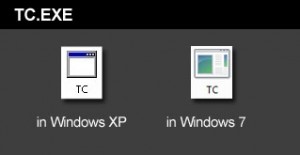
    Screenshot showing the TC.EXE executable file to run Turbo C++

    The above is the TC.EXE file that you MUST run.
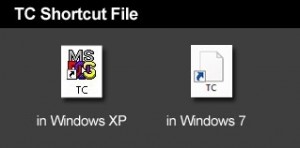
    Screenshot showing the incorrect TC shortcut file to avoid

    The above is the TC Shortcut file, don’t use it.

    The compiler is the file named TC.EXE. Don’t confuse it with the TC shortcut! Simply double click on that and the compiler will run.

  4. Just before you type your C program code, please make sure you have the correct path for the INCLUDE Directory and LIBRARY Directory. You can check by clicking on Options -> Directories…
  5. The path for the INCLUDE Directory must be C:YourFolderINCLUDE. For example, C:tcpp3INCLUDE. The file you downloaded uses tcpp3 as folder name, which is why I’m using the same folder name in my example. Please make sure you specify the correct path to the INCLUDE folder, this is crucial, or else it you would get errors. The INCLUDE folder should directly under tcpp3 folder, and tcpp3 folder is directly under your drive C folder.
  6. And the path for the LIBRARY Directory must be C:YourFolderLIB, for example C:tcpp3LIB. Again, check if you have the correct path to the LIB folder.
  7. Remember to change the YourFolder into the name of the folder you are using for your Turbo C++.
  8. You can now test a C program code. First, select File from the menu and choose new. Copy the sample codes at the end of this blog entry.
  9. After copying the codes, select Run from the menu, and choose Run. There should be an output of Hello World on the screen. The codes worked for me, please copy them carefully.

Hello World sample code for testing in C language

Hello World sample code for testing in C++ language


Related Posts

About the author:

Catzie Avatar

The homo sapiens behind these blog posts is “Catzie“

Explore my top blog posts:

Comments

261 responses to “Turbo C++ 3.0 Windows 7 Free Download: Compiler with Instructions”

  1. cenon Avatar
    cenon

    thanks for sharing….it runs on C.. why not the example on C++ does’nt? what is the problem?i copied the example exactly..thanks

    1. Catzie Avatar
      Catzie

      I can only think of one solution. If you haven’t, please try saving your code as a .cpp file instead of .c

  2. k Avatar
    k

    it doesn’t work in my windows 7 home premium-64 bit 🙁

    i can’t open the tc.exe file maybe because of compatibiliy issues

  3. Pitambar Avatar
    Pitambar

    Thank Boss its working fine ! : )

  4. jezz Avatar
    jezz

    mine not working on windows 7 64 bit

    it said:

    is not compatible with the version of Windows you’re running. Check your computer’s system information to see whether you need a x86 (32-bit) or x64 (64-bit) version of the program, and then co
    ntact the software publisher.

  5. lorbren Avatar

    ate ang ganda mo naman ehehhee..cute pa heheh wag serious^_~V

  6. Harshi Avatar
    Harshi

    i try to run the tc file but all it gives is “divide overflow”
    i am new to all dis and need help urgently!
    plz help!

  7. arvind kumar Avatar
    arvind kumar

    mam it will run for vista

  8. SUMANYU Avatar
    SUMANYU

    RUNNING WINDOW7 HOME PREMIUM. ON DOUBLE CLICKING TC FILE, GET THE INCOMPATIBLE MESSAGE.ANY OTHER METHOD OF RUNNING IT?

  9. saffull Avatar
    saffull

    when irun the program it is not showing output screen,plse help

  10. Srini Avatar
    Srini

    When i click TC.exe it shows that “C:tcpp3TC.PIF
    C:PROGRA~1SymantecS32EVNT!.DLL.An installable Virtual Device Driver failed DLL initialization.”
    what s it…how can i clear it

  11. cathy Avatar
    cathy

    i installed it but unable to execute it its does not work shows a lot of errors that cant work with stdio and conio and other stuff please i even checked the path directory but it wont work ?(i use windows home premium)

    1. billy Avatar
      billy

      there is another way of writin the program in c++
      #include
      #include
      void main()
      {
      cout<<"hello world"
      }
      (this does not work in windows 7

    2. jinal Avatar
      jinal

      it is not working after i double clicked tc.exe

  12. mia Avatar
    mia

    ya same here did not work

  13. praveen Avatar

    is itn’t fuckn?

  14. justin Avatar
    justin

    me, too. can you send me a working link. or somthing i really need it. for my school work. the thing with the coordinates like

    gotxy(3, 2);
    cprintf(“xxx”);

    1. kar Avatar
      kar

      hai how r u

  15. vidya Avatar
    vidya

    wen i install turbo and run the program is shows an erroe named”TV.lib” file is unable to open

  16. Marj Avatar
    Marj

    Still not working,, it only pop up and quickly gone…

    1. jinal Avatar
      jinal

      same here

  17. Noel Avatar
    Noel

    I run the program TC.exe but it just showed me an empty black screen until I close it.

  18. Romeo Avatar
    Romeo

    Try this in C++

    main()
    {
    clrscr();

    cout<<"Your Name :"

    }

  19. amogh Avatar
    amogh

    same here…. its not workin……

  20. von levi Avatar
    von levi

    it doesn’t work at all..i can’t run the program to change the path directory.tss!

Leave a Reply

Your email address will not be published. Required fields are marked *