Turbo C++ 3.0 Windows 7 Free Download: Compiler with Instructions

Written by

on

in

, ,


🚀 Quick Summary

  • Download and extract Turbo C++ 3.0 directly to your C: drive.
  • Use TC.EXE (not the shortcut) to run the compiler.
  • Windows 7 64-bit users must use DOSBox to emulate a 32-bit environment.

Note for users of Windows 7 64-bit: You need to use DOSBox to emulate a 32-bit system because this compiler is not compatible with 64-bit. Install DOSBox, and mount your C: drive, or whichever drive you installed Turbo C in.

The download page for Turbo C++ 3.0 was one of the most popular pages in poochycat.com, my previous domain which had already expired.

(The rest of this post must be viewed to find the download links and installation instructions for turbo c++ 3.0 windows 7 free download)

Installation Instructions

Last Updated: November 2011

  1. Download the archive from the link(s) provided somewhere at the top of this post.
  2. Unzip it and place the contents of the archive into a folder inside your Drive C. (e.g., C:tcpp3)
  3. Please observe:
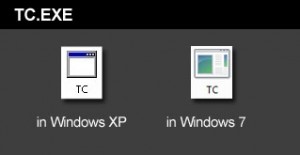
    Screenshot showing the TC.EXE executable file to run Turbo C++

    The above is the TC.EXE file that you MUST run.
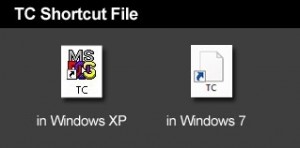
    Screenshot showing the incorrect TC shortcut file to avoid

    The above is the TC Shortcut file, don’t use it.

    The compiler is the file named TC.EXE. Don’t confuse it with the TC shortcut! Simply double click on that and the compiler will run.

  4. Just before you type your C program code, please make sure you have the correct path for the INCLUDE Directory and LIBRARY Directory. You can check by clicking on Options -> Directories…
  5. The path for the INCLUDE Directory must be C:YourFolderINCLUDE. For example, C:tcpp3INCLUDE. The file you downloaded uses tcpp3 as folder name, which is why I’m using the same folder name in my example. Please make sure you specify the correct path to the INCLUDE folder, this is crucial, or else it you would get errors. The INCLUDE folder should directly under tcpp3 folder, and tcpp3 folder is directly under your drive C folder.
  6. And the path for the LIBRARY Directory must be C:YourFolderLIB, for example C:tcpp3LIB. Again, check if you have the correct path to the LIB folder.
  7. Remember to change the YourFolder into the name of the folder you are using for your Turbo C++.
  8. You can now test a C program code. First, select File from the menu and choose new. Copy the sample codes at the end of this blog entry.
  9. After copying the codes, select Run from the menu, and choose Run. There should be an output of Hello World on the screen. The codes worked for me, please copy them carefully.

Hello World sample code for testing in C language

Hello World sample code for testing in C++ language


Related Posts

About the author:

Catzie Avatar

The homo sapiens behind these blog posts is “Catzie“

Explore my top blog posts:

Comments

261 responses to “Turbo C++ 3.0 Windows 7 Free Download: Compiler with Instructions”

  1. Abhinav Avatar
    Abhinav

    Wow! Its working Catzie…thank you so much 🙂
    I tried two versions of Turbo C++ 3 before this and both didn’t work, so I’m really glad to finally have a working compiler! 😀

  2. shraddha Avatar
    shraddha

    m unable to open OBJ folder in Emulated turbo C++ 3.0

  3. shraddha Avatar
    shraddha

    how to copy COS.OBJ from OBJ folder to main comipler folder……….
    there is no OBJ folder in my Turbo C++ 3.0

  4. Raghav Avatar
    Raghav

    The TC.exe is not working on my windows 7 ultimate 64-bit.

    1. sandhya Avatar
      sandhya

      ya …. i too have windows 7 ultimate 64 bit… TC.exe is not working !! do u have any solution???

  5. Muhamed Auda Avatar

    thans too
    really i use linux at all but my fried has porbem concerned to conio.h so this good complier i have used before 5 years

  6. kamlesh kaur Avatar
    kamlesh kaur

    hiiiiii…..i am also not able to open TC in my window xp….when i click on TC to open it, it get disappear….plz reply me..help me……….

  7. pb Avatar
    pb

    where can I dL version 4.5?

  8. incexz Avatar
    incexz

    hi … i cant open my TC.EXE in my window xp .. pls help me ASAP 🙂

  9. Pawan Avatar
    Pawan

    I am able to run turbo C.
    But not C++.
    I want to practice C++ programs.
    So, can anybody help me how to run C++ using these files?

  10. art hulpa Avatar
    art hulpa

    What a nice program it so very nice i like this

  11. shiela Avatar

    i want to download a turbo c
    bt i dnt know how to download it!

    i want to learn in turbo c….

    pls. help me

  12. yeshwanth Avatar
    yeshwanth

    hello!!..
    actually i downloaded everything!!.. my download was process z cmplt bt after tat whn i open th folder in tat turbo c++ it opens fr 5secs and blinks and juss com back.. my system os is windows xp.. plz help me..

  13. bilal Avatar
    bilal

    thanx

  14. jayachandra Avatar
    jayachandra

    I just downloaded TC ++ I can’t run it.When I click the shortcut the monitor screen will be full black.

  15. Jhezrylle Avatar

    I want to have a Turbo C++ to program my assign.

  16. Soumita Das Avatar
    Soumita Das

    Good

  17. john dave Avatar
    john dave

    hi to all i need your help can you help me to answer my assignment. this is the question..

    Write a program that will accept two numbers and display the highest

    N1 N2

    1. jamalix Avatar
      jamalix

      depending on your compiler…..
      #include
      #int main()
      {
      int N1, N2;
      cout <> N1;
      cout <> N2;
      if (N1>N2)
      cout << "nThe higher number is: ";
      cout << N1;
      if (N1<N2)
      cout << "nThe higher number is: ";
      cout << N2;
      if (N1==N2)
      cout << "nThe two numbers are equal";
      return o;
      }

      Note: It can be much more simplified, you can do that on your own. cheers

  18. jamalix Avatar
    jamalix

    when i run the program with the compiler and view the output, nothing shows! I previously used this compiler on a windows xp system and it worked just fine. I’m currently using a windows 7 system, does this new development have anything to do with this change? Please help.

    1. jamalix Avatar
      jamalix

      I solved the problem already! Thanks

      1. preeti Avatar
        preeti

        can u tel me hw the prob was solved…even i too hav a same prob…!!!

Leave a Reply

Your email address will not be published. Required fields are marked *