An older blog post about CCNA Exploration 4.0 Curriculum was one of my most popular pages in this site. A guest requested that I share CCNA V5 Curriculum Download links here for Routing and Switching, and I decided to try to fulfill such request because I think this will help a lot of people who are studying to get certified by Cisco.
These are portable offline curriculum files for CCNA Routing & Switching — there’s no need for installation I’m not sure yet if it’s the same but more updated version of CCNA Exploration or completely different.
Extract the .rar files into your computer so that you can study for CCNA even when you are offline. You can also make the curriculum portable by extracting the contents into your USB flash drive and take your CCNA V5 curriculum with you anywhere.
Please download these and check if they are what you need for your CCNA studies. Let me know what you think. 🙂 (more…)
As usual, I do my best not to drop spoilers as I myself hate those. But since my judgement is not flawless, please beware that I might mention potential minor spoilers here.
Thanks to having friends who like watching anime, I am once again an anime fan. 🙂 When I was in high school, I really loved anime, especially Bubblegum Crisis Tokyo 2040. I was also obsessed about Final Fantasy X-2.
Chaos Dragon was one of the recent anime series that I watched. It wasn’t one of the best series to me, but I still liked it.
The story takes place in Huanli (the Year of Dazzling) 3015. Donatia and Kouran, two countries fighting for supremacy, are causing the world to be torn apart due to the constant war. Amidst the strife is the island country Nil Kamui, which has lost its independence. Red Dragon, the guardian god of Nil Kamui, goes out of control. Will the island country be able to regain its independence? (Source: MyAnimeList News)
Chaos dragon: The art
It was nice to glance at the art of Chaos Dragon: Sekiryuu Seneki, but upon inspection, I don’t like how the characters were drawn.
Personally, I don’t like it when anime characters are drawn like this. Look at Fugaku in the picture above. I don’t know his age, but he looks like a young boy when I think he’s supposed to be at least 18 years old, judging by his character and the depth of his voice.
Also notice how their eyes were drawn. There are straight lines and corners, and it bothers me.
Of course not everyone would care about the character art that much. A friend won’t even watch Kids on the Slope just because the character art wasn’t classic “cutesy” anime drawing. But I LOVED how Kids on the Slope characters were drawn! So, yeah, it comes from viewers’ personal tastes. 🙂
Chaos Dragon: Story
When I had watched up to a certain episode, I was wondering if all of Ibuki’s friends will die! Not telling you who kills who though. And it’s up to you to find out by watching Chaos Dragon. :p
It was nice how in every episode, they reminded us what’s going on with Nil Kamui, Donatia, and Kouran.
Chaos Dragon: Characters
I don’t recall any character development or any outstanding personality in Chaos Dragon. I guess it wasn’t a good anime in this aspect.
Would I recommend Chaos Dragon?
Hmmm.. Uh, maybe if you’re really bored, yes. Go ahead and watch it. 😆 I was in tears near the ending, so I guess it’s not that bad for an anime series.
Have you watched Chaos Dragon: Sekiryuu Seneki? What do you think of it?
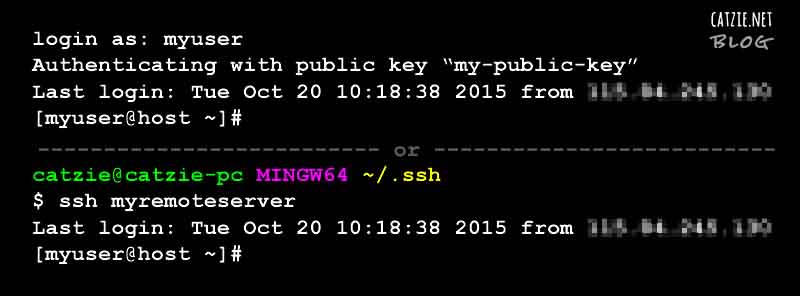
We access remote Linux servers everyday from our Windows computers. Having different servers for different projects, it can be difficult having to enter the passwords over and over in everyday. And so, I suggest that we use SSH Keys instead for authentication to save us some time and boost productivity. SSH keys should also make logins more secure than passwords — just be careful when someone else uses your computer.
I’ll show you two methods that we can use to connect to our Linux servers using SSH keys and without a password.
I personally like using Git Bash to connect via SSH to our server because it’s done in fewer steps than when using PuTTY, but in this tutorial I will first show you password-less connection to SSH via PuTTY.
Method 1: SSH Connection without password in PuTTY
Download PuTTY from the PuTTY Download Page if you haven’t yet. No installation is required — you just run this .exe file when you need it.
You also need PuTTYgen so if you don’t have it yet, download PuTTYgen from the PuTTY Download Page. This is the PuTTY Key Generator, and will be used to generate a key later. Like putty.exe, no installation is needed for this.
Right click on puttygen.exe then run it.
Make sure that under Parameters, SSH-2 RSA is selected, then click the Generate button. Move your mouse pointer all over the blank area to hasten the key generation.
In PuTTY Key Generator, click “Save public key” and save it as a .txt file.
Still in PuTTY Key Generator, click “Save private key” and save it as a .ppk file. It’s recommended for you to save a passphrase for the private key.
Now, run PuTTY. Go to Connection -> SSH -> Auth. Click the browse button to find and select the private key (.ppk file) that you saved in the previous step.
From Connection, go to Session so that you can connect to the Linux server via SSH. Enter the host name or IP address then click Open.
Enter your username.
You should be logged in now without being prompted for password. I think you need to select the .ppk file under Connection -> SSH -> Auth each time you will log in.
Method 2: SSH Connection without username & password in Git Bash
Install Git on your Windows computer if you haven’t yet. Download Git here. During setup, I didn’t change any setting aside from ticking the “Enable file system caching” checkbox.
If a .ssh folder doesn’t exist yet under C:\Users\<YOUR-WINDOWS-USERNAME>\ then please create it. (I used the browser for Local Site in FileZilla to create .ssh folder)
While inside the .ssh window, right click then choose Git Bash Here.
Run this command: ssh-keygen -t rsa -C "[email protected]", then type the file name for your key (we’ll use this in a config file later), and then type the passphrase that you want to use, twice.
Create a file named config, with no extension name, under the .ssh folder. (FileZilla’s browser for Local Site might help again)
Paste the following into the config file and edit as necessary. <NAME_OF_SSH_KEY> should be the file name you typed earlier after the ssh-keygen command.
1
2
3
4
Host<LABEL_FOR_CONNECTION>
HostName<HOST_NAME>
User<USERNAME>
IdentityFile~/.ssh/<NAME_OF_SSH_KEY>
Open the .pub key file that you just generated in C:\Users\<YOUR-WINDOWS-USERNAME>\.ssh\ and copy its contents.
Edit the Linux server’s authorized_key file in the .ssh folder (e.g. /home/username/.ssh), and paste the key from the .pub file into it. If the .ssh folder or authorized_key file do not exist yet, create a .ssh folder with permission 700, then create the file authorized_key with permission 600.
Run Git Bash then enter this command: ssh <LABEL_FOR_CONNECTION> The label for connection should be as set in the config file. If you set a passphrase, you will be prompted for that too.
Just run the same command in Git Bash each time you want to start the connection.
Resources:
Let me link to the web pages that helped me complete this tutorial:
HOW TO PASSWORDLESS SSH LOGIN – Server Mom explains how passwordless SSH connections work and will teach you how to implement a Linux to Linux or Windows to Linux connection. This page mostly helped me with Method 1: PuTTY.
There’s a huge banner at Meat Plus Cafe in Subic that says “I can’t leave Subic without eating at Meat Plus”, and I think that when I go back to Subic, I would be saying exactly the same thing. 😉 Meat Plus Cafe sure is a must-visit when you travel to Subic. Why, you ask? Because they serve good quality steaks at low prices. U.S. Steak Meals cost P260 to P405. Yessss, they’re very affordable for steak meals!
And there was a really good food item at Meat Plus Cafe that can give you tongue-gasm. I’ll talk about it later in this post. 😀
With this tutorial you’ll see how we can place a Google map with search box on your web page, and then get coordinates (i.e. latitude and longitude) based on where you click or where you drag and drop the marker into. The JavaScript API of Google Maps will help us achieve this.
This kind of map will be useful if you want to save coordinates from a Google map into your database. For example, if you’d like to save coordinates of a user-defined location, you can incorporate this map into your registration process — ask your users to point the marker to their location by clicking on the map or by dragging then dropping the marker.
There will be two types of icons in this map. First, a red default marker. Wherever you move it, we’ll get the coordinates that it points to. Second, white square markers which will appear to point to the location you searched for using the search box.
Map Demo
Try the map below — this is more or less how our map will look like later at the end of this tutorial. 🙂 Please read on and soon I’ll share the codes with you.
Get coordinates from Google Map
Latitude:Longitude:
Click on any point or drag the marker to get coordinates.
This tutorial will cover the following:
Google map on a web page
Search box for map
Get map coordinates on click
Get map coordinates on drag and drop of the marker
And you will need these:
Familiarity with HTML and JavaScript
Internet connection
Google account
Development environment (I used XAMPP on Windows 7 for this)
Attack on Titan is one of the recent anime series that I watched. I loved it! It was really refreshing for me because I had not watched any action-packed anime for a long time.
Update: We found a trailer for season 2 of Attack on Titan! Ugh, I can’t wait!
If you haven’t watched season 1 though, I suggest you watch all season 1 anime episodes first before watching the season 2 trailer. 🙂
Most of the anime series I watched prior to Attack on Titan were “slice of life” type with comedy and romance, the kind of anime that relieved my daily stress. The kind of anime that didn’t make me think a lot. Attack on Titan aroused my curiosity about many things in the anime series.
Then I realized that these anime series that I’ve been watching had began to bore me. So I opened the folder where my boyfriend transferred several anime series videos into. I chose to watch Shingeki no Kyojin, or “Attack on Titan” in English. I was told that this anime could get really addictive at around episode 15 when things get really interesting.
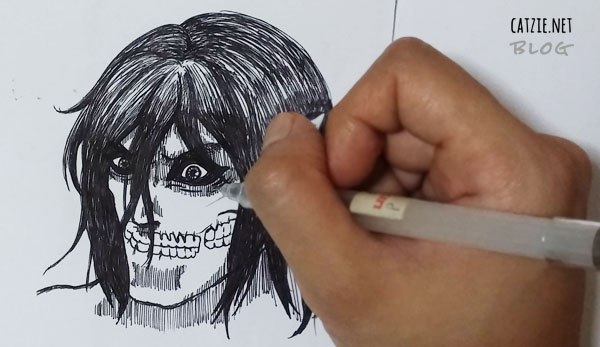
Titan drawing by Catzie
Just sharing a titan that I drew:
Attack on Titan drawing by Catzie. Quickly drawn on a sketch pad using a gel pen, and then edited in Photoshop to adjust brightness and contrast, and then filled the hair with translucent black.
Here’s a raw version of the drawing:
Attack on Titan drawing by Catzie, raw.
This might have been my first time drawing a male character, especially one that looks like a monster. Over 10 years ago, I was so addicted to drawing and most of what I drew were pretty anime girls. I didn’t feel like drawing male anime characters. Until now. xD I guess people always change.
Something to think about from Attack on Titan
“People who can’t throw something important away can never hope to change anything.” – Armin Arlert
The quote above is something that Armin Arlert said in one of the last episodes of Attach on Titan. This somehow inspires me, being someone who desires many changes in life.
What I liked about Attack on Titan
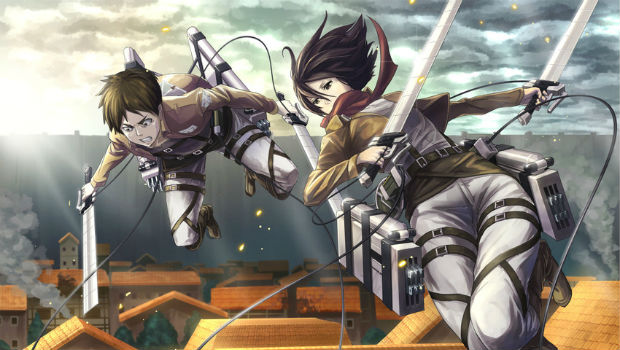
The 3D Maneuver Gears are so cool! I hope there’s a theme park or studio that features 3D Maneuver Gears that fans can try on. That would be a great experience, right? It would also be really great if there were titans you can control from the back of the neck — you’ll get what I mean when you watch the anime. 😉
If you watch the anime, you would see how hard humanity struggle to regain freedom from their predators – the titans. You’d see how much the characters had to sacrifice for their goals. And this brings back that quote from Armin in my head: People who can’t throw something important away can never hope to change anything.
In a certain scene with that female titan, when they were about to find out the identity… oh dear, I can’t remember any anime with a scene that made my heart beat that fast! Kudos to the production team of Attack on Titan anime. :3
I liked how strong Eren’s will is. He sometimes seems to become really scary when he says he’ll exterminate the titans, but I can relate to him. After all, the titans have taken away so many lives around him, including that of his beloved mother.
Mikasa who’s always there for Eren is another character that I liked. I admire how she’s devoted to Eren who she calls her “family”, well, her last remaining family. She’s also a very skilled soldier — I like it when a girl is tough. Sometimes I feel bad for her when Eren kind of turns away from her. I hope they end up together someday. Tee-hee.
I can’t say I like Armin as much as I like Eren and Mikasa, but I do admire the way he thinks. His body may not be strong, but his mind is. Armin helped the military survive many times, thanks to his brilliant mind.
The character development on Jean Kirstein. It was nice how the anime showed us his internal struggle.
What I hope for in Attack on Titan season 2
Like I said, I hope Mikasa and Eren end up together. :3
I hope to find out more about Eren’s dad. Where the heck is he all this time? Is he involved with titans? Is he actually a villain?
I want to find out exactly how the titans came into the earth. How do they reproduce?
Attach on Titan is getting season 2 in 2016! This gives me 3 very exciting things to wait for in 2016: Attack on Titans season 2, the next season of Game of Thrones, and someone I’m hoping to come home from Japan! 😀
Attack on Titan movie trailer
Every person I talk about the live action movie of Attack on Titan with, says that it’s a horrible one! A friend said that the story deviated from what was in the anime.
I checked the trailer, and I didn’t like the way things looked. The setup didn’t look realistic to me. All I liked were the acting of Hanji (going nuts as usual), as well as how cool the titan on my drawing looked even in the movie. 🙂
Victim blaming. How are we able stand it? Blaming the victim to find an excuse for the act an offender has done… It’s stupid and needs to stop.
Warning: Crude words may be present in this page.
I don’t know if it’s part of Eat Bulaga’s script or it’s actually his opinion but Wally Bayola, while playing Lola Nidora in the noontime show Eat Bulaga in the Philippines, said things that implied that women are to blame when they are harassed in the streets.
Bayola was saying something along the lines of: (more…)
Say Aaaah!~
Taste this soft, moist red velvet cake. It’s made from the Duncan Hines red velvet cake mix.
I liked this product, but I won’t use it regularly because I like making cakes from scratch. The cake was also a bit too fluffy compared to all red velvet cakes I tried before. Still, my first experience in using a boxed cake mix is reason enough to write this Duncan Hines red velvet cake mix review. (more…)
In the morning, I sometimes forget the time I log into the time-tracking system in my workplace so I stay a bit longer to make sure I don’t get an “undertime”.
I thought that my computer at work could help me with this issue somehow. I hoped there was a Windows program that can record the dates and times I turn my computer on. I tried searching for an application like this on Google but couldn’t find any, and wasn’t sure what keywords to search for. (^_^) Someone suggested that I make a Windows Batch File. And so after some web search I came up with this Windows Batch File, which I will later set up to be run each time Window starts.
This Windows batch file doesn’t tell me exactly what time I came into the office, but it helps, because it logs the date and time I turned my computer on. And turning my computer on is the first thing I do on my office desk. 🙂
What is a Windows batch file?
How does this Windows batch file work?
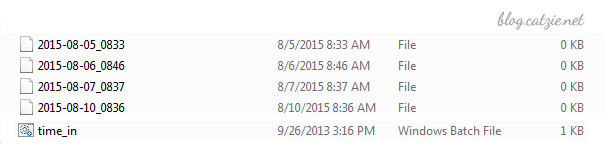
The Windows batch file is run every time Windows starts, and each time the file is run, it gets the current date and time then saves it into a file. Each time Windows starts, it creates one file with the date and time.
Like I said, turning my computer on is the first thing I do when I arrive at the office, so the time in the text file written by the program gives me an idea of the approximate time I came in.
Here’s a preview Save files with current date and time with Windows batch fileof the results:
How to make a batch file that logs current date & time when Windows starts
Before we begin, please note that I implemented this in a Windows 7 machine.
Create a folder where you’d like the files to be created. Name it anything you like. I named mine “Time-in” since I’m using the batch file to estimate the time I come into the office.
Open a text editor such as Notepad.
Copy the following codes and then paste it into Notepad.
Save it into the folder you created as “time_in.bat”
Now, go to that folder and right click on the icon of “time_in.bat” then choose “Create Shortcut”.
You’ll now see a new file “time_in.bat – shortcut”. Move that shortcut file into your Windows’ startup folder. My Startup folder is in C:\Users\MyUserName\AppData\Roaming\Microsoft\Windows\Start Menu\Programs\Startup so try looking for yours there.
With what we have done, a file named with current date and time should be created in your folder each time you start Windows.
Some notes when using this Windows batch file
You will eventually have a folder with a large number of files because our batch file creates one file per Windows startup. Please find a way to manage those files. You may move older files into an archive folder, or you may delete older files that you no longer need.
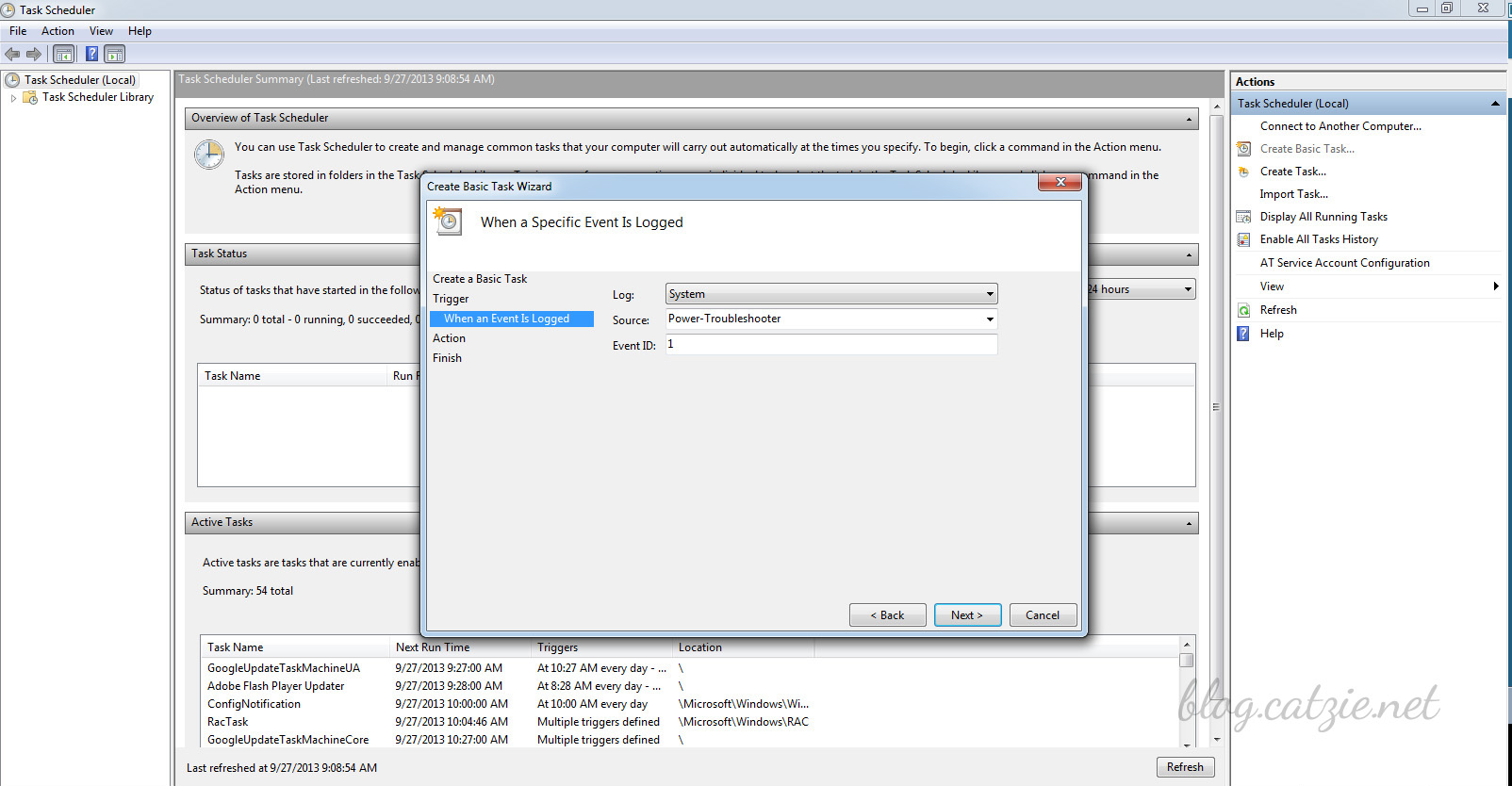
Another note if you’ll use the batch file to track your office time in the morning like I do: the batch file will not create any file if you just hibernate your computer before leaving work instead of shutting down. This is because the “startup” only happens when you start Windows, and this does not happen when you wake your Windows up from hibernation. Possible solution for this may be creating a task in the Task Scheduler of Windows, making the “on wake up” the “trigger” and pointing to the batch file to let it execute. The following settings are what I’ve tried and nothing has worked yet so far… so maybe some of you may come up with a solution that will work. 🙂
Task scheduler in Windows 7 for the batch file
Go to Task Scheduler
Create Basic Task
Fill out name and description
Start the task when a specific event is logged
Log: System
Source: Power-Troubleshooting (or try Kernel-Power with Event ID 42, or try Kernel-General with Event ID 1)
I usually post in English, but this will be a mix of English and Tagalog. I’m writing this to let people know of a way to somehow shorten the lines for ticket booths at LRT-1 Northbound. It seems that not every passenger knows about the “Modified Coupon System”. Pa’no ba naman, hindi kapansin-pansin yung posters nila tungkol sa bagong system. Wala man lang ibang form of announcement.
LRT-1 Beep Card Update:
Pwede nang gamitin ang Beep cards at any LRT-1 station, Northbound man o Southbound! I’ll try to keep updating the post about my LRT-1 Beep card experience when there’s anything new to add. 🙂
If you take a Northbound LRT-1 train every night like I do, then you’ve experienced the very long lines just to buy a coupon (ticket). The coupons are being used because the Beep card system has not yet been implemented for Northbound trips of LRT-1.
Paano nga ba mababawasan ang pila sa LRT-1 Northbound?
Pwede na tayong bumili ng hanggang 5 coupons per transaction, thanks to this temporary “Modified Coupon System” for Northbound LRT-1 trips.
Meaning, the next few times you have to take an LRT-1 train Northbound, you proceed straight to the platform area, past the long line of people who are just about to buy their coupon. UNLESS may pila sa platform area dahil sa “Passenger Limit per Platform” scheme nila.
Kung may pila man dahil sa limiting of passengers, I think it’s okay. At least we skip the long lines for the ticket booths.
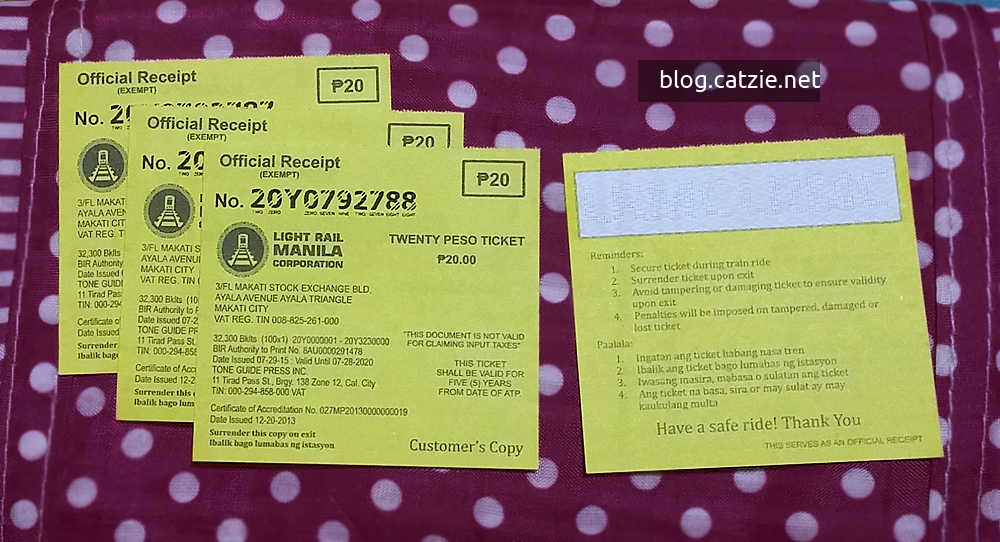
LRT-1 20-Peso paper ticket (coupon).
Honestly, when I read about this new system, medyo nainis ako. Ang impression kasi sa akin, mapapatagal pa ma-implement ang Beep card system sa Northbound side ng LRT-1.
My game plan for my nightly Northbound LRT-1 trips
Note: Five times per week, I take a Northbound train.
Every Monday morning, I’ll go to the Northbound side of my LRT-1 station just to buy 5 coupons. Less hassle ito, kasi maikli lang usually (and relatively) ang pila sa ticket booths pag umaga. 🙂
Tapos ayun, having 5 coupons every Monday, I’ll have enough coupons hanggang Friday na, para sa gabi-gabi kong pagsakay sa LRT papuntang North.
Mas okay kesa gabi-gabing pipila sa ticket booth diba?
Alternative on Mondays: Minsan may kahabaan din ang pila sa Northbound pag umaga, so pwedeng every Monday night pipila tayo para bumili ng 5 coupons. :3
Pa-kwento lang ha…
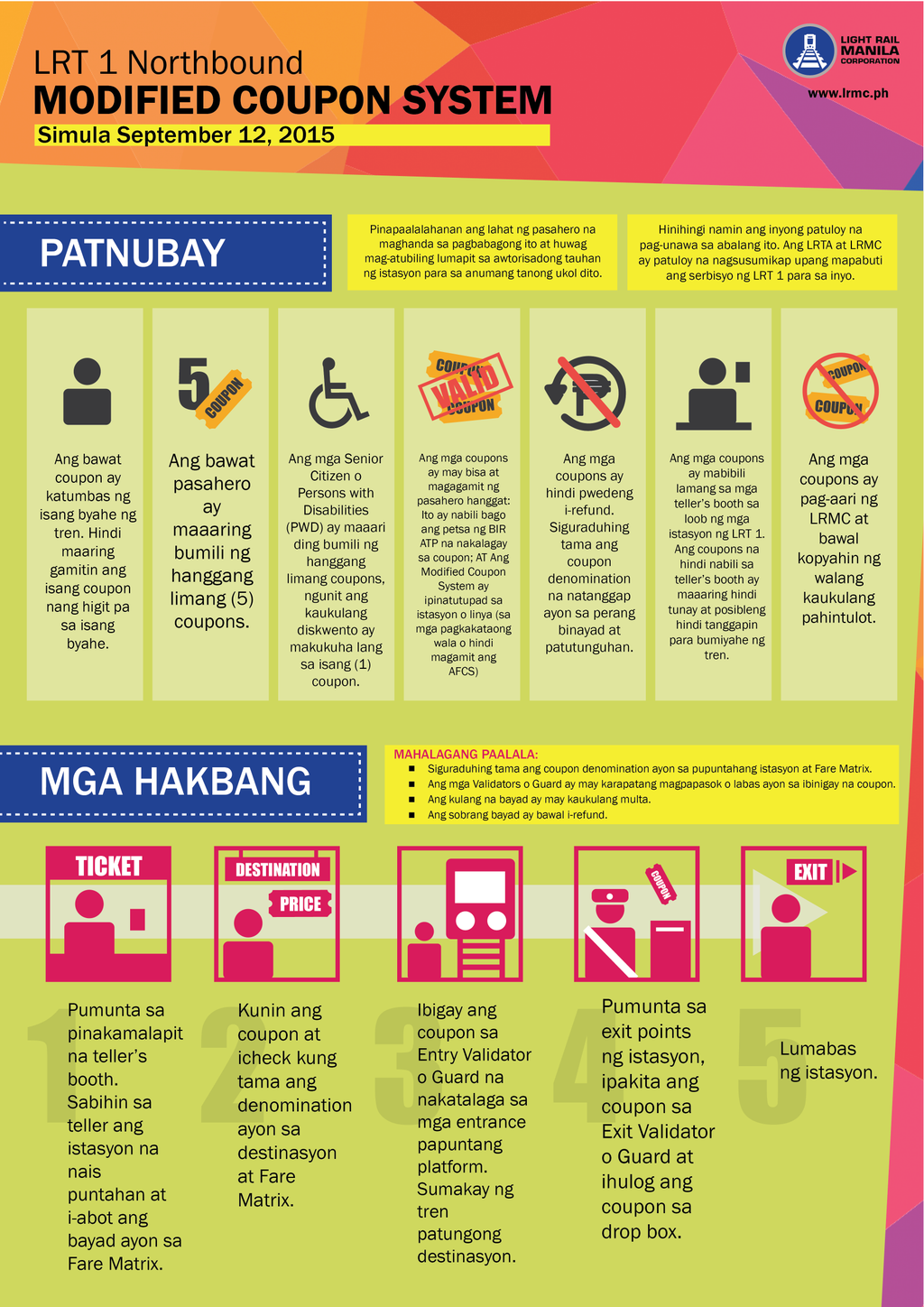
This week I noticed a new poster at an LRT-1 station pero hindi ko gaano mabasa kasi sa super babang part ng dingding ba naman dinikit, natatakpan ng legs ng mga passengers na nakapila sa ticket booths. So hinanap ko sa Twitter ni @attycabs and @officialLRT1. Found it! Heto siya:
Modified Coupon System for LRT-1 Northbound. To view in full size, right-click above image (or press and hold if you’re on mobile / tablet) then click on “open link in new tab”
Then I asked LRT-1 staffs, just to confirm, if I could go straight to the platform area for as long as I have extra coupons. I was in doubt because there was one night when I think I heard a guard telling a lady that she still needed to fall in line even when she already had a coupon. That was before I saw posters of the “Modified Coupon System” at LRT-1 Northbound stations though.
So tonight, I took a little detour. Dumaan muna ako sa mall na kadikit ng LRT-1 station na sinasakyan ko. Yung top floor kasi, may exit na diretso na sa entrance to the platform. Tinanong ko muna yung guards, “Pwede na po dumiretso sa loob? May ticket na po.” And they said, pwede na.
It was a less stressful evening. Di na ko naging parte ng mahabang pila papuntang ticket gates. Swerte din dahil walang pila sa platform area sa station ko. Try niyo na rin! 😀




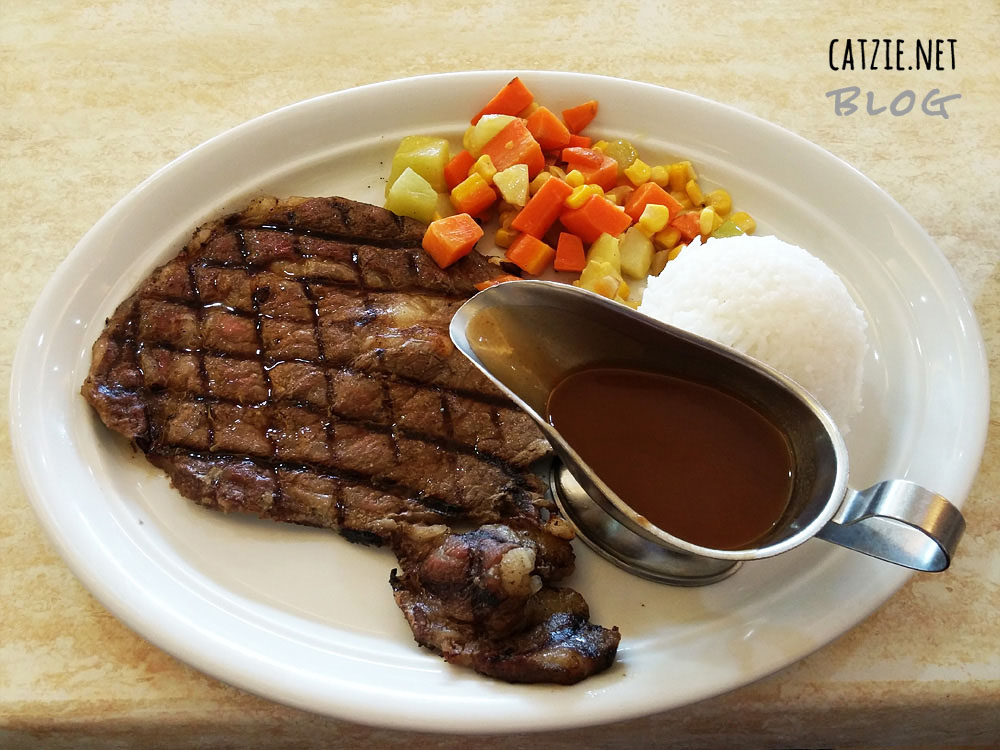
 There’s a huge banner at Meat Plus Cafe in Subic that says “I can’t leave Subic without eating at Meat Plus”, and I think that when I go back to Subic, I would be saying exactly the same thing. 😉 Meat Plus Cafe sure is a must-visit when you travel to Subic. Why, you ask? Because they serve good quality steaks at low prices. U.S. Steak Meals cost P260 to P405. Yessss, they’re very affordable for steak meals!
 which will appear to point to the location you searched for using the search box.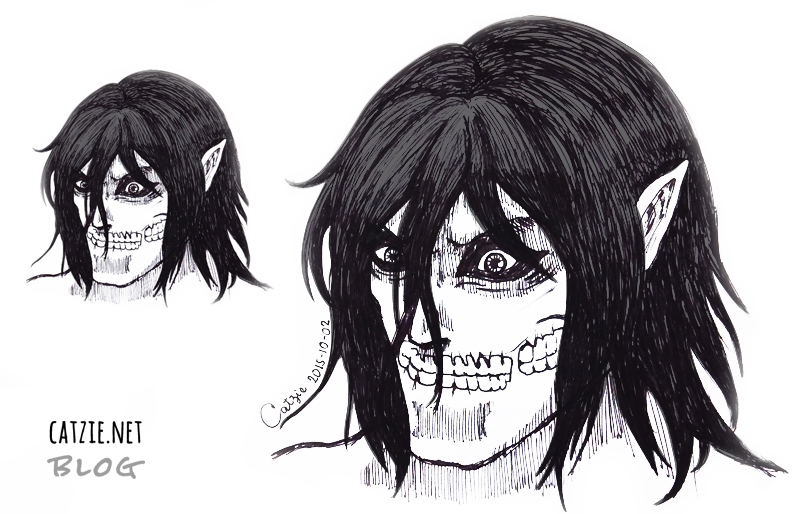
 Attack on Titan is one of the recent anime series that I watched. I loved it! It was really refreshing for me because I had not watched any action-packed anime for a long time.