I rarely use a credit card these days but BPI just sent me a renewed credit card. It requires activation before use.
How to activate BPI credit card thru text:
Send the following mesage to 225689 using the mobile number that’s registered with your BPI credit card:
BPIACT <LAST 10 DIGITS OF YOUR CREDIT CARD NUMBER>
For example: BPIACT 0123456789
After sending the above message, you should receive a reply from BPI:
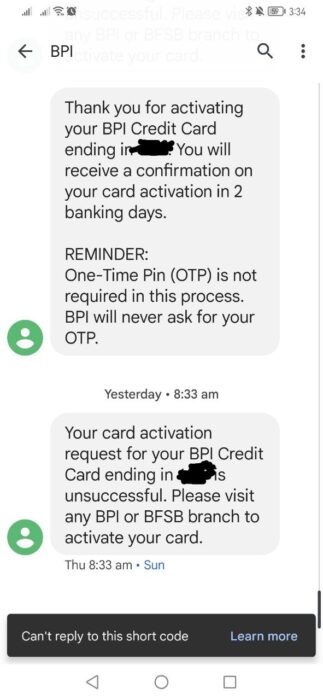
“Thank you for activating your BPI Credit Card ending in ****. You will receive a confirmation on your card activation in 2 banking days. Thank you.”
How many days for BPI credit card activation?
BPI credit card activation should take 2 banking days.
BPI credit card activation unsuccessful. What to do?
I tried to activate my new BPI credit card thru text 2 times but they were both unsuccessful.
BPI credit card activation unsuccessful. 🙁
The status update that I received from BPI was:
“Your card activation request for your BPI Credit Card ending in 6217 is unsuccessful. Please visit any BPI or BFSB branch to activate your card.”
You may call the BPI hotline number 889-10055 to ask for assistance. I called that number to ask why my activation is always unsuccessful. The agent told me that my current mobile number doesn’t match the one in my credit card records! The one in BPI’s record is an old mobile number which I lost together with a phone many years ago. I was able to request for a BPI name change and BPI address update through phone banking before, but they can’t accommodate mobile number change through phone because of security reasons. After all, they send OTPs to our mobile numbers.
Now I really need to go to a BPI branch to request for mobile number update, and file a request for credit card activation right there. I just hope that it won’t take so long.
How to activate BPI credit card at a branch:
Bring 1 valid ID and the credit card that you want to activate at a BPI branch.
Line up for the customer service counters. It took me around 1 hour in the queue before it was my turn at BPI La Fuerza Pasong Tamo (Chino Roces) branch in Makati City. It was a painful wait.
I had to fill out a customer information update sheet for BPI credit card holders first, because my mobile number is outdated.
The banker told me that he will text me later on that day, or the next day, once my BPI credit card has been successfully activated.
I received the text from the banker on the day after going to BPI La Fuerza Pasong Tamo branch.
I also received a text straight from BPI with the following message:
Your BPI Credit Card is now active. You can now enjoy and take advantage of your BPI Credit Card’s features and perks. To know more, visit our BPI Website, click on ‘Cards’ and select ‘Credit Cards’. Thank you.
Disclaimer: What I wrote in this article were based on my experience as I requested a change in account name for my BPI credit card, but a similar process and set of requirements may apply for non-credit card BPI products. The process and requirements may be changed by BPI at any time. I am not affiliated with BPI in any way, but let this article be a guide, in case you’re planning to change your BPI credit card’s billing address. 🙂
The process is done through phone and online (email). You don’t have to leave home to do it!
My BPI credit card will expire on September 2022 and I just received an email with following message from BPI:
Your BPI Credit Card/s ending in **** will be expiring on September 2022. As long as your account remains active and in good credit standing, please expect to receive your renewal card within 2 months before your card expires. To ensure receipt of your renewal card, please update your address and contact information before June 28, 2022 through the following channels:
24-hour BPI Contact Center
Call 889-10000 (Metro Manila), domestic toll-free 1-800-188-89100 (available to PLDT subscribers), or 63+2+889-10000 for mobile phone and international access;
Any BPI branch
Aside from an address change, I also hoped to change my credit card’s account name from maiden name to married name so that the new card will bear my updated information.
I chose to request a change from maiden to married name through the phone because I don’t want to leave home. :-p
Note: At the time of writing, BPI only processes credit card information update between 6AM-8PM. This is according to a pre-recorded advisory that played during my phone call when I attempted to call past 8PM.
Prompts and corresponding numbers as of June 3, 2022 (BPI may update the choices any time!):
Press 2 for credit card
Press 1 for credit card services
Press 3 for information update
Dial your credit card number
Once a phone banker verifies that you are the owner of the credit card account, they will create a request and reference number for you.
Requirements to change account name in BPI online, from maiden to married name in credit card:
Submit the following in JPEG/TIFF file format (max 1MB for all files in the email) to [email protected], with your reference number in the subject of your email. Send the email within 3 days or your request will be cancelled.
Clear scan of letter of request to change your BPI credit card’s name (must be handwritten and signed)
Clear scan of Valid government-issued ID, front and back (must have a photo and signature)
Clear scan of credit card, front side
Marriage certificate
Turnaround time for this kind of request takes 4 banking days. After this time period you may call the BPI hotline again to verify if your email was correctly received, along with the attachments.
So that’s how you update your BPI credit card’s name through phone and online. I’m glad that BPI now lets us do this within the comfort of our home.
Disclaimer: The process and requirements may be changed by BPI at any time. I am not affiliated with BPI in any way, but let this article be a guide, in case you’re planning to change your BPI credit card’s billing address. 🙂 The process is a mix of phone banking and online. The important thing is you don’t have to leave home to do it!
My BPI credit card will expire on September 2022 and I just received an email with following message from BPI:
Your BPI Credit Card/s ending in **** will be expiring on September 2022. As long as your account remains active and in good credit standing, please expect to receive your renewal card within 2 months before your card expires. To ensure receipt of your renewal card, please update your address and contact information before June 28, 2022 through the following channels:
24-hour BPI Contact Center
Call 889-10000 (Metro Manila), domestic toll-free 1-800-188-89100 (available to PLDT subscribers), or 63+2+889-10000 for mobile phone and international access;
Any BPI branch
I chose to request a change in address through phone because it’s more convenient.
Note: At the time of writing, BPI only processes credit card information update between 6AM-8PM. This is according to a pre-recorded advisory that played during my phone call when I attempted to call last night… at 8:30PM! Sayang hindi umabot.
Prompts and corresponding numbers as of June 3, 2022 (BPI may update the choices any time!):
Press 2 for credit card
Press 1 for credit card services
Press 3 for information update
Dial your credit card number
Once a phone banker verifies that you are the owner of the credit card account, they will create a request and reference number for you.
Requirements for BPI credit card – change address online:
Submit the following in JPEG/TIFF file format (max 1MB for all files in the email) to [email protected], with your reference number in the subject of your email. Send the email within 3 days or your request will be cancelled.
Clear scan of letter of request to change your BPI credit card’s billing address (must be handwritten and signed)
Clear scan of Valid government-issued ID, front and back (must have a photo and signature)
Clear scan of credit card, front side
Turnaround time for this kind of request takes 4 banking days. After such period you may call the BPI hotline again to verify if your email was correctly received.
So that’s how you update your BPI credit card’s address through phone and online. Thank you BPI for letting us do this without leaving home as there’s still a pandemic.
BPI used to be my favorite bank but the quality of service has degraded over the years.
I felt [initially] relieved to find out that I could reorder a checkbook from BPI online, because it will save time since I don’t need to go to a BPI branch anymore. But of course, the online checkbook reorder of BPI does not work, at least currently as I write this article.
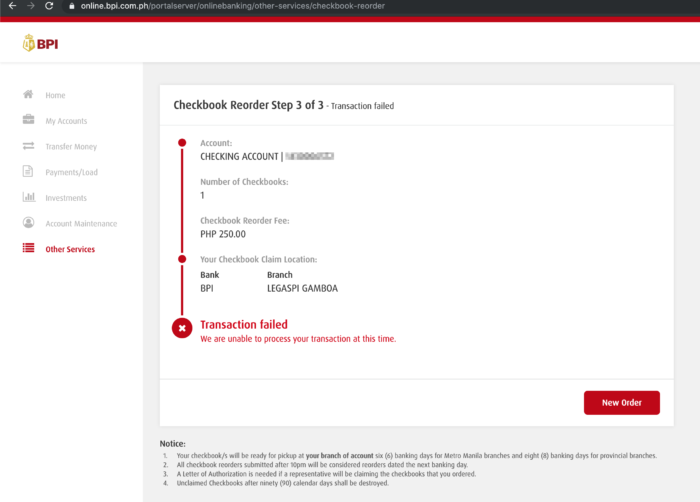
After entering my One-Time Pin during the checkbook reorder process at BPI Online, I get the error message: “Transaction failed. We are unable to process your transaction at this time.”
I did multiple attempts to reorder a checkbook online from BPI, but all failed with the same error message.
“Tsk. No choice,” I thought. I planned to just visit a nearby BPI branch. We inquired first if we can reorder and claim a checkbook at a branch different from where I opened my BPI checking account. BPI said yes, we can. Okay, that was really a relief. The branch where I opened my BPI checking account is in Makati CBD and that’s not so close from where I live.
So I went to a nearby BPI branch and took a queue number for Customer Service. The wait wasn’t long until a BPI staff called me.
Side note: on updating your name on your BPI account after marriage
I wanted to update my name too, from maiden to married name, but the staff told me that customer information update can only be done at the branch of account. Also, I will need to bring bring 2 IDs with the new name along with marriage contract.
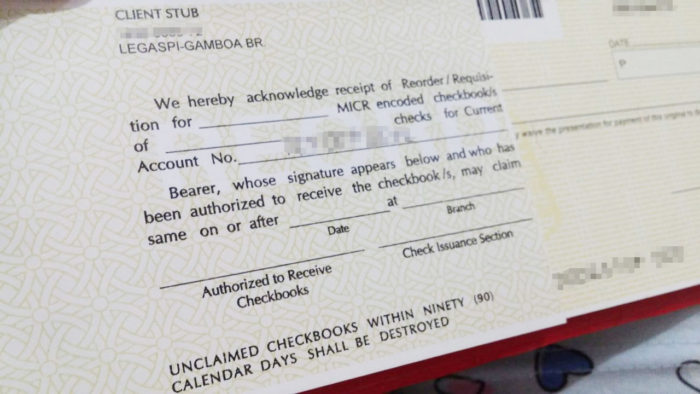
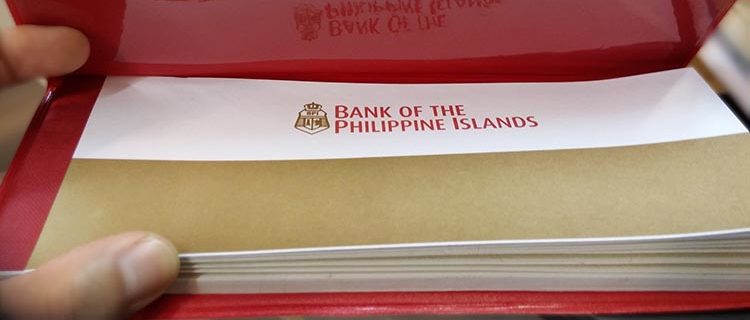
Back to the topic! The BPI staff asked me to fill our the stubs in the middle of the checkbook which looks like the following. I was only able to take a photo after tearing off the half of the stub which I gave to the BPI staff:
The “client stub” for checkbook reorder at BPI
I also presented a valid ID for my checkbook reorder to be processed by BPI.
After a few minutes the processing was done, and I was told that I should present the client stub and my valid ID to claim my checkbook. If I remember correctly I was also handed a slip with brown paper… or was I? Here goes my memory gap again. What I’m sure of is I can’t find it in my bag. HAHAHA. I hope that the client stub and ID are the only ones needed to claim the checkbook! 😅
About the online checkbook reorder of BPI
I told the BPI staff that the checkbook reorder of BPI Online is not working. She told me it’s supposed to be working, and that it’s down for maintenance daily from 10pm to 9am. Whoa, a web application that has working hours! Last Sunday night my online checkbook reorder was failing and I can’t remember what time that was. On the following day, a Monday, I was sure I attempted again at 2pm and it failed. *scratches head* Oh well.
Let me know if you have tried to reorder a checkbook from BPI too and how it went! 🙂
You may also be interested in the following BPI-related posts:
The need for a checking account came in my life. 😆 It’s for a monthly bill that requires “checks”.
BPI was my first option because I would be able to easily transfer funds online from my savings account into my newly created checking account. I dislike going to banks to fall in line and deposit, so online funds transfer is very convenient to me.
Click here to jump to the directions on how to open a checking account at BPI.
Some info on BPI checking accounts…
Types of BPI checking accounts
Let me tell you about the 2 types of BPI checking accounts first, based on what the BPI staff told me:
Current Account: maintaining balance is P10,000 without interest
Maxi-One Account: maintaining balance is P25,000 (eek!) with interest
Both Current [checking] account and Maxi-One checking account come with a checkbook (P175).
Can you convert an individual BPI checking account into a joint checking account?
I asked the bank staff this question and she said yes. Your co-depositor will be required to visit the same branch where you opened your checking account and present the same requirements, after which he/she will be able to issue checks from your account too.
ATM Card with BPI checking account?
Whether you get a Current/checking account or a Maxi-One checking account, you may request an ATM card with it. You may request an ATM card upon opening of the account, then you’ll have to wait a few days before visiting the BPI branch again to claim it.
Warning(s) on using any checking account
Never issue a check with insufficient funds in your account! BPI-to-BPI check encashment is realtime and has no clearing period, which means that once the recipient of your check goes to a BPI branch to encash the check, your checking account must have sufficient amount of money as written in the check.
This is how you can open a checking account at BPI:
Prepare BPI checking account requirements
Prepare the following before you visit a BPI branch:
2 Valid IDs with photo and signature: For example, SSS ID and passport
1×1 ID picture:
Initial deposit: P10,000 for a regular current/checking account, or P25,000 for a Maxi-One checking account
Payment for checkbook: P175
Utility Bill reflecting address: For example, Meralco billing statement. This is to prove that you are providing BPI your correct address.
Your SSS number, TIN number, and employer’s phone number (if applicable)
Visit a BPI branch
Go to the area for opening new BPI accounts and approach the bank staff. Ask a manong guard where to go for opening accounts, just to be sure.
Tell the bank staff you want to open a BPI checking account. Tell him/her whether you’d like a regular current/checking account or the Maxi-One checking account. The staff might ask you the purpose of opening this account.
Present the required documents to the bank staff, as listed in my requirements section.
Fill up the forms given to you by the bank staff. He/she will tell you which parts of the form should be filled, then will later verify and might ask you to fill up some fields you missed.
The bank staff should orient you about using BPI checking accounts… feel free to ask him/her about anything you are unsure of.
Hand over your initial deposit + payment for checkbook when the bank staff asks you for it. He/she will deposit it for you and give you a stub/receipt for the deposit. Also, according to the bank staff who assisted me, if you have an existing savings account with BPI, you may request that they just transfer funds from that account into the new checking account that you’re opening. I think that’s more convenient if you want to deposit a large amount of money on your newly created checking account.
Wait for the checkbook. You should get it on the same day.
You’re done. Use your checks wisely and carefully! 🙂
What actually happened when I tried to open a BPI checking account:
Requirements that I had to present at BPI
I prepared all the requirements as listed above, but I did not have to present a utility bill. Maybe that’s because she has seen that I already have an existing BPI account that reflects the address I provided.
The bank staff asked me for 2 valid IDs (I used SSS ID and passport), one recent 1×1 photo, and P10,175 for initial deposit plus the checkbook.
How long does it take to open a BPI checking account?
Your BPI checking account opening should be done within 1 hour. I was at BPI – Legaspi Gamboa around 9:15AM (Eek! Daming nakapila sa mga BEA, buti hindi yun ang sadya ko) and got my checkbook around 9:50AM. 🙂
When you login to BPI Express Online account and get a message that says your BPI online account is disabled, you should be taken to a page where you can reset your password. This is because BPI requires password reset when your online account is disabled.
On that page you will be able to choose between resetting your password via ATM or via phone.
Automated processes are always more convenient to me (i.e. less human interaction) because they are faster so I chose to reset my BPI online password through an ATM. I will only cover the ATM activation in this article, and not the phone activation.
Choose new password (BPI online account disabled)
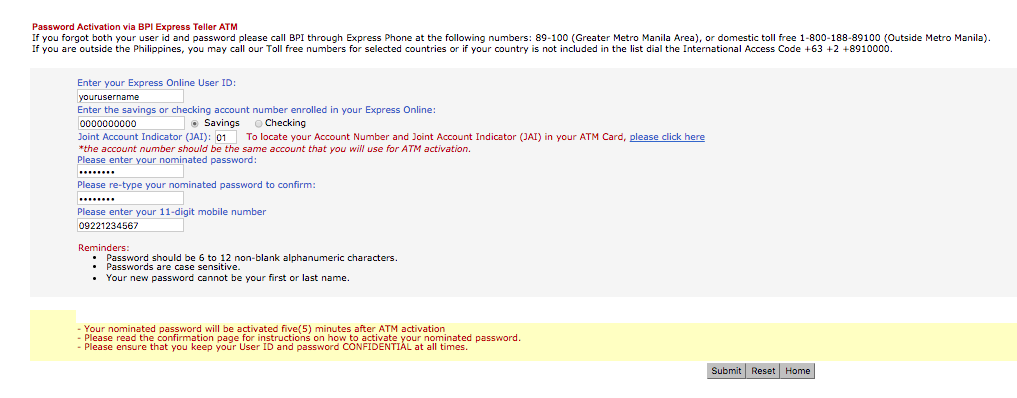
After choosing ATM, you need to fill out this form like so:
The BPI account number that you will enter on the form should should match the account number of the ATM card that you plan to use for the BPI ATM activator later.
You should receive an email “BPI Express Online Password Reset Nomination” with the following instructions:
This is to confirm your request to nominate a new password in BPI Express Online
Confirmation Date & Time: 10/20/2016 10:00:00 AM
Confirmation Number: XXXXXXX
To activate your nominated password simply follow the steps below:
1. Go to any BPI Express Teller ATM within 20 banking days
2. Insert your ATM card
3. Select: Special Services -> Activate Enrollments -> Express Online
Your nominated password will be activated five(5) minutes after ATM activation.
Please ensure that you keep your User ID and password CONFIDENTIAL at all times.
At Your Service,
The BPI Express Online Team
Activate new password on any BPI ATM (BPI online account disabled)
After filling out that form, you need to go to a nearby BPI ATM for password activation, but only within 20 days! It is best to go to a BPI ATM as soon as you’re done nominating a new password online. Insert the ATM card whose account number is the same as the one you typed in the form earlier online. Choose Special Services -> Activate Enrollments -> Express Online , and after 5 minutes, your new BPI online account should no longer be disabled. You may also use your new password.
Confirmation of BPI password activation
Now, you should receive a new email “BPI Express Online Password Reset Activation”:
Greetings from BPI Express Online.
This is to confirm that your nominated Express Online password is already activated.
In case you don’t remember nominating a new password, may we request you to please reply at once to this e-mail and/or call your 24-hour phonebanker at Express Phone no. 89-100.
Please ensure that you keep your User ID and password CONFIDENTIAL at all times.
I wanted to open a joint account with someone, and our choice is a BPI savings account with ATM card. We failed to make it a BPI “joint” savings account (I’ll tell you why later), but I successfully opened a BPI savings account without maintaining balance.
Want a BPI savings account without maintaining balance? I’ll provide as much details as possible in this article to help you out. 🙂 This type of account is called BPI Easy Saver Account.
To me, a BPI savings account without maintaining balance is much more practical than the one that requires 3000 pesos minimum balance. It’s like depositing money that you can’t use.
In 3 Steps, I’ll show you how to open BPI savings account without maintaining balance! 🙂
Step 1: Prepare the following for your BPI savings account
Information such as:
TIN number
SSS or GSIS number
Employer’s/Business’ address and phone number
Home address (kabisado mo ba? 😆 kung bagong lipat baka hindi, diba?)
Phone number and mobile number
Full name of father and mother
I didn’t have my TIN number, SSS number, and employer’s phone number with me when I tried to open a BPI savings account, but the business manager was kind enough to just let me text her those details later that day so she could process my application. So, prepare these details to avoid delays in your application! 🙂
Two (2) 2×2 or 1×1 ID photos
The BPI business manager asked for only 1 photo, but try to bring 2 photos to be sure. She asked for 1×1, but she accepted the 2×2 photo that I brought.
Two (2) valid IDs
I presented an unexpired passport and my SSS UMID. View list of accepted valid IDs in Step 2. Please scroll down a bit to view the list.
200 pesos for initial deposit (Add 50 pesos for ATM card)
Initial deposit of 200 pesos is required to open BPI Easy Saver account. When your account is activated, that amount should be part of your account balance. I chose to have an Express Teller Card (ATM Card) instead of passbook, and that card costs 50 pesos.
Utility Bill reflecting address
Examples of utility bills are Meralco or Maynilad billing statement. Bring the latest statement to prove validity of your address. I heard that only the bill’s address should match yours, and the name may be someone else’s. BPI actually didn’t ask for any utility bill when applied for a savings account, but that might be because of my home address’ proximity to the BPI branch — it’s like 5 minutes of walk away from BPI. 😆
Step 2: Visit a BPI branch near you to open an account
Tell a BPI staff you want to open an account
Approach a banker and tell him/her that you want to open an “Easy Saver” account — that’s the name of the BPI savings account without maintaining balance. See the tables in the bank where BPI bankers accomodate people with their concerns? That’s where you go, not to the counter where you find bank tellers processing deposits and withdrawals. 😉
Fill out forms completely
This, my friends, is when the information I advised you earlier to prepare comes in handy. Double check what you write down, okay? The banker will let you know if you missed anything.
Present your valid IDs
I brought 2 IDs: passport and my SSS UMID. I forgot to ask the BPI business manager if only one is actually required. When I search online though, I read that BPI requires one primary (with picture and signature) and one secondary, like in this list from BPI Trade FAQs: PRIMARY Click to show/hide PRIMARY ID list
Alien Certification of Registration/Immigrant Certificate of Registration
Driver’s License
Government Office and GOCC ID, e.g. Armed Forces of the Philippines (AFP ID), Home Development Mutual Fund (HDMF ID)
Government Service and Insurance System (GSIS) e-Card
Certification from the National Council for the Welfare of Disabled Persons (NCWDP)
Company IDs issued by private entities or Institutions registered with or Supervised or regulated either by the Bangko Sentral ng Pilipinas, Securities and Exchange Commission or Insurance Commission
BPI Direct Savings bank is a bit irrelevant to this article’s topic which is BPI Easy Saver Account, but their website lists the following IDs as accepted valid IDs, so I’m listing them down too as reference. And oh, they only require one (1) valid ID. Please still try to bring 2 valid IDs though. Here is BPI Direct’s list: Click to show/hide BPI Direct’s list
In opening a new account, please present any one (1) of the following IDs:
Passport (including those issued by Foreign Governments)
Driver’s License
Social Security Systems (SSS) ID
Professional Regulations Commission (PRC) ID
Government Service and Insurance (GSIS) e-Card
Overseas Workers Welfare Administration (OWWA) ID
OFW ID
Seaman’s book
Alien Certification of Registration / Immigrant Certificate of Registration
Government Office and GOCC ID (e.g. Armed Forces of the Philippines (AFP), Home Development Mutual Fund (HDMF) IDs
Integrated Bar of the Philippines (IBP) ID
Company IDs issued by private entities or institutions registered with or supervised or regulated either by the BSP, SEC or Insurance Commission
IDs issued by an official foreign authority (e.g. foreign passport, foreign driver’s license, etc)
For Students: School ID duly signed by the principal or head of school
For Non-Philippine Residents: Similar ID issued by the foreign government (e.g. foreign passport, foreign driver’s license) where the customer is a resident or a citizen.
The I.D. should be:
in original copy
photo-bearing
unexpired
issued by an Official Authority (e.g. Local or Foreign Authority that is duly authorized to issue the specified ID type)
This is the point when the BPI staff will tell you if you can get your ATM card or passbook on the same day. If picking up another day, please bring at least one (1) valid ID with you to prove that the owner of the card/passbook is you. Mine’s not available until 1 or 2 days after application, being told by the business manager that it depends on the availability of the machine that produces Express Teller cards. Besides, I was a bit late in submitting my TIN number, SSS number, and employer’s phone number. hehe.
Got my BPI Easy Saver ATM card!
Also, if necessary, you can request that you pick-up the Express Teller ATM card from another BPI branch. In my case, I applied for a BPI Easy Saver account in a branch near my house on a week day when I was on leave from work. I need to pick it up the next day but I need to be in another city by then for work. So, BPI asked me to choose a BPI branch near my workplace and told me they will forward my Express Teller ATM card to that branch so I could get it there instead.
Step 3: Change the PIN of your ATM / Express Teller card to activate it
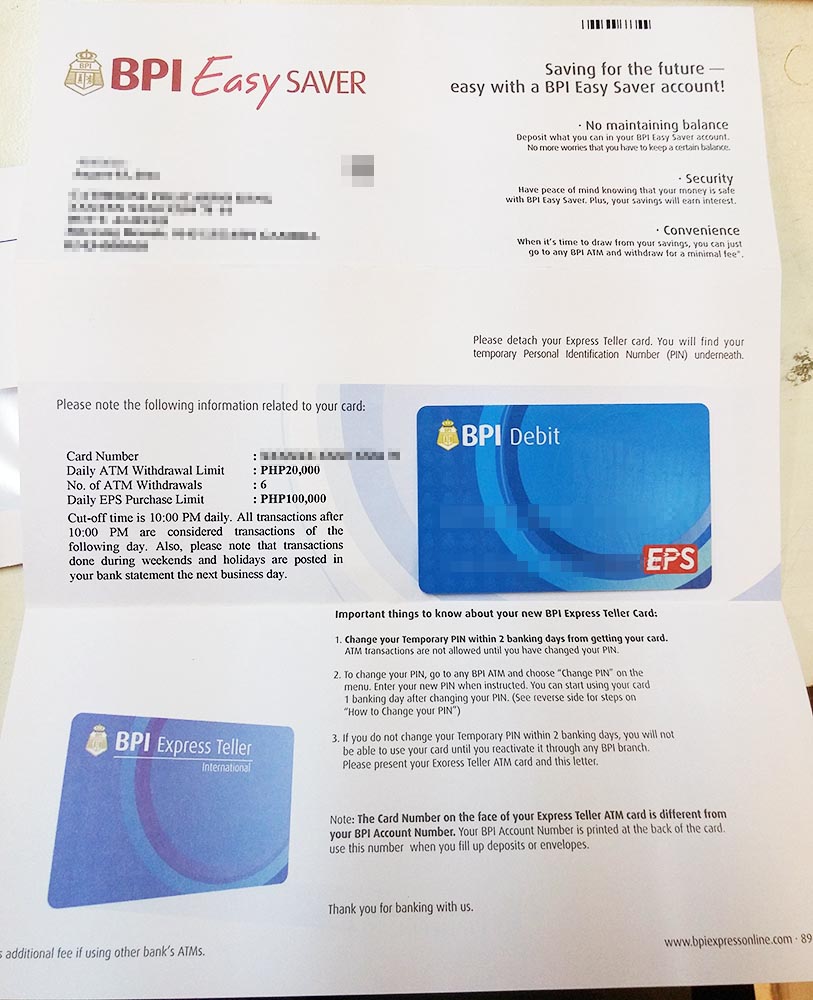
Within 48 hours, you need to change the pin of your ATM card! You should have been given instructions on how to do that. No? Okay, here are the instructions on how to activate your BPI Express Teller ATM Card:
Change your Temporary PIN within 2 banking days from getting your card. ATM transactions are not allowed until you have changed your PIN.
To change your PIN, go to any BPI ATM and choose “Change PIN” on the menu. Enter your new PIN when instructed. You can start using your card 1 banking day after changing your PIN. Click to show/hide instructions for changing temporary PIN
Insert your Express Teller Card in the ATM
Choose the language English or Taglish
Select “Change PIN” from the ATM Menu
If you want a receipt, select “Yes”; If not, select “No”
Enter your temporary PIN found in this card carrier
Wait for the confirmation that you have successfully changed your PIN.
If you do not change your Temporary PIN within 2 baking days, you will not be able to use your card until you reactivate it through any BPI branch. Please present your Express Teller ATM card and this letter.
Good luck! Make sure no one’s watching as you enter your new pin, alright? And remember, the number on the front of your card is your “card number” while the number at the back is your BPI account number.
This concludes the 3-step application for a BPI savings account without maintaining balance. 😉
Other information on BPI Easy Saver account
Daily withdrawal limit for BPI Easy Saver account is 20,000 pesos
You can only withdraw 6 times per day
Daily EPS purchase limit is 100,000
Cut-off time is 10:00 PM daily.
You can start using your card 1 banking day after changing PIN
As instructed, I texted BPI Legaspi-Gamboa branch today, and I was told that my ATM card is available for pickup. Yay!
The BPI staff asked me to take a seat for a few minutes and then came back with an envelope containing printed instructions and the Express Teller ATM card. Then she handed a form to me to fill up details such as Cardholder name, account number, ATM card number, and my signature.
To activate ATM card transactions on my new account, I only had 48 hours to activate it starting from when I received my card. How to activate BPI’s Express Teller ATM card? Change your pin. 🙂 I brought my new ATM card and a note with my temporary pin, and headed to the nearest BPI ATM, and changed my pin.
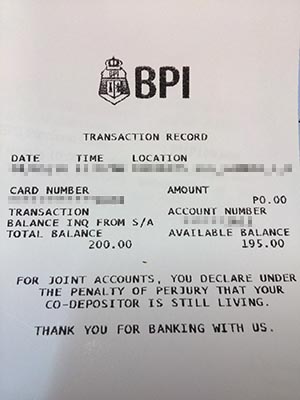
I am wondering though, why my total balance is 200 but available balance is only 195 pesos. Does it have something to do with the 5-peso charge per withdrawal from BPI Easy Saver accounts? But I haven’t withdrawn any amount yet. 😮 My best guess as of now is that the available balance is always the Total Balance minus 5 pesos, 5 pesos being the “allowance” or “padding”, which is reserved for any debit/withdrawal transaction that you may want to do with your BPI Easy Saver Account.
Update (Aug. 4, 2016): 2 days after application for BPI savings account without maintaining balance
I visited the branch I chose to pickup my Express Teller ATM card in the morning. The BPI manager at the branch where I applied told me it should be available yesterday, Aug. 3, if everything goes smoothly i.e. no problem is encountered by their machines. However, my Express Teller ATM card was not yet available 2 days after application because according to the BPI staff, there’s been a delay in processing all new ATM cards this week. She gave me the phone number and mobile number of their Branch so that I could check with them tomorrow. Contact phone number of BPI Legaspi-Gamboa is 822-5375 and mobile number is 0917 554 4164.
Why I chose a BPI savings account without maintaining balance
The business manager that I talked to at BPI told us about 2 types of BPI savings account: Type A is without maintaining balance but has extra charge per debit, and TYPE B has 3000-peso maintaining balance but withdrawals are free.
There is one disadvantage that I know about when one chooses to get a BPI savings account without maintaining balance: the charge for withdrawals. There’s the 5-peso charge per debit. By debit, I mean any deduction of account balance that’s initiated by the account owner. For example, withdrawal via ATM or debit transaction at a shopping mall. There’s also 100 pesos charge if you withdraw money over-the-counter in any BPI branch. Eek!
So why did I choose this over the other type of BPI savings account?
It’s because of that 3000 pesos “Required Minimum Monthly ADB” for the Type B savings account at BPI. By the way, ADB stands for Average Daily Balance, which is defined as the sum of the daily end-of-day balances in the account for a month divided by the number of days in that month. That 3000 pesos is not a small amount of money for me, and it just sits idly there in the savings account. Nope, you can’t use it! It’s the maintaining balance, remember? 🙁
My purpose for this account is for budgets, and I expect that there will be times when this account will run out of funds. Having a maintaining balance of 3000 pesos is a hindrance to my purpose.
So yeah, I’m really happy that there’s a BPI savings account without maintaining balance available because it’s very convenient for people who actually need to use up all funds in a bank account sometimes… you know, those bad times. 😆
Why we failed to open a BPI “joint” savings account
The person (let’s call her Ella) I planned to open a BPI joint savings account with had 3 IDs: her birth certificate from NSO, an expired passport, and expired NBI Clearance. BPI is very strict with account opening requirements and does not accept expired IDs. The business manager at BPI told us that when Ella has renewed valid IDs, we can then open a BPI joint savings account and transfer our current BPI Easy Saver account funds into it.
BPI Easy Saver gives clients a worry-free option when it comes to saving.
Open a BPI Easy Saver account today! Visit a BPI or BPI Family Savings Bank branch near you.
PRODUCT FEATURES:
Account opening for as low as PHP 200.
NO maintaining balance.
For a minimal fee, withdrawal transactions are made convenient.
Fees
– PHP 5* per withdrawal in any BPI Express Teller ATMs.
– PHP 50 for the Express Teller Card fee.
– PHP 100 for withdrawals done over-the-counter in any BPI Branch.
*other customer-initiated debits (OTC, EPS, and/or 24/7 banking channels)
I asked Citibank how much they would charge if I would do electronic funds transfer from them to a BPI account.
According to them, we can transfer funds from Citibank to other banks for free if it’s electronic funds transfer. 🙂 I’m starting to like Citibank. Withdrawal from any ATM machine using my Citibank card is free, unlike for example, when I withdraw with my BPI ATM card from a BDO machine, I get charged transaction fee… about 12 or 15 pesos if I’m remembering correctly.
Quoting Citibank’s response regarding funds transfer to other banks:
We wish to inform you that the funds transfer using Citibank Online is
free of charge. However, we suggest that you check the applicable fees
that BPI may charge.
Then I asked BPI if there would be a charge when I transfer funds from Citibank to my BPI account, and they told me there’s a fixed fee of 150 PhP per received funds from another bank.
Quoting BPI’s response to me:
We understand you would
like to know the fees when you send funds from your other local bank to
your BPI Direct account. Please note that the fee is Php 150 regardless of
amount transferred.
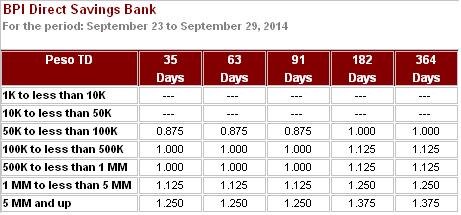
Today I emailed BPI Direct, asking if the interest rates in the following table taken from their website is monthly rate.
The table of BPI’s time deposit rates above may have changed already as you read this blog entry, so please verify in this page: BPI Direct – Time Deposit Rates.