Tag: Android app development

  • Spoofing Battery and Forcing Sleep (Android Development)

    I wanted to do something with my Android phone using ADB commands, while keeping it plugged in to run the said commands. However, the thing I wanted to test was related to the idle (dozing or asleep) mode of Android devices. The workaround was to spoof the battery state to bypass Android’s charging restrictions.

    Spoofing Battery Charging Status and Forcing Android Device to Sleep (Idle Mode)

    • Turn off the device screen using the physical power button.
    • Trick Android into thinking the device is running on battery power: adb shell dumpsys battery unplug
    • Force the device to step into deep Doze mode: adb shell dumpsys deviceidle force-idle
    • Verify the device is successfully spoofed and asleep: adb shell dumpsys deviceidle get deep (This should return IDLE).

    Can also do:
    adb shell dumpsys battery unplug && adb shell dumpsys deviceidle force-idle && adb shell dumpsys deviceidle get deep

    Device Cleanup for Spoofed Battery and Forced Sleep (Crucial!)

    1. Once testing is done, you must tell the OS to start reading the actual battery state again, otherwise it won’t charge properly: adb shell dumpsys battery reset
    2. Bring the device out of idle: adb shell dumpsys deviceidle unforce

    Can also do:
    adb shell dumpsys battery reset && adb shell dumpsys deviceidle unforce && adb shell dumpsys deviceidle get deep
  • A random dev brain dump

    I don’t need a reason to randomly post a brain dump on my blog, no?

    • If an Android dev wishes to implement a precise “notification ID” that they want to be able to precisely cancel later (imagine that it plays an annoying alarm tone!) they can go about it either by
      • Using a unique ID tied to that notification’s base entity (e.g., an app’s incoming message) so that NOTIFS WILL STACK, or
      • Using a unique, dedicated ID that is defined as a constant and is defined without ties to the notification’s base entity so that ONLY THE LAST NOTIF WILL BE SHOWN
    • I gotta update my site’s, something..
    • If an Android dev’s soft keyboard covers a text input field when it’s displayed, particularly in Android 15 devices, they may wanna try to add an imePadding modifier to the root element (e.g., Box, Column) because this modifier will take care of spacings whenever the keyboard appears, avoiding issues such as covering the text input field.
  • Get Navigation Component destinations in back stack // Android Kotlin Dev Diary

    It’s simple to get the list of destinations that’s currently in your back stack. The only thing you need is a reference to the Navigation Component’s NavController.

    The NavController object has a backQueue property that you can inspect.

    backQueue is an array, and each item’s destination property is what you’re probably looking for!

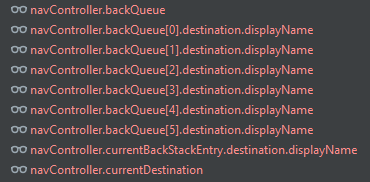
    To show my current Navigation’s back stack, I use Android Studio’s Debugger, and create watches such as the following:

    Screenshot taking when no frames were available, and thus the texts are red…

    I haven’t literally tried, but logging them programmatically like so should work too:

    for(item in navController.backQueue){
        Log.d("MyNavigationBackStack", "item.destination.displayName: ${item.destination.displayName}")
    }
    Log.d("MyNavigationBackStack", "navController.backQueue: ${navController.backQueue}")
    Log.d("MyNavigationBackStack", "navController.currentBackStackEntry.destination.displayName: ${navController.currentBackStackEntry.destination.displayName}")
    Log.d("MyNavigationBackStack", "navController.currentDestination: ${navController.currentDestination}")

    Lemme know if these work, or if you have relevant tips that haven’t been mentioned!

  • A working shared ViewModel between parent and child Fragments //Android Kotlin Dev Diary

    I initially had a problem with the shared ViewModel because the child fragments were creating a new instance from the one held by the parent fragment.

    The ViewModel instantiations below work for me:

    CreateLogFragment.kt (parent)

    CreateLogFoodFragment.kt (child)

    CreateLogNotesFragment.kt (another child)

    by activityViewModels turned things around!

  • Dao Error: Not sure how to handle query method’s return type //Android Kotlin Dev Diary

    As I brush up on my Room database knowlege I came upon the following error while building my app:

    WordDao.java:21: error: Not sure how to handle query method's return type (java.lang.Object). DELETE query methods must either return void or int (the number of deleted rows).

    The solution:

    Set Kotlin version to 1.6.10 then Room to 2.4.2 (Or use more recent compatible versions) in my top-level build.gradle file.

    Reference: Android Room Kotlin throws Delete Query error

  • Prevent Huawei from Killing Your App //Android Dev Diary

    I have been playing around with Android app development, particularly on how to retain UI values after configuration changes and minimizing the app to launch a different one.

    To retain values after configuration changes, I use ViewModels.

    And to retain values after minimizing the app, the following is supposed to do the trick:

        override fun onSaveInstanceState(outState: Bundle) {
            super.onSaveInstanceState(outState)
             outState.putInt(KEY, number)
        }
        
        override fun onRestoreInstanceState(savedInstanceState: Bundle) {
            binding.textView.text = savedInstanceState.getInt(KEY)
        }
    

    But in the phone where I test most of my apps, it doesn’t! Minimizing my app to play a YouTube video, open a mobile game, and watch a few TikTok videos for about 15 minutes, causes my app’s UI data to reset.

    I installed the same app to another phone, a Samsung phone under the A Series. The user played a mobile game for several hours, and came back to my app to find all the previous UI values still intact!

    I remember that when I was still working with the Squadzip team (still grateful to Roman for suggesting that I try to practice “mindfulness” — it works wonders for a hectic lifestyle!), that Huawei phones gave us the same kind of issue. Apparently, Huawei phones are quite aggressive at killing apps in the background to preserve battery life.

    Options that I considered to prevent Huawei phone from killing my Android app in the background:

    • Save UI data to SharedPreferences, on top of using Bundle to save and restore instance state (hesitatant to do this because I don’t really need to save UI data)
    • Simply advise the user not to leave the app if they want their data to be retained (BAAAD IDEA!)
    • Find some sort of “whitelist” in Huawei settings to exempt my app from being aggressively killed

    The method I chose to prevent Huawei phone from killing my Android app:

    For the current app I’m working on, I chose to change a setting in the Huawei phone because it’s the easiest. It shouldn’t be so hard to explain to app users either.

    Instructions:

    • Go to Settings
    • Look for “Battery” and click on it
    • Look for “App launch” and click on it
    • Type the name of your app in the Search field.
    • Turn off the “Manage automatically” setting
    • Click OK on the prompt. (I chose to leave auto-launch, secondary launch, and run in background to keep my app alive.)
    • The description below your app’s name should now be “Manage manually” instead of “Manage automatically.”
  • Android Kotlin: ‘getter for position int’ is deprecated. deprecated in java


    Today I encountered a deprecation warning as I’m coding the app: 'getter for position int' is deprecated. deprecated in java

    And I was like, whoa, this wasn’t deprecated a couple of months back when I last touched Android code… this is how long I’ve missed out! 😂😂😂 I haven’t touched any app code for a while, until this week. I am easing back into Android app development, and this time it’s for my personal use but hoping to share on Google Play Store for free… just in case it may help others.

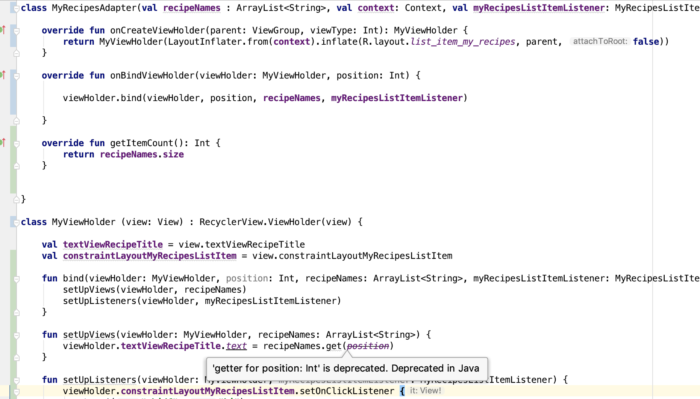
    The following RecyclerView Adapter code needs polishing 😂, but for the sake of showing you the deprecation warning, here’s a screenshot:

    android getter for position int is deprecated. deprecated in java

    The deprecation warning is inside the ViewHolder class inside my RecyclerView Adapter file. By the way, I code in Kotlin now for Android apps.

    I worked with a developer before who liked suppressing deprecation errors like this, but I advised him that it’s better to address the issue than suppress it because it will haunt him in the future! 🤣 I still believe in that up to now, so I searched for a solution.

    This is the problematic line, and ‘position’ is the problematic variable:

    The solution? Simply replace position with adapterPosition.

    And why is it deprecated? I found a note in RecyclerView.java:

    * @deprecated This method is deprecated because its meaning is ambiguous due to the async
    * handling of adapter updates. You should use {@link #getLayoutPosition()} or
    * {@link #getAdapterPosition()} depending on your use case.

    That’s all I have to say about the ‘getter for position int’ is deprecated. deprecated in java warning. Happy coding, you all.

  • Android Kotlin: “overrides nothing” error appears on instantiateItem() function of PagerAdapter

    I just began learning Kotlin for work and one of the first errors I encountered is “overrides nothing” pointing at the overrides of the function instantiateItem() for my PagerAdapter

    The function/method signature was like this:

    override fun instantiateItem(parent: ViewGroup?, position: Int): Any {

    To fix the error, I simply removed the question mark from the arguments so that it looked like:

    override fun instantiateItem(parent: ViewGroup, position: Int): Any {

    Voila! Error gone and the swipe view that needed the PagerAdapter worked.

    Reference: Sudden “overrides nothing” errors appear, no recent change to Kotlin build version

  • Android: Facebook SDK “Invalid Key Hash” on Ubuntu


    I kept getting a different Facebook key hash from the one being actually generated by my debug app when it runs. Turns out I’ve been entering the wrong keystore password.

    To get your key hash for Facebook SDK on Ubuntu, run the following command:

    In case you don’t have the keytool program yet, you’ll see the following message:

    The program ‘keytool’ can be found in the following packages:
    * gcj-5-jre-headless
    * openjdk-8-jre-headless
    * gcj-4.8-jre-headless
    * gcj-4.9-jre-headless
    * openjdk-9-jre-headless
    Try: sudo apt install

    What I did was install openjdk-9-jre-headless by running the command:

    Wait for your selected program to install and try the first command again to generate key hash for Facebook on Ubuntu.

    When prompted for keystore password, try to use “android”.

  • Android: SharedPreferences not accessible from SyncAdapter

    When I was trying to access a SharedPreferences value from my Android app’s SyncAdapter, I kept on receiving an old value that was saved to the key.

    Quick solution to inaccessible SharedPreferences from SyncAdapter

    A quick solution (which may be a short-term one) I tried was to remove android:process=":sync" from the following code:

    But beware:

    The attribute android:process=”:sync” tells the system to run the Service in a global shared process named sync. If you have multiple sync adapters in your app they can share this process, which reduces overhead.

    My long-term solution to inaccessible SharedPreferences from SyncAdapter

    Source:
    SharedPreference committed in SyncAdapter not updated in Activity?