Category: Coding

  • Get “order” object/details from Thank You page of WooCommerce (WordPress)

    It’s been a long while since I last posted anything related to coding. I haven’t really stopped, but from Android app development, I switched back to PHP. Life has become occupied with other things, but when I do code, it’s in WordPress with WooCommerce. It’s for my online shop.

    In my opinion, WordPress is not the most pleasant platform to use if you’re a developer (after years of MVC coding for Android I find WordPress quite messy), but it’s what I already know. I don’t have time to learn another.

    Today’s code snippet is for customizing the Thank You page (post-checkout) by retrieving the “order” object.

    The $order_id is what we’ll start with. Then we get the order object with the help of the wc_get_order($order_id) method. Once you’re able to successfully call the order object, you may use its methods such as get_billing_first_name() to get the order details.

    You may refer to the WC_Order class page for a list of available methods.

    I originally got this code from Order Received (Thank you) page in WooCommerce and modified it to suit my needs. Check his blog out, as he has many helpful posts on how to customize WooCommerce!
  • Git/Bitbucket: Resolving “fatal: unable to create thread: Resource temporarily unavailable” error during push

    I’ve been trying to push a new WordPress site’s codebase to my Bitbucket Git repository but it kept on failing with the following error messages:

    Enumerating objects: 11966, done.
    Counting objects: 100% (11966/11966), done.
    Delta compression using up to 56 threads
    fatal: unable to create thread: Resource temporarily unavailable
    error: remote unpack failed: eof before pack header was fully read
    error: failed to push some refs to '[email protected]:<my_workspace_name>/<my_repo_name>.git'

    I was trying to push my codebase from my server (hosted by Namecheap) to Bitbucket.

    The solution to make the push work was to enter the following through command line on my server:

    git config --global pack.windowMemory "100m"
    git config --global pack.packSizeLimit "100m"
    git config --global pack.threads "1"

    Reference: git push fatal: unable to create thread: Resource temporarily unavailable

  • Android Kotlin: ‘getter for position int’ is deprecated. deprecated in java


    Today I encountered a deprecation warning as I’m coding the app: 'getter for position int' is deprecated. deprecated in java

    And I was like, whoa, this wasn’t deprecated a couple of months back when I last touched Android code… this is how long I’ve missed out! 😂😂😂 I haven’t touched any app code for a while, until this week. I am easing back into Android app development, and this time it’s for my personal use but hoping to share on Google Play Store for free… just in case it may help others.

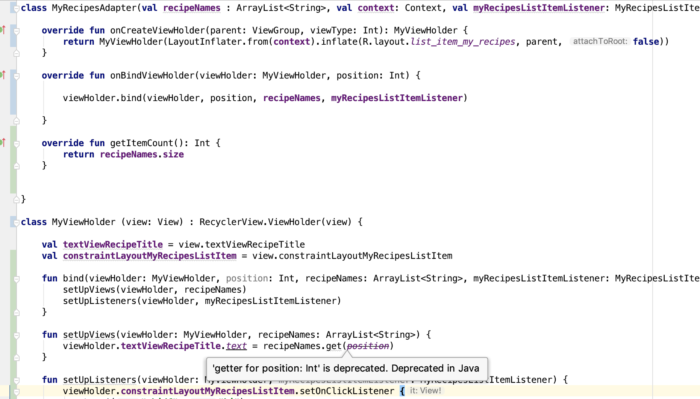
    The following RecyclerView Adapter code needs polishing 😂, but for the sake of showing you the deprecation warning, here’s a screenshot:

    android getter for position int is deprecated. deprecated in java

    The deprecation warning is inside the ViewHolder class inside my RecyclerView Adapter file. By the way, I code in Kotlin now for Android apps.

    I worked with a developer before who liked suppressing deprecation errors like this, but I advised him that it’s better to address the issue than suppress it because it will haunt him in the future! 🤣 I still believe in that up to now, so I searched for a solution.

    This is the problematic line, and ‘position’ is the problematic variable:

    The solution? Simply replace position with adapterPosition.

    And why is it deprecated? I found a note in RecyclerView.java:

    * @deprecated This method is deprecated because its meaning is ambiguous due to the async
    * handling of adapter updates. You should use {@link #getLayoutPosition()} or
    * {@link #getAdapterPosition()} depending on your use case.

    That’s all I have to say about the ‘getter for position int’ is deprecated. deprecated in java warning. Happy coding, you all.

  • Android Kotlin: “overrides nothing” error appears on instantiateItem() function of PagerAdapter

    I just began learning Kotlin for work and one of the first errors I encountered is “overrides nothing” pointing at the overrides of the function instantiateItem() for my PagerAdapter

    The function/method signature was like this:

    override fun instantiateItem(parent: ViewGroup?, position: Int): Any {

    To fix the error, I simply removed the question mark from the arguments so that it looked like:

    override fun instantiateItem(parent: ViewGroup, position: Int): Any {

    Voila! Error gone and the swipe view that needed the PagerAdapter worked.

    Reference: Sudden “overrides nothing” errors appear, no recent change to Kotlin build version

  • Laravel 5.X directory permissions / ownership setup

    According to the Laravel docs, “After installing Laravel, you may need to configure some permissions. Directories within the storage and the bootstrap/cache directories should be writable by your web server or Laravel will not run”.

    After running this command to install Laravel via Composer:

    Change directory ownership by running these commands:

    Then you should see “Laravel 5” on your public folder when you visit it on a web browser.

    Make sure you setup your app key by running php artisan key:generate, or else your Laravel still won’t run!

    Reference: “The permissions for the storage and vendor folders should stay at 775, for obvious security reasons” on File permissions for Laravel 5 (and others)

  • Android: Facebook SDK “Invalid Key Hash” on Ubuntu


    I kept getting a different Facebook key hash from the one being actually generated by my debug app when it runs. Turns out I’ve been entering the wrong keystore password.

    To get your key hash for Facebook SDK on Ubuntu, run the following command:

    In case you don’t have the keytool program yet, you’ll see the following message:

    The program ‘keytool’ can be found in the following packages:
    * gcj-5-jre-headless
    * openjdk-8-jre-headless
    * gcj-4.8-jre-headless
    * gcj-4.9-jre-headless
    * openjdk-9-jre-headless
    Try: sudo apt install

    What I did was install openjdk-9-jre-headless by running the command:

    Wait for your selected program to install and try the first command again to generate key hash for Facebook on Ubuntu.

    When prompted for keystore password, try to use “android”.

  • Android: SharedPreferences not accessible from SyncAdapter

    When I was trying to access a SharedPreferences value from my Android app’s SyncAdapter, I kept on receiving an old value that was saved to the key.

    Quick solution to inaccessible SharedPreferences from SyncAdapter

    A quick solution (which may be a short-term one) I tried was to remove android:process=":sync" from the following code:

    But beware:

    The attribute android:process=”:sync” tells the system to run the Service in a global shared process named sync. If you have multiple sync adapters in your app they can share this process, which reduces overhead.

    My long-term solution to inaccessible SharedPreferences from SyncAdapter

    Source:
    SharedPreference committed in SyncAdapter not updated in Activity?

  • Android app dev: Intent extras set in onBackPressed() misssing when back to onActivityResult()

    It’s funny how we spent about an hour trying to figure out why the Intent extras that we’re setting are not being sent back to onActivityResult(). If we only knew that the solution was as simple as moving one line of code.

    The call to super.onBackPressed() should be placed after setting Intent extras and after finishing the current activity. Like so:

  • Android app dev: Missing import org.apache.commons.lang3.text.WordUtils;


    I use a few instances of WordUtils.capitalizeFully() on an Android app that I’ve been working on. And there are times when the import org.apache.commons.lang3.text.WordUtils;
    breaks, sometimes after merging with some of my git branches.

    To fix this, what I do is open app/build.gradle and add the following line under dependencies:

    Hope this saves somebody else’s day 😆 I got the solution from How to add org.apache.commons.lang3 to AndroidStudio with gradle

  • Something to avoid when using Android RecyclerView

    When using Android’s RecyclerView, don’t use the same inflated XML layout file for items you intend to shuffle on the fly! Their contents will overlap.

    -CK