Author: Catzie

  • Error inflating class androidx.fragment.app.FragmentContainerView // Android Kotlin Dev Diary

    The cause of error in Logcat:

         Caused by: android.view.InflateException: Binary XML file line #9 in net.catzie.sampleapp:layout/activity_main: Binary XML file line #9 in net.catzie.sampleapp:layout/activity_main: Error inflating class androidx.fragment.app.FragmentContainerView
         Caused by: android.view.InflateException: Binary XML file line #9 in net.catzie.sampleapp:layout/activity_main: Error inflating class androidx.fragment.app.FragmentContainerView
         Caused by: java.lang.IllegalStateException: no start destination defined via app:startDestination for net.catzie.sampleapp:id/nav_graph

    The fix was to add a startDestination to <navigation> tag in the nav_graph.xml.

  • Expand ScrollView vertically if height is smaller than screen // Android Dev Diary

    I have the following XML layout code in an Android app that I’ve been tinkering with:

    <?xml version="1.0" encoding="utf-8"?>
    <layout xmlns:android="http://schemas.android.com/apk/res/android"
        xmlns:tools="http://schemas.android.com/tools">
    
        <data>
            <variable
                name="viewModel"
                type="net.catzie.sampleapp.MainViewModel" />
        </data>
    
        <ScrollView
            android:layout_width="match_parent"
            android:layout_height="match_parent">
    
            <GridLayout
                android:layout_width="match_parent"
                android:layout_height="match_parent"
                android:background="#aaa"
                android:columnCount="4"
                android:rowCount="5">
    
                ...
    
            </GridLayout>
        </ScrollView>
    </layout>

    I wrapped my GridLayout in a ScrollView because on the landscape orientation of the Android app’s screen, my grid contents are cut from the view because they’re too tall, and there’s no way to see them without a scrollbar, which the ScrollView provides.

    That gave birth to another problem though. The landscape view looks fine, but the vertical view became too short!

    After a few clicks at Google search results I found something that helped:

    android:fillViewport="true"

    I added the above attribute to my ScrollView, and voila! A GridLayout that scrolls vertically on landscape view, and fits the height of the Android device screen perfectly on portrait view~

  • Sample Instrumented Test for Retained Text After Screen Rotation // Android Kotlin Dev Diary

    First I added the following UI Automator to my app:

    androidTestImplementation 'com.android.support.test.uiautomator:uiautomator-v18:2.1.3'

    So now my build.gradle (Module) file has the following dependecies:

    dependencies {
    
        implementation 'androidx.core:core-ktx:1.7.0'
        implementation 'androidx.appcompat:appcompat:1.5.1'
        implementation 'com.google.android.material:material:1.6.1'
        implementation 'androidx.constraintlayout:constraintlayout:2.1.4'
        implementation 'net.objecthunter:exp4j:0.4.8'
    
        testImplementation 'junit:junit:4.13.2'
        androidTestImplementation 'androidx.test.ext:junit:1.1.3'
        androidTestImplementation 'androidx.test.espresso:espresso-core:3.4.0'
        androidTestImplementation 'com.android.support.test.uiautomator:uiautomator-v18:2.1.3'
    
    }

    Then under the package app/src/androidTest/java/net/catzie/samplecalculatorapp I added the following instrumented test class:

    package net.catzie.samplecalculatorapp 
    
    import android.support.test.uiautomator.UiDevice
    import androidx.test.espresso.Espresso
    import androidx.test.espresso.ViewInteraction
    import androidx.test.espresso.action.ViewActions
    import androidx.test.espresso.matcher.ViewMatchers
    import androidx.test.ext.junit.rules.ActivityScenarioRule
    import androidx.test.ext.junit.runners.AndroidJUnit4
    import androidx.test.platform.app.InstrumentationRegistry.getInstrumentation
    import org.junit.Assert.*
    import org.junit.Rule
    import org.junit.Test
    import org.junit.runner.RunWith
    
    
    /**
     * Instrumented test, which will execute on an Android device.
     *
     * See [testing documentation](http://d.android.com/tools/testing).
     */
    
    @RunWith(AndroidJUnit4::class)
    class ValueRetainedInstrumentedTest {
    
        @get:Rule
        var activityRule: ActivityScenarioRule<MainActivity>
                = ActivityScenarioRule(MainActivity::class.java)
    
        @Test
        fun test_ui_value_after_screen_rotation() {
            Espresso.onView(ViewMatchers.withId(R.id.num_1)).perform(ViewActions.click())
            Espresso.onView(ViewMatchers.withId(R.id.num_period)).perform(ViewActions.click())
            Espresso.onView(ViewMatchers.withId(R.id.num_5)).perform(ViewActions.click())
    
            val device = UiDevice.getInstance(getInstrumentation())
            device.setOrientationLeft()
    
            val displayPanel: ViewInteraction = Espresso.onView(ViewMatchers.withId(R.id.display_panel))
            val displayPanelText = InstrumentedTestHelper.getText(displayPanel)
            assertEquals("1.5", displayPanelText)
        }
    }

    What it does is press the buttons 1, period, and 5 on the calculator’s UI to show “1.5” which should show up the display panel, rotate the screen of the emulator/device, and then check if the display panel is still showing the value “1.5”.

    I use a ViewModel and LiveData to let the value survive configuration changes such as screen rotation.

  • Prevent Huawei from Killing Your App //Android Dev Diary

    I have been playing around with Android app development, particularly on how to retain UI values after configuration changes and minimizing the app to launch a different one.

    To retain values after configuration changes, I use ViewModels.

    And to retain values after minimizing the app, the following is supposed to do the trick:

        override fun onSaveInstanceState(outState: Bundle) {
            super.onSaveInstanceState(outState)
             outState.putInt(KEY, number)
        }
        
        override fun onRestoreInstanceState(savedInstanceState: Bundle) {
            binding.textView.text = savedInstanceState.getInt(KEY)
        }
    

    But in the phone where I test most of my apps, it doesn’t! Minimizing my app to play a YouTube video, open a mobile game, and watch a few TikTok videos for about 15 minutes, causes my app’s UI data to reset.

    I installed the same app to another phone, a Samsung phone under the A Series. The user played a mobile game for several hours, and came back to my app to find all the previous UI values still intact!

    I remember that when I was still working with the Squadzip team (still grateful to Roman for suggesting that I try to practice “mindfulness” — it works wonders for a hectic lifestyle!), that Huawei phones gave us the same kind of issue. Apparently, Huawei phones are quite aggressive at killing apps in the background to preserve battery life.

    Options that I considered to prevent Huawei phone from killing my Android app in the background:

    • Save UI data to SharedPreferences, on top of using Bundle to save and restore instance state (hesitatant to do this because I don’t really need to save UI data)
    • Simply advise the user not to leave the app if they want their data to be retained (BAAAD IDEA!)
    • Find some sort of “whitelist” in Huawei settings to exempt my app from being aggressively killed

    The method I chose to prevent Huawei phone from killing my Android app:

    For the current app I’m working on, I chose to change a setting in the Huawei phone because it’s the easiest. It shouldn’t be so hard to explain to app users either.

    Instructions:

    • Go to Settings
    • Look for “Battery” and click on it
    • Look for “App launch” and click on it
    • Type the name of your app in the Search field.
    • Turn off the “Manage automatically” setting
    • Click OK on the prompt. (I chose to leave auto-launch, secondary launch, and run in background to keep my app alive.)
    • The description below your app’s name should now be “Manage manually” instead of “Manage automatically.”
  • ECG at Makati Med Heart Station

    I just came home from Makati Med Heart Station, where I had my very first ECG test.

    Several years ago, I started feeling my heart “shaking” at random times, regardless if I was stressed or at rest, but usually lasting for only 1 second and it wasn’t painful so I didn’t worry about it. By “shaking”, I mean that my heart beats louder and faster than usual.

    This year I started drinking more coffee because I’ve been quite busy, and since then, the heart-shaking became more frequent! There was even a time when it lasted almost 3 seconds and it scared the hell out of me. It was still pain-free, but I was scared.

    My family medicine doctor wrote me a referral to get a 12-Lead ECG, to rule out “cardiac dysrhythmia”, which means that there is a irregular heartbeat.

    Preparation for ECG at Makati Med Heart Station

    I brought the following items:

    Valid ID
    ECG Referral (can be a soft copy; ask for their email address)
    HMO Card, if any
    HMO Loa, if any
    Vaccination card, just in case

    What to wear for your ECG at Makati Med Heart Station

    For ladies, if you’d like to feel as comfortable as possible, you may want to wear a bra that provides good coverage, and a button-up top so that you simply have to unbutton it during the procedure. I was told that all staff who perform ECG at Makati Med Heart Station are female, so don’t worry so much about it.

    And for the gentlemen, if not taking off your shirt is the most comfortable for you, I also suggest that you wear a button-up shirt.

    What was it like getting an ECG done at Makati Med Heart Station?

    First, get a number from the kiosk inside Makati Med Heart Station, near the entrance. The waiting line to the reception counter at Makati Med Heart Station was very slow, and the room was so hot in the afternoon. But there’s a cold water dispenser there that may help you feel refreshed. The wait was a bit stressful nonetheless, and I hope it doesn’t affect the ECGs of the patients.

    Once your number is called in the counter, things will start to get faster. A short moment after talking to the lady in the reception counter, my name was called by the lady who was about to perform ECG on me.

    I laid upright in bed as the lady attached the electrodes (correct me if that’s not the right term!) to my legs, arms, and chest. Then she ran a machine for… I think not more than a minute. I hope that it’s enough to catch an abnormal heart rhythm. I prefer not to do the 24-hour monitor because I have pressure urticaria, and I think it’s gonna make me itch a lot for 24 hours! But if it comes to that, then I’ll just have to woman up to get it over with.

    Can you get the ECG result online from Makati Med?

    Results for ECG and 24-Hr Holter Monitor ​are not yet available online, so you’ll have to claim the results at Makati Med Heart Station. Bring your official receipt with you.

    Processing of results is 24 hours, according to the lady who did my ECG. I am confused though, because on the Makati Med website they say it should take 2 business days. Anyway, I won’t be able to go there within the next 2 days so… yeah.
  • DataBinderMapperImpl Error: cannot find symbol (DataBinding) //Android Kotlin Dev Diary

    Today I encountered the following error as I was building an Android app:

    DataBinderMapperImpl.java:18: error: cannot find symbol
    import net.catzie.myproject.databinding.ActivityMainBindingImpl;
    ^
    symbol: class ActivityMainBindingImpl
    location: package net.catzie.myproject.databinding

    Turns out, there’s an error in the related XML file, activity_main.xml! πŸ˜‚

    For other possible solutions, this StackOverflower answer may help: android: data binding error: cannot find symbol class

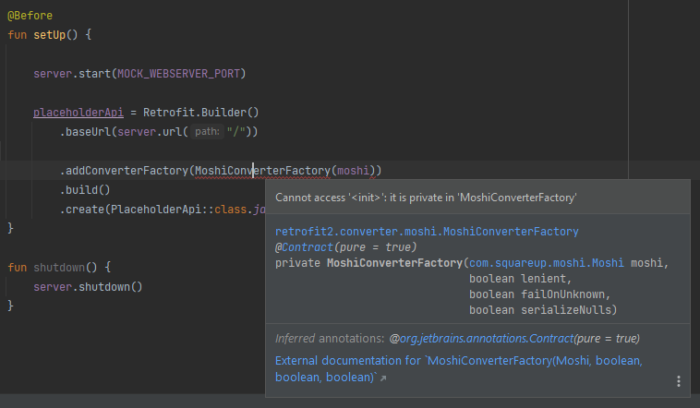
  • Cannot access ‘‘: it is private in ‘MoshiConverterFactory’ //Android Kotlin Dev Diary

    I’m starting a new category on my blog — Dev Diary, to document some of the errors that I encounter and what I did to fix them. I’m doing this in hopes of helping developers (including my future self!) as they work with code (and to get more blog visits! LOL). It’s nice to save time fixing a problem that you have already encountered and fixed before.

    Today’s problem:

    You are creating an instance of a class such as MoshiConverterFactory, but you get an error that says Cannot access '<init>': it is private in 'MoshiConverterFactory'

    The solution:

    Use the .create() method of the MoshiConverterFactory, like so:

    .addConverterFactory(MoshiConverterFactory.create(moshi))

  • BPI credit card activation thru text unsuccessful

    I rarely use a credit card these days but BPI just sent me a renewed credit card. It requires activation before use.

    How to activate BPI credit card thru text:

    Send the following mesage to 225689 using the mobile number that’s registered with your BPI credit card:

    BPIACT <LAST 10 DIGITS OF YOUR CREDIT CARD NUMBER>

    For example: BPIACT 0123456789

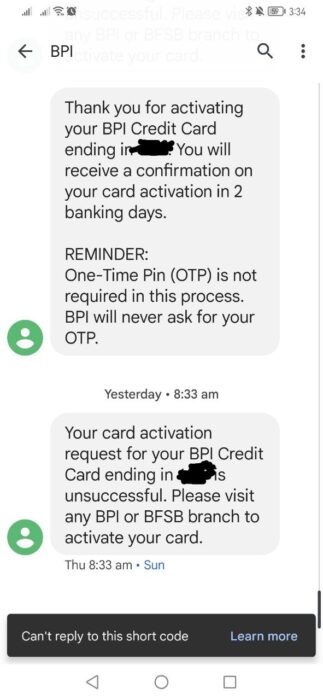
    After sending the above message, you should receive a reply from BPI:

    “Thank you for activating your BPI Credit Card ending in ****. You will receive a confirmation on your card activation in 2 banking days. Thank you.”

    How many days for BPI credit card activation?

    BPI credit card activation should take 2 banking days.

    BPI credit card activation unsuccessful. What to do?

    I tried to activate my new BPI credit card thru text 2 times but they were both unsuccessful.

    BPI credit card activation unsuccessful.
    BPI credit card activation unsuccessful. πŸ™

    The status update that I received from BPI was:

    “Your card activation request for your BPI Credit Card ending in 6217 is unsuccessful. Please visit any BPI or BFSB branch to activate your card.”

    You may call the BPI hotline number 889-10055 to ask for assistance. I called that number to ask why my activation is always unsuccessful. The agent told me that my current mobile number doesn’t match the one in my credit card records! The one in BPI’s record is an old mobile number which I lost together with a phone many years ago. I was able to request for a BPI name change and BPI address update through phone banking before, but they can’t accommodate mobile number change through phone because of security reasons. After all, they send OTPs to our mobile numbers.

    Now I really need to go to a BPI branch to request for mobile number update, and file a request for credit card activation right there. I just hope that it won’t take so long.

    How to activate BPI credit card at a branch:

    Bring 1 valid ID and the credit card that you want to activate at a BPI branch.

    Line up for the customer service counters. It took me around 1 hour in the queue before it was my turn at BPI La Fuerza Pasong Tamo (Chino Roces) branch in Makati City. It was a painful wait.

    I had to fill out a customer information update sheet for BPI credit card holders first, because my mobile number is outdated.

    The banker told me that he will text me later on that day, or the next day, once my BPI credit card has been successfully activated.

    I received the text from the banker on the day after going to BPI La Fuerza Pasong Tamo branch.

    I also received a text straight from BPI with the following message:

    Your BPI Credit Card is now active. You can now enjoy and take advantage of your BPI Credit Card’s features and perks. To know more, visit our BPI Website, click on ‘Cards’ and select ‘Credit Cards’. Thank you.

    -BPI
  • How to get Voter’s Certification at Makati (Requirements, Price, Location)

    How to get Voter’s Certification at Makati (Requirements, Price, Location)

    Today we went to COMELEC to request voter’s certificate.

    It is near Makati City Hall, along Morong St. near its intersection with F. Zobel St. The building says “Gen Pio Del Pilar High School” but Google Map says that the school is permanently closed. For the exact location of COMELEC, see the map above.

    Once past the gate, the guard will ask for your barangay name, as the window where you’ll request the voter’s certificate will depend on the barangay where you reside.

    The staff that caters for people from Barangay Bangkal Makati only asked for two requirements: 1 valid ID and a fee of 75 pesos. I think the price of voter’s certification for PWD is zero.

    There was no queue at the time we went, so the process was pretty fast. We received our voter’s certificate within 5 minutes!

    I was worried that it might be difficult for me to get my voter’s certification, because my records here in Makati is still in my maiden name. So I presented an old ID with my maiden name, but the address is not in Makati! The staff still accepted it, to my relief. Anyway, I already submitted a request to change my name before the 2022 election, but they did not change it. I don’t want to go through the process again so maybe I will just use my maiden name next election.

  • Change name in BPI online (maiden to married name in credit card)

    Disclaimer: What I wrote in this article were based on my experience as I requested a change in account name for my BPI credit card, but a similar process and set of requirements may apply for non-credit card BPI products. The process and requirements may be changed by BPI at any time. I am not affiliated with BPI in any way, but let this article be a guide, in case you’re planning to change your BPI credit card’s billing address. πŸ™‚

    The process is done through phone and online (email). You don’t have to leave home to do it!

    My BPI credit card will expire on September 2022 and I just received an email with following message from BPI:

    Your BPI Credit Card/s ending in **** will be expiring on September 2022. As long as your account remains active and in good credit standing, please expect to receive your renewal card within 2 months before your card expires. To ensure receipt of your renewal card, please update your address and contact information before June 28, 2022 through the following channels:

    24-hour BPI Contact Center

    Call 889-10000 (Metro Manila), domestic toll-free 1-800-188-89100 (available to PLDT subscribers), or 63+2+889-10000 for mobile phone and international access;

    Any BPI branch

    Aside from an address change, I also hoped to change my credit card’s account name from maiden name to married name so that the new card will bear my updated information.

    I chose to request a change from maiden to married name through the phone because I don’t want to leave home. :-p

    Note: At the time of writing, BPI only processes credit card information update between 6AM-8PM. This is according to a pre-recorded advisory that played during my phone call when I attempted to call past 8PM.

    Prompts and corresponding numbers as of June 3, 2022 (BPI may update the choices any time!):

    • Press 2 for credit card
    • Press 1 for credit card services
    • Press 3 for information update
    • Dial your credit card number

    Once a phone banker verifies that you are the owner of the credit card account, they will create a request and reference number for you.

    Requirements to change account name in BPI online, from maiden to married name in credit card:

    Submit the following in JPEG/TIFF file format (max 1MB for all files in the email) to [email protected], with your reference number in the subject of your email. Send the email within 3 days or your request will be cancelled.

    • Clear scan of letter of request to change your BPI credit card’s name (must be handwritten and signed)
    • Clear scan of Valid government-issued ID, front and back (must have a photo and signature)
    • Clear scan of credit card, front side
    • Marriage certificate

    Turnaround time for this kind of request takes 4 banking days. After this time period you may call the BPI hotline again to verify if your email was correctly received, along with the attachments.

    So that’s how you update your BPI credit card’s name through phone and online. I’m glad that BPI now lets us do this within the comfort of our home.