Author: Catzie

  • Catzie’s Creamy Carbonara Recipe

    Catzie’s Creamy Carbonara Recipe

    When it comes to pasta dishes, I like it when the sauce is thick and really clings to the pasta. And when eating white sauce pasta, I want it really creamy.

    I’ll share with you a creamy carbonara recipe, with sauce that’s thick and creamy, and doesn’t use flour or cornstarch to thicken.

    The recipe you’ll find here is not classic Italian spaghetti carbonara. The classic carbonara sauce has eggs and parmesan cheese, but my recipe uses cream, butter, and a local processed cheese.

    This recipe won’t tell you exactly how much salt or pepper to add — add as much as you need and taste the sauce as you do.

    Serves about 6 people.

    Ingredients

    • salt
    • pepper
    • 1/4 cup butter
    • 1 Tbsp olive oil
    • 1 medium red onion, minced
    • 4 cloves of garlic, minced
    • 1 large chicken breast half, sliced into cubes (or 2 small breast halves)
    • 1 cup canned sliced mushrooms
    • 1 cup all purpose cream
    • 1/4 cup water
    • 1/4 Eden cheese, grated
    • 250 grams bacon, cooked until crispy then cut to small pieces
    • about 250 grams spaghetti, prepared according to instructions

    Procedures

    1. Cook spaghetti pasta according to its instructions. Make sure not to cook too much or it might get soggy! We want it al dente
    2. Slice the chicken breast half into cubes, then season with salt and pepper
    3. In a medium or large sized frying pan, melt the butter then add olive oil.
    4. When the butter and oil mixture is hot and bubbly, add minced red onion and cook until a little translucent, then add garlic.
    5. Add the sliced chicken and stir fry.
    6. Add the mushrooms. Make sure to cook until the chicken slices are slightly browned.
    7. Pour the all purpose cream and water and mix well.
    8. Add grated cheese then mix well again
    9. Add as much salt and pepper as you like, but taste as you go to avoid a sauce that’s too salty.
    10. If the sauce is too thick, add a little more water and salt. If it’s too thin/runny, let it simmer until thick enough for your liking.
    11. Serve immediately with the spaghetti you cooked earlier. Add as much sauce as you like into the pasta.

    Enjoy! I hope it turns out well.

    Leftover creamy carbonara sauce?

    You can place leftover creamy carbonara sauce in an airtight container in your refrigerator for up to 3 days. Reheat, then serve with pasta.

    I haven’t tried freezing this carbonara sauce so I’m not sure if it will reheat well after becoming frozen. But the sauce will last longer in the freezer — maybe for up to 2 weeks?

    You can also use the leftover sauce in your omelette or in your sandwich, or wherever you think it will go well. 😆

    My preferred brand of Spaghetti pasta

    royal-premium-spaghetti

    I like Royal Premium Spaghetti because based on my experience, the pasta doesn’t easily sog. It’s perfect for those who try to achieve “al dente” spaghetti! 😀

  • CCNA V5 Curriculum Download – Portable Offline Study (Routing & Switching)

    CCNA V5 Curriculum Download – Portable Offline Study (Routing & Switching)

    An older blog post about CCNA Exploration 4.0 Curriculum was one of my most popular pages in this site. A guest requested that I share CCNA V5 Curriculum Download links here for Routing and Switching, and I decided to try to fulfill such request because I think this will help a lot of people who are studying to get certified by Cisco.

    These are portable offline curriculum files for CCNA Routing & Switching — there’s no need for installation I’m not sure yet if it’s the same but more updated version of CCNA Exploration or completely different.

    Extract the .rar files into your computer so that you can study for CCNA even when you are offline. You can also make the curriculum portable by extracting the contents into your USB flash drive and take your CCNA V5 curriculum with you anywhere.

    Please download these and check if they are what you need for your CCNA studies. Let me know what you think. 🙂 (more…)

  • Chaos Dragon: Sekiryuu Seneki review

    Chaos Dragon: Sekiryuu Seneki review

    As usual, I do my best not to drop spoilers as I myself hate those. But since my judgement is not flawless, please beware that I might mention potential minor spoilers here.

    Thanks to having friends who like watching anime, I am once again an anime fan. 🙂 When I was in high school, I really loved anime, especially Bubblegum Crisis Tokyo 2040. I was also obsessed about Final Fantasy X-2.

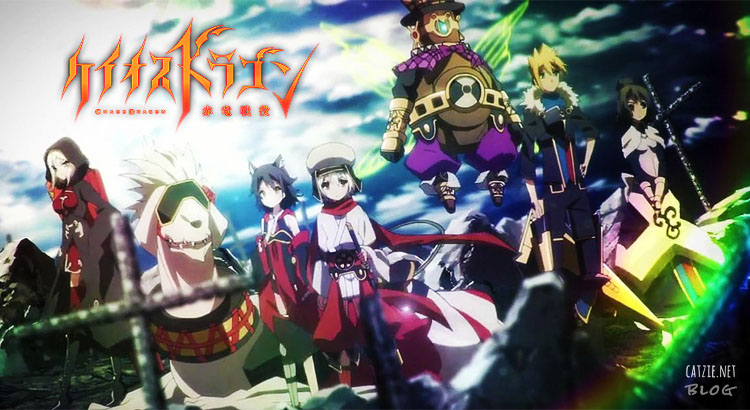
    Chaos Dragon was one of the recent anime series that I watched. It wasn’t one of the best series to me, but I still liked it.

    The story takes place in Huanli (the Year of Dazzling) 3015. Donatia and Kouran, two countries fighting for supremacy, are causing the world to be torn apart due to the constant war. Amidst the strife is the island country Nil Kamui, which has lost its independence. Red Dragon, the guardian god of Nil Kamui, goes out of control. Will the island country be able to regain its independence? (Source: MyAnimeList News)

    Chaos dragon: The art

    It was nice to glance at the art of Chaos Dragon: Sekiryuu Seneki, but upon inspection, I don’t like how the characters were drawn.

    chaos-dragon-Sekiryuu-Seneki-character-art

    Personally, I don’t like it when anime characters are drawn like this. Look at Fugaku in the picture above. I don’t know his age, but he looks like a young boy when I think he’s supposed to be at least 18 years old, judging by his character and the depth of his voice.

    eyha / eykha in chaos dragon: sekiryuu seneki

    Also notice how their eyes were drawn. There are straight lines and corners, and it bothers me.

    Of course not everyone would care about the character art that much. A friend won’t even watch Kids on the Slope just because the character art wasn’t classic “cutesy” anime drawing. But I LOVED how Kids on the Slope characters were drawn! So, yeah, it comes from viewers’ personal tastes. 🙂

    Chaos Dragon: Story

    When I had watched up to a certain episode, I was wondering if all of Ibuki’s friends will die! Not telling you who kills who though. And it’s up to you to find out by watching Chaos Dragon. :p

    It was nice how in every episode, they reminded us what’s going on with Nil Kamui, Donatia, and Kouran.

    Chaos Dragon: Characters

    I don’t recall any character development or any outstanding personality in Chaos Dragon. I guess it wasn’t a good anime in this aspect.

    Would I recommend Chaos Dragon?

    Hmmm.. Uh, maybe if you’re really bored, yes. Go ahead and watch it. 😆 I was in tears near the ending, so I guess it’s not that bad for an anime series.

    Have you watched Chaos Dragon: Sekiryuu Seneki? What do you think of it?

  • SSH without password: PuTTY or Git Bash

    SSH without password: PuTTY or Git Bash

    We access remote Linux servers everyday from our Windows computers. Having different servers for different projects, it can be difficult having to enter the passwords over and over in everyday. And so, I suggest that we use SSH Keys instead for authentication to save us some time and boost productivity. SSH keys should also make logins more secure than passwords — just be careful when someone else uses your computer.

    I’ll show you two methods that we can use to connect to our Linux servers using SSH keys and without a password.

    Method 1: PuTTY
    Method 2: Git Bash

    Requirements for this tutorial:

    I personally like using Git Bash to connect via SSH to our server because it’s done in fewer steps than when using PuTTY, but in this tutorial I will first show you password-less connection to SSH via PuTTY.

    Method 1: SSH Connection without password in PuTTY

    1. Download PuTTY from the PuTTY Download Page if you haven’t yet. No installation is required — you just run this .exe file when you need it.
    2. You also need PuTTYgen so if you don’t have it yet, download PuTTYgen from the PuTTY Download Page. This is the PuTTY Key Generator, and will be used to generate a key later. Like putty.exe, no installation is needed for this.
    3. Right click on puttygen.exe then run it.
    4. Make sure that under Parameters, SSH-2 RSA is selected, then click the Generate button. Move your mouse pointer all over the blank area to hasten the key generation.
    5. Copy the generated key, edit the Linux server’s authorized_key file in the .ssh folder (e.g. /home/username/.ssh), and paste the generated key into it. If the .ssh folder or authorized_key  file do not exist yet, create a .ssh folder with permission 700, then create the file authorized_key file with permission 600.
    6. In PuTTY Key Generator, click “Save public key” and save it as a .txt file.
    7. Still in PuTTY Key Generator, click “Save private key” and save it as a .ppk file. It’s recommended for you to save a passphrase for the private key.
    8. Now, run PuTTY. Go to Connection -> SSH -> Auth. Click the browse button to find and select the private key (.ppk file) that you saved in the previous step.
    9. From Connection, go to Session so that you can connect to the Linux server via SSH. Enter the host name or IP address then click Open.
    10. Enter your username.
    11. You should be logged in now without being prompted for password. I think you need to select the .ppk file under Connection -> SSH -> Auth each time you will log in.

    Method 2: SSH Connection without username & password in Git Bash

    1. Install Git on your Windows computer if you haven’t yet. Download Git here. During setup, I didn’t change any setting aside from ticking the “Enable file system caching” checkbox.
    2. If a .ssh folder doesn’t exist yet under C:\Users\<YOUR-WINDOWS-USERNAME>\ then please create it. (I used the browser for Local Site in FileZilla to create .ssh folder)
    3. While inside the .ssh window, right click then choose Git Bash Here.
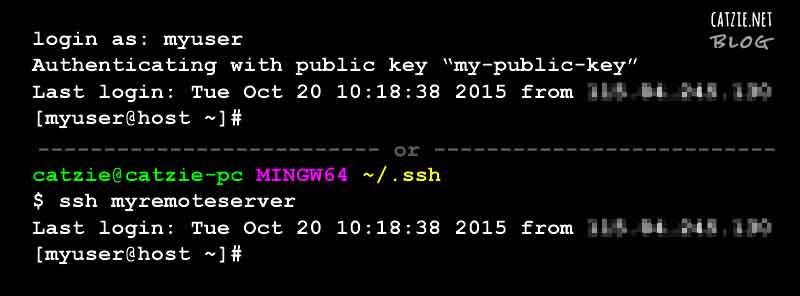
    4. Run this command: ssh-keygen -t rsa -C "[email protected]", then type the file name for your key (we’ll use this in a config file later), and then type the passphrase that you want to use, twice.
    5. Create a file named config, with no extension name, under the .ssh folder. (FileZilla’s browser for Local Site might help again)
    6. Paste the following into the config file and edit as necessary. <NAME_OF_SSH_KEY> should be the file name you typed earlier after the ssh-keygen command.
    7. Open the .pub key file that you just generated in C:\Users\<YOUR-WINDOWS-USERNAME>\.ssh\ and copy its contents.
    8. Edit the Linux server’s authorized_key file in the .ssh folder (e.g. /home/username/.ssh), and paste the key from the .pub file into it. If the .ssh folder or authorized_key  file do not exist yet, create a .ssh folder with permission 700, then create the file authorized_key with permission 600.
    9. Run Git Bash then enter this command: ssh <LABEL_FOR_CONNECTION> The label for connection should be as set in the config file. If you set a passphrase, you will be prompted for that too.
    10. Just run the same command in Git Bash each time you want to start the connection.


    Resources:

    Let me link to the web pages that helped me complete this tutorial:

    HOW TO PASSWORDLESS SSH LOGIN – Server Mom explains how passwordless SSH connections work and will teach you how to implement a Linux to Linux or Windows to Linux connection. This page mostly helped me with Method 1: PuTTY.

    Adding SSH Keys to Authorized_Keys – this page was my reference for chmod settings

    Simplify Your Life With an SSH Config File – helped me complete the Method 2: Git Bash.

  • Meat Plus Cafe menu and review (Subic, Olongapo)

    Meat Plus Cafe menu and review (Subic, Olongapo)

    “I can’t leave Subic without eating at Meat plus”

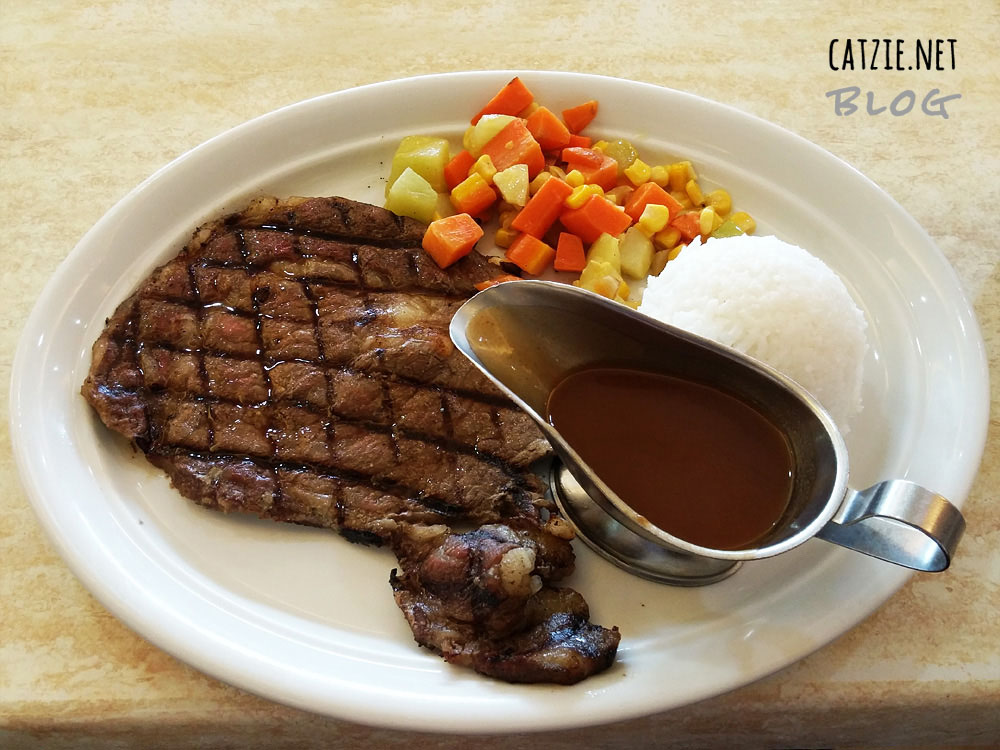
    i can't leave subic without eating at meat plus There’s a huge banner at Meat Plus Cafe in Subic that says “I can’t leave Subic without eating at Meat Plus”, and I think that when I go back to Subic, I would be saying exactly the same thing. 😉 Meat Plus Cafe sure is a must-visit when you travel to Subic. Why, you ask? Because they serve good quality steaks at low prices. U.S. Steak Meals cost P260 to P405. Yessss, they’re very affordable for steak meals!


    And there was a really good food item at Meat Plus Cafe that can give you tongue-gasm. I’ll talk about it later in this post. 😀

    (more…)

  • Google Maps get coordinates on click or drag and drop

    Google Maps get coordinates on click or drag and drop

    With this tutorial you’ll see how we can place a Google map with search box on your web page, and then get coordinates (i.e. latitude and longitude) based on where you click or where you drag and drop the marker into. The JavaScript API of Google Maps will help us achieve this.

    This kind of map will be useful if you want to save coordinates from a Google map into your database. For example, if you’d like to save coordinates of a user-defined location, you can incorporate this map into your registration process — ask your users to point the marker to their location by clicking on the map or by dragging then dropping the marker.

    There will be two types of icons in this map. First, a red default marker. Wherever you move it, we’ll get the coordinates that it points to. Second, white square markers which will appear to point to the location you searched for using the search box.
    Map Demo

    Try the map below — this is more or less how our map will look like later at the end of this tutorial. 🙂 Please read on and soon I’ll share the codes with you.

    Get coordinates from Google Map

    Latitude:   Longitude:


    Click on any point or drag the marker to get coordinates.


    This tutorial will cover the following:

    • Google map on a web page
    • Search box for map
    • Get map coordinates on click
    • Get map coordinates on drag and drop of the marker
    And you will need these:

    • Familiarity with HTML and JavaScript
    • Internet connection
    • Google account
    • Development environment (I used XAMPP on Windows 7 for this)
    • Code editor (I use Sublime Text)

    (more…)

  • Attack on Titan: Season 1, one of the best anime I watched so far

    Attack on Titan: Season 1, one of the best anime I watched so far

    attack-on-titan-anime-season-1Attack on Titan is one of the recent anime series that I watched. I loved it! It was really refreshing for me because I had not watched any action-packed anime for a long time.
    Update: We found a trailer for season 2 of Attack on Titan! Ugh, I can’t wait!

    If you haven’t watched season 1 though, I suggest you watch all season 1 anime episodes first before watching the season 2 trailer. 🙂


    Most of the anime series I watched prior to Attack on Titan were “slice of life” type with comedy and romance, the kind of anime that relieved my daily stress. The kind of anime that didn’t make me think a lot. Attack on Titan aroused my curiosity about many things in the anime series.

    Then I realized that these anime series that I’ve been watching had began to bore me. So I opened the folder where my boyfriend transferred several anime series videos into. I chose to watch Shingeki no Kyojin, or “Attack on Titan” in English. I was told that this anime could get really addictive at around episode 15 when things get really interesting.

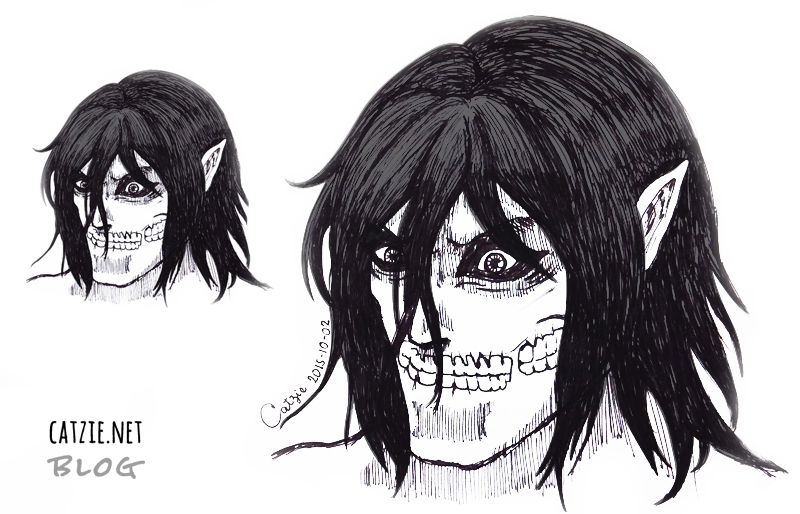
    Titan drawing by Catzie

    Just sharing a titan that I drew:

    Attack on Titan drawing by Catzie
    Attack on Titan drawing by Catzie. Quickly drawn on a sketch pad using a gel pen, and then edited in Photoshop to adjust brightness and contrast, and then filled the hair with translucent black.

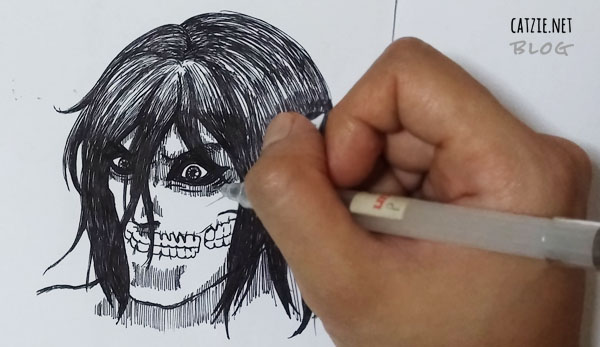
    Here’s a raw version of the drawing:

    Attack on Titan drawing by Catzie, raw.
    Attack on Titan drawing by Catzie, raw.

    This might have been my first time drawing a male character, especially one that looks like a monster. Over 10 years ago, I was so addicted to drawing and most of what I drew were pretty anime girls. I didn’t feel like drawing male anime characters. Until now. xD I guess people always change.

    Something to think about from Attack on Titan

    “People who can’t throw something important away can never hope to change anything.” – Armin Arlert

    The quote above is something that Armin Arlert said in one of the last episodes of Attach on Titan. This somehow inspires me, being someone who desires many changes in life.

    What I liked about Attack on Titan

    attack-on-titan-maneuver-gear

    The 3D Maneuver Gears are so cool! I hope there’s a theme park or studio that features 3D Maneuver Gears that fans can try on. That would be a great experience, right? It would also be really great if there were titans you can control from the back of the neck — you’ll get what I mean when you watch the anime. 😉

    If you watch the anime, you would see how hard humanity struggle to regain freedom from their predators – the titans. You’d see how much the characters had to sacrifice for their goals. And this brings back that quote from Armin in my head: People who can’t throw something important away can never hope to change anything.

    In a certain scene with that female titan, when they were about to find out the identity… oh dear, I can’t remember any anime with a scene that made my heart beat that fast! Kudos to the production team of Attack on Titan anime. :3

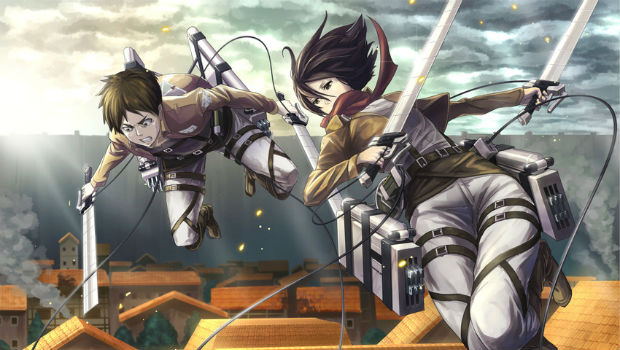
    I liked how strong Eren’s will is. He sometimes seems to become really scary when he says he’ll exterminate the titans, but I can relate to him. After all, the titans have taken away so many lives around him, including that of his beloved mother.

    Mikasa who’s always there for Eren is another character that I liked. I admire how she’s devoted to Eren who she calls her “family”, well, her last remaining family. She’s also a very skilled soldier — I like it when a girl is tough. Sometimes I feel bad for her when Eren kind of turns away from her. I hope they end up together someday. Tee-hee.

    I can’t say I like Armin as much as I like Eren and Mikasa, but I do admire the way he thinks. His body may not be strong, but his mind is. Armin helped the military survive many times, thanks to his brilliant mind.

    The character development on Jean Kirstein. It was nice how the anime showed us his internal struggle.

    What I hope for in Attack on Titan season 2

    Like I said, I hope Mikasa and Eren end up together. :3

    I hope to find out more about Eren’s dad. Where the heck is he all this time? Is he involved with titans? Is he actually a villain?

    I want to find out exactly how the titans came into the earth. How do they reproduce?

    Attach on Titan is getting season 2 in 2016! This gives me 3 very exciting things to wait for in 2016: Attack on Titans season 2, the next season of Game of Thrones, and someone I’m hoping to come home from Japan! 😀

    Attack on Titan movie trailer

    Every person I talk about the live action movie of Attack on Titan with, says that it’s a horrible one! A friend said that the story deviated from what was in the anime.

    I checked the trailer, and I didn’t like the way things looked. The setup didn’t look realistic to me. All I liked were the acting of Hanji (going nuts as usual), as well as how cool the titan on my drawing looked even in the movie. 🙂

    See for yourself: