
Quick answer: The Android Studio Agent missed your commits because its git log command filtered by a date that carried the current time of day, printed only subject lines, and checked only the current branch. Start a new chat and tell the agent to run git log with --all, --since set to today at 00:00:00, and %B in the format. The exact prompt to copy is below.
I have been using the Android Studio Agent to get things done faster as I focus on what’s more important to me as I work on the Senior/PWD Discount Calculator app for Android.
A problem I encountered today was that my android studio agent tells me i dont have git commits today when i made over 10 commits. My goal was to get a git log of all commits done today, with complete commit messages.
How do I make Android Studio Agent list all of today’s git commits?
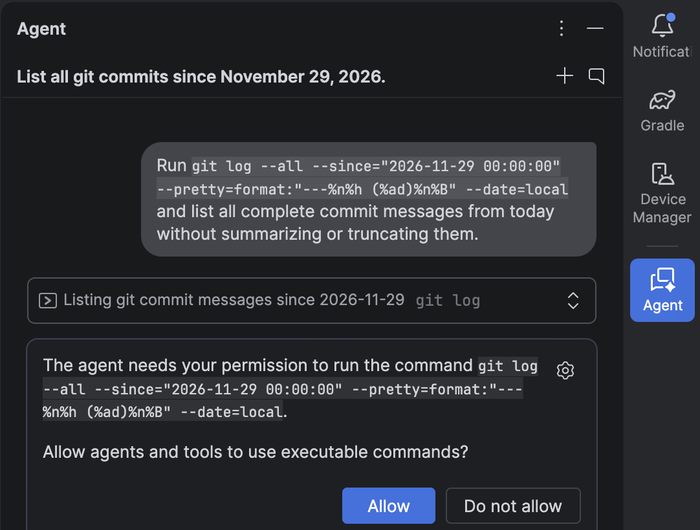
What made it work was sending this exact message to a new chat with the Android Studio Agent:
Run git log --all --since="2026-11-29 00:00:00" --pretty=format:"---%n%h (%ad)%n%B" --date=local and list all complete commit messages from today without summarizing or truncating them.Change 2026-11-29 to today’s date before you send it. This prompt worked with both the Built-in Default and Gemini 3.1 Flash Lite agent models in Android Studio.
Hit the “Allow” button if Agent asks permission to run the git command:
How do I know it worked?
Check the shell tool output (stdout) in the agent’s reply. It should show every commit made after 00:00:00 today, separated by ---. Each one shows the short hash, the local timestamp, the subject line, and the full body text.
Why did Android Studio Agent say I had no git commits today?
Your repo was valid (the command finished with exitCode: "0"), so Git ran cleanly. It simply filtered your commits out, for three reasons.
Git adds the current time to a date-only –since
This was the main culprit. When you write --since="2026-11-29" with no time, Git fills in the current time of day, for example 2026-11-29 20:26:00. Every commit you made earlier than that minute is excluded, which hides most of today’s work. Writing 00:00:00 explicitly fixes it. See the official git log documentation for the date options.
The agent printed subject lines, not full commit messages
With --pretty=format:"%s", Git prints only the first line of each commit and strips the body. Even if the agent had found your commits, you would not get the complete messages. Use %B instead, which prints the full multi-line message. The Git pretty-formats documentation lists every placeholder.
git log without –all only checks your current branch
Without --all, git log only looks at your current HEAD branch. If any of your 10+ commits are on another local branch, they are skipped unless --all is included.
What if some commits are still missing?
They may have been committed in a different subfolder or repo root, or amended with an older committer date. To inspect your last 15 commits and their exact timestamps, replace --since="2026-11-29 00:00:00" with -n 15:
git log --all -n 15 --pretty=format:"---%n%h (%ad)%n%B" --date=localOutro: I have been thinking of creating a web version of the Senior/PWD Discount Calculator app so that it might help more users that don’t use any Android device. Might as well familiarize with ReactJS along the way!