Category: Technology

  • Get “order” object/details from Thank You page of WooCommerce (WordPress)

    It’s been a long while since I last posted anything related to coding. I haven’t really stopped, but from Android app development, I switched back to PHP. Life has become occupied with other things, but when I do code, it’s in WordPress with WooCommerce. It’s for my online shop.

    In my opinion, WordPress is not the most pleasant platform to use if you’re a developer (after years of MVC coding for Android I find WordPress quite messy), but it’s what I already know. I don’t have time to learn another.

    Today’s code snippet is for customizing the Thank You page (post-checkout) by retrieving the “order” object.

    The $order_id is what we’ll start with. Then we get the order object with the help of the wc_get_order($order_id) method. Once you’re able to successfully call the order object, you may use its methods such as get_billing_first_name() to get the order details.

    You may refer to the WC_Order class page for a list of available methods.

    I originally got this code from Order Received (Thank you) page in WooCommerce and modified it to suit my needs. Check his blog out, as he has many helpful posts on how to customize WooCommerce!

  • Git/Bitbucket: Resolving “fatal: unable to create thread: Resource temporarily unavailable” error during push

    I’ve been trying to push a new WordPress site’s codebase to my Bitbucket Git repository but it kept on failing with the following error messages:

    Enumerating objects: 11966, done.
    Counting objects: 100% (11966/11966), done.
    Delta compression using up to 56 threads
    fatal: unable to create thread: Resource temporarily unavailable
    error: remote unpack failed: eof before pack header was fully read
    error: failed to push some refs to '[email protected]:<my_workspace_name>/<my_repo_name>.git'

    I was trying to push my codebase from my server (hosted by Namecheap) to Bitbucket.

    The solution to make the push work was to enter the following through command line on my server:

    git config --global pack.windowMemory "100m"
    git config --global pack.packSizeLimit "100m"
    git config --global pack.threads "1"

    Reference: git push fatal: unable to create thread: Resource temporarily unavailable

  • GCash Customer Service – Does it even exist?

    I run a small baked-per-order goods business and many of my customers wanted to pay in GCash so granted them their wish to make payment more convenient. Prior to this, we used to accept bank transfer/deposit only, but when my husband showed me that he could cash-out money from his GCash account by sending it to his bank account, I knew we could make the business work with GCash because I’ll just transfer payments from the business’ GCash account to the business’ bank account. I created a GCash account and began accepting payments through it.

    Then I found out that in order to send to banks, I need to get “verified”. And so I went through the full verification process: Uploaded a picture of my government-issued ID, a selfie, and my personal details. The GCash app said that it should only take 30 minutes to get verified.

    For 30 minutes I waited, and received no SMS, email, or app notification from GCash. Ok, cool, maybe it’s just a bit delayed! I waited an hour more; still none. I waited one day, two days…. still no feedback on my GCash full verification status!

    This is what my Get Verified screen looks like in the GCash app:

    GCash app - upgrade in progress in Get Verified screen
    GCash app – upgrade in progress in Get Verified screen

    You’ll see that it says “Upgrade in progress” in my GCash app’s Get Verified screen. That message just sits there 24/7 and never changes.

    I tried to ask for help from GCash Care on Facebook Messenger, and all it does is make a chat bot get my hopes up that they will help me, but I never seem to be chatting with an actual customer service person.

    We tried calling the GCash hotline 2882 but we couldn’t get any customer service staff to answer even when we waited for over 30 minutes.

    The last thing I tried was write an email to [email protected] but same as GCash Care on Facebook Messenger, all the responses that I received were automatic responses.

    GCash caused my stress level to soar up so bad, worrying that they might deduct money from my account due to inactivity and all our business’ earnings will be taken by GCash. Why do I worry about this? Because that periodic deduction is why I didn’t push through with using GCash before. I want to be able keep an account inactive for a long time without getting charged. I think the big problem is they don’t send out warning before charging! They send a notification AFTER CHARGING.

    I wrote a rant post about this on my Facebook just to let off some steam, and a former colleague suggested that I just try to cash-out my money at Villarica Pawnshop. I will probably try that soon and hope it works, because I don’t wanna lose our money. It’s just extremely disappointing. I decided that we let our business’ customers pay via GCash because I thought I will be able to transfer money directly from GCash to the business’ bank account, but it’s not happening because no one at GCash can help me out with the full verification of my account.

  • Samsung Galaxy S8 stuck on model name screen / SM Megamall SAMSUNG Service Center

    Samsung Galaxy S8 stuck on model name screen / SM Megamall SAMSUNG Service Center

    One afternoon, I was playing an “action” game on my Samsung Galaxy S8 when the phone suddenly froze — no button responded to my presses, whether it’s a soft button or hard button, with the motionless screen of my game still on display. After a few seconds, the phone turned off. I noticed that my phone was very HOT! I thought maybe I zeroed out its battery so I tried charging it… nope, it wasn’t charging. I thought maybe the battery is really exhausted and that after 5-10 minutes there would be an indicator of it charging, but nope. I kept on trying to charge it but no luck so I called it a night and left the Samsung Galaxy S8 to rest in my drawer, while switching to my extra phone — an LG G3 which still works fine but is very slow and the camera can’t compare to that of Samsung Galaxy S8. Still, I’m glad I kept it.

    The next day I tried plugging it in and it finally began charging again! The LED light was on and it had a charging indicator.
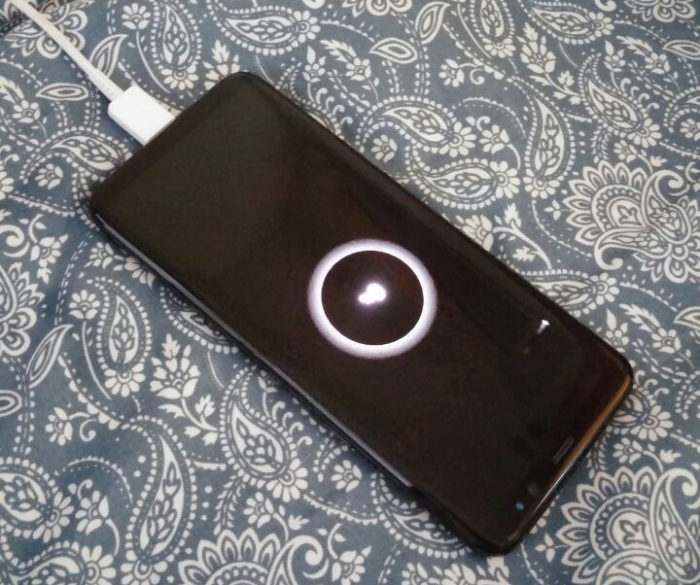
    Later, I turned it on. It prompted me for my lock pattern so I thought I was gonna be able to use my phone again. But each time I enter the correct pattern, the Samsung Galaxy S8 would restart and prompt me for the pattern again. It went on like that so many times.

    Fix attempt #1: Clear Cache

    Wipe cache partition
    Turn off the device.
    Press and hold the Volume Up key and the Bixby key, then press and hold the Power key.
    When the Android logo displays, release all keys (‘Installing system update’ will show for about 30 – 60 seconds before showing the Android system recovery menu options).
    Press the Volume down key several times to highlight “wipe cache partition.”
    Press the Power key to select.
    Press the Volume down key to highlight “yes” and press the Power key to select.
    When the wipe cache partition is complete, “Reboot system now” is highlighted.
    Press the Power key to restart the device.
    Source: Wipe cache partition: Samsung Galaxy S8

    First thing I tried to do was to clear the phone’s cache via Recovery Mode. Then I chose “Reboot”.

    After rebooting, my phone automatically entered Recovery Mode again. I thought “ugh it must have not worked because this feels like a loop again”.

    Fix attempt #1: Clear Cache

    Turn off your Galaxy S8 (if it’s not already).
    Hold down the Volume up, Bixby, Power buttons simultaneously until the Samsung logo shows up on the screen. Lift fingers.
    You’ll see an Android figure with the words No command on screen. Wait a few seconds.
    Once the black background with colored text appears, use the volume down button to scroll to Wipe data/factory reset.
    Use the power button to select Wipe data/factory reset.
    Use the volume down button to scroll to Yes.
    Use the power button to select Yes.
    Source: How to reset the Galaxy S8 to factory settings

    Desperate, I did a data wipeout. As I thought, I was in another boot loop. Each time I reboot from Recovery Mode, my phone just automatically re-enters Recovery Mode again.

    Rebooting my Samsung Galaxy S8 from Recovery Mode triggers the loop, but “Power Off” works as long as the phone is not plugged to a charger. I also noticed that while the Samsung Galaxy S8 was powered off, when I plug it to a charger, it automatically turns on. I have no idea why that happened.

    Anyway, that was the time when I knew I had to take my Samsung Galaxy S8 to the service center. I was ready to try flashing the “bricked” Samsung Galaxy S8 but I wasn’t able to obtain a copy of the firmware, so yeah, I had no choice but to as professional help.

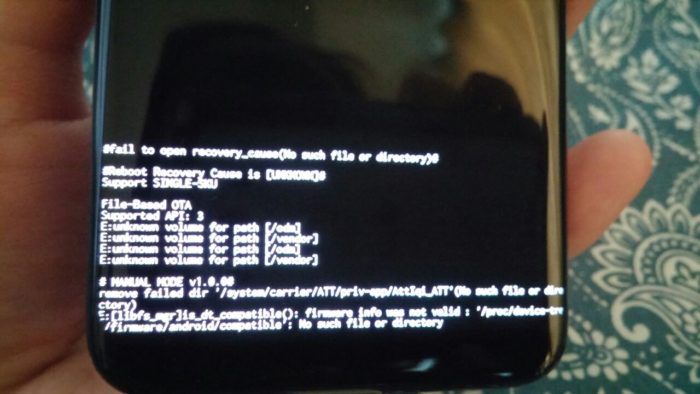
    By the way, te Recovery Mode screen showed error messages at bottom, like so:
    Mall repairman

    First I went to a guy in a nearby mall who does phone and laptop repairs instead of a Samsung Service Center; my Samsung Galaxy S8’s warranty had already expired anyway. The repairman refused to work on it. He said that if he fails to fix it by flashing the firmware, I’ll have to bring it to the Samsung Service Center, who in turn might refuse to service it because a third party already attempted to flash it. Well, thanks to him for being considerate instead of attempting to fix it and charge us for it.

    Samsung Service Center

    Come weekend, me and my hubby went to SM Megamall to watch Spider-Man: Far From Home with friends (nice movie, by the way, except the villain reveal part). But before and after the movie we had gone back and forth the Samsung Service Center in there. I think it’s also called the “Samsung Flagship Store SM Megamall”.

    In the Samsung Service Center there is a kiosk that prints a queue number, which could be for Inquiry, Repair, Claim, and another item whose name I forgot because I never used it on my visit. xD

    We had a “Repair” queue number and during our turn, the staff assigned to us said that they will attempt to flash the firmware. If that worked they would charge me P700, otherwise they won’t but will advise motherboard replacement to fix my sick baby Samsung Galaxy S8 which will cost me P12,000. OH NOOOOO… I was still hopeful that a flash was all it needed. On a side note, I liked that all the staff we encountered there at the Samsung Service Center were easy to talk to and not intimidating in any way.

    After 1 hour we returned (got a “Claim” type of queue number) and were told that the firmware flash did not work and the motherboard had to be replaced.

    Buying a new phone is the common decision of users when the phone needs repair that costs over P10,000. But for important reasons, I had to stick with my Samsung Galaxy S8 and had no choice but to have the motherboard replaced. What important reasons? I did not NEED an S9 or S10. I was still happy with my S8, if only it hadn’t become a pretty little BRICK. For a moment I had considered buying a new Samsung phone that costs around P15,000 but we found out that it’s NOT WATERPROOF and that nowadays, only flagship phones are released as waterproof by Samsung. The hubby advised that if I wanted a phone whose specs and camera are at par with the Samsung flagship phones, I should buy Huawei or Xiaomi phone… but buying a phone from these companies is not an option because as much as possible I wish to NOT support Chinese brands. And… err, I am just really attached to Samsung phones! 😊 That left me with fewer choices, which are: buy an S9, buy an S10, or revive my Samsung Galaxy S8. I chose the last option because it’s still waaaaay cheaper than buying S9 or S10 which I don’t really want anyway! After all, there’s something I’ve been saving up for. Nah, I ain’t telling you what. 🤣

    With that decision we took another queue number for “Repair”. I felt the energy leave my body when the staff told me the total cost would be P15,300. The additional costs came from the “tape” to be used to retain waterproofing on my beloved waterproof phone, and the service charge. I stuck with my decision and pushed through with the motherboard replacement. When I met up with our friends again I was totally in a bad mood but I tried my best to act normal; I hope they didn’t mind my slight grumpiness.

    The staff told me they’ll call when the phone repair is done and ready for pickup, or when something aside from motherboard replacement need be done to make the Galaxy S8 work again. After watching Spider-Man: Far From Home, they hadn’t called yet. I realized I didn’t ask if it should be done on the same day. 😅 We went back to the Samsung Service Center to ask what time was the expected repair completion. It was around 4:30PM then. The staff said we can come back to claim my phone by 7PM. W00t!

    Me, the hubby, and our friends first went to Ramen Nagi for early dinner in The Podium… only to find out that the Ramen Nagi we were expecting is now just an “under construction” wall. 🤣🤣🤣 But my friends’ craving for that bagoong flavored ramen at Ramen Nagi was strong enough to make us walk to Robinsons Galleria! Another side note: I usually have adventurous taste buds but at Ramen Nagi, I was the only one in our table who disliked the bagoong ramen and the basil & cheese ramen! Ugh. Sorry, Ramen Nagi. I really loved the basic “butao” ramen tho.

    At 7PM our pals said goodbye, while me and the hubby walked back to SM Megamall to get my phone. We like walking, yeah.

    For the last time we took a queue number at the Samsung Service Center, a “claim” number. The staff powered my Samsung Galaxy S8 on, and my eyes lit up when I finally saw my phone boot up the Android OS again 😂She demonstrated various functionalities of the newly revived phone such as color display, screen rotation, sounds, among others, to show that it’s working. I paid for the repair right there, with the staff who handed the phone over to me. Thanks for accepting debit cards! Otherwise I would have had to run to find an ATM machine outside and then run back to the service center again.

    Why does this happen?

    The Samsung Service Center staff could not give us a satisfactory answer, but it’s not a big deal to me because I understand how we can’t provide accurate reasons for failure of software/hardware some times. If they were running a profiler on my phone while I was playing that “action” game (I’m not saying what game because I suck at it even though I LOVE playing it) before it broke, then they should be able to pinpoint what went wrong, but no. In case you’re curious about what the staff said, she said that it’s possibly because I downloaded an update for my system, which didn’t finish. But I didn’t do any system update before that game session so it doesn’t make sense to me. 🤔

  • Android Kotlin: ‘getter for position int’ is deprecated. deprecated in java


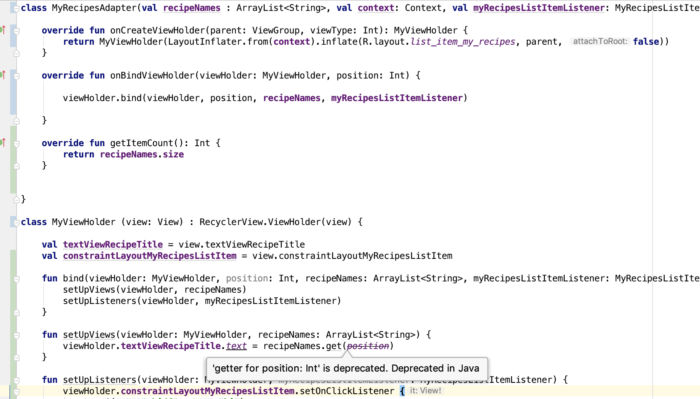
    Today I encountered a deprecation warning as I’m coding the app: 'getter for position int' is deprecated. deprecated in java

    And I was like, whoa, this wasn’t deprecated a couple of months back when I last touched Android code… this is how long I’ve missed out! 😂😂😂 I haven’t touched any app code for a while, until this week. I am easing back into Android app development, and this time it’s for my personal use but hoping to share on Google Play Store for free… just in case it may help others.

    The following RecyclerView Adapter code needs polishing 😂, but for the sake of showing you the deprecation warning, here’s a screenshot:

    android getter for position int is deprecated. deprecated in java

    The deprecation warning is inside the ViewHolder class inside my RecyclerView Adapter file. By the way, I code in Kotlin now for Android apps.

    I worked with a developer before who liked suppressing deprecation errors like this, but I advised him that it’s better to address the issue than suppress it because it will haunt him in the future! 🤣 I still believe in that up to now, so I searched for a solution.

    This is the problematic line, and ‘position’ is the problematic variable:

    The solution? Simply replace position with adapterPosition.

    And why is it deprecated? I found a note in RecyclerView.java:

    * @deprecated This method is deprecated because its meaning is ambiguous due to the async
    * handling of adapter updates. You should use {@link #getLayoutPosition()} or
    * {@link #getAdapterPosition()} depending on your use case.

    That’s all I have to say about the ‘getter for position int’ is deprecated. deprecated in java warning. Happy coding, you all.

  • Android Kotlin: “overrides nothing” error appears on instantiateItem() function of PagerAdapter

    I just began learning Kotlin for work and one of the first errors I encountered is “overrides nothing” pointing at the overrides of the function instantiateItem() for my PagerAdapter

    The function/method signature was like this:

    override fun instantiateItem(parent: ViewGroup?, position: Int): Any {

    To fix the error, I simply removed the question mark from the arguments so that it looked like:

    override fun instantiateItem(parent: ViewGroup, position: Int): Any {

    Voila! Error gone and the swipe view that needed the PagerAdapter worked.

    Reference: Sudden “overrides nothing” errors appear, no recent change to Kotlin build version

  • Laravel 5.X directory permissions / ownership setup

    According to the Laravel docs, “After installing Laravel, you may need to configure some permissions. Directories within the storage and the bootstrap/cache directories should be writable by your web server or Laravel will not run”.

    After running this command to install Laravel via Composer:

    Change directory ownership by running these commands:

    Then you should see “Laravel 5” on your public folder when you visit it on a web browser.

    Make sure you setup your app key by running php artisan key:generate, or else your Laravel still won’t run!

    Reference: “The permissions for the storage and vendor folders should stay at 775, for obvious security reasons” on File permissions for Laravel 5 (and others)

  • Android: Facebook SDK “Invalid Key Hash” on Ubuntu


    I kept getting a different Facebook key hash from the one being actually generated by my debug app when it runs. Turns out I’ve been entering the wrong keystore password.

    To get your key hash for Facebook SDK on Ubuntu, run the following command:

    In case you don’t have the keytool program yet, you’ll see the following message:

    The program ‘keytool’ can be found in the following packages:
    * gcj-5-jre-headless
    * openjdk-8-jre-headless
    * gcj-4.8-jre-headless
    * gcj-4.9-jre-headless
    * openjdk-9-jre-headless
    Try: sudo apt install

    What I did was install openjdk-9-jre-headless by running the command:

    Wait for your selected program to install and try the first command again to generate key hash for Facebook on Ubuntu.

    When prompted for keystore password, try to use “android”.

  • Android: SharedPreferences not accessible from SyncAdapter

    When I was trying to access a SharedPreferences value from my Android app’s SyncAdapter, I kept on receiving an old value that was saved to the key.

    Quick solution to inaccessible SharedPreferences from SyncAdapter

    A quick solution (which may be a short-term one) I tried was to remove android:process=":sync" from the following code:

    But beware:

    The attribute android:process=”:sync” tells the system to run the Service in a global shared process named sync. If you have multiple sync adapters in your app they can share this process, which reduces overhead.

    My long-term solution to inaccessible SharedPreferences from SyncAdapter

    Source:
    SharedPreference committed in SyncAdapter not updated in Activity?

  • Android app dev: Intent extras set in onBackPressed() misssing when back to onActivityResult()

    It’s funny how we spent about an hour trying to figure out why the Intent extras that we’re setting are not being sent back to onActivityResult(). If we only knew that the solution was as simple as moving one line of code.

    The call to super.onBackPressed() should be placed after setting Intent extras and after finishing the current activity. Like so: