Tag: Kotlin

  • Sample Instrumented Test for Retained Text After Screen Rotation // Android Kotlin Dev Diary

    First I added the following UI Automator to my app:

    androidTestImplementation 'com.android.support.test.uiautomator:uiautomator-v18:2.1.3'

    So now my build.gradle (Module) file has the following dependecies:

    dependencies {
    
        implementation 'androidx.core:core-ktx:1.7.0'
        implementation 'androidx.appcompat:appcompat:1.5.1'
        implementation 'com.google.android.material:material:1.6.1'
        implementation 'androidx.constraintlayout:constraintlayout:2.1.4'
        implementation 'net.objecthunter:exp4j:0.4.8'
    
        testImplementation 'junit:junit:4.13.2'
        androidTestImplementation 'androidx.test.ext:junit:1.1.3'
        androidTestImplementation 'androidx.test.espresso:espresso-core:3.4.0'
        androidTestImplementation 'com.android.support.test.uiautomator:uiautomator-v18:2.1.3'
    
    }

    Then under the package app/src/androidTest/java/net/catzie/samplecalculatorapp I added the following instrumented test class:

    package net.catzie.samplecalculatorapp 
    
    import android.support.test.uiautomator.UiDevice
    import androidx.test.espresso.Espresso
    import androidx.test.espresso.ViewInteraction
    import androidx.test.espresso.action.ViewActions
    import androidx.test.espresso.matcher.ViewMatchers
    import androidx.test.ext.junit.rules.ActivityScenarioRule
    import androidx.test.ext.junit.runners.AndroidJUnit4
    import androidx.test.platform.app.InstrumentationRegistry.getInstrumentation
    import org.junit.Assert.*
    import org.junit.Rule
    import org.junit.Test
    import org.junit.runner.RunWith
    
    
    /**
     * Instrumented test, which will execute on an Android device.
     *
     * See [testing documentation](http://d.android.com/tools/testing).
     */
    
    @RunWith(AndroidJUnit4::class)
    class ValueRetainedInstrumentedTest {
    
        @get:Rule
        var activityRule: ActivityScenarioRule<MainActivity>
                = ActivityScenarioRule(MainActivity::class.java)
    
        @Test
        fun test_ui_value_after_screen_rotation() {
            Espresso.onView(ViewMatchers.withId(R.id.num_1)).perform(ViewActions.click())
            Espresso.onView(ViewMatchers.withId(R.id.num_period)).perform(ViewActions.click())
            Espresso.onView(ViewMatchers.withId(R.id.num_5)).perform(ViewActions.click())
    
            val device = UiDevice.getInstance(getInstrumentation())
            device.setOrientationLeft()
    
            val displayPanel: ViewInteraction = Espresso.onView(ViewMatchers.withId(R.id.display_panel))
            val displayPanelText = InstrumentedTestHelper.getText(displayPanel)
            assertEquals("1.5", displayPanelText)
        }
    }

    What it does is press the buttons 1, period, and 5 on the calculator’s UI to show “1.5” which should show up the display panel, rotate the screen of the emulator/device, and then check if the display panel is still showing the value “1.5”.

    I use a ViewModel and LiveData to let the value survive configuration changes such as screen rotation.
  • DataBinderMapperImpl Error: cannot find symbol (DataBinding) //Android Kotlin Dev Diary

    Today I encountered the following error as I was building an Android app:

    DataBinderMapperImpl.java:18: error: cannot find symbol
    import net.catzie.myproject.databinding.ActivityMainBindingImpl;
    ^
    symbol: class ActivityMainBindingImpl
    location: package net.catzie.myproject.databinding

    Turns out, there’s an error in the related XML file, activity_main.xml! ๐Ÿ˜‚

    For other possible solutions, this StackOverflower answer may help: android: data binding error: cannot find symbol class

  • Cannot access ‘‘: it is private in ‘MoshiConverterFactory’ //Android Kotlin Dev Diary

    I’m starting a new category on my blog — Dev Diary, to document some of the errors that I encounter and what I did to fix them. I’m doing this in hopes of helping developers (including my future self!) as they work with code (and to get more blog visits! LOL). It’s nice to save time fixing a problem that you have already encountered and fixed before.

    Today’s problem:

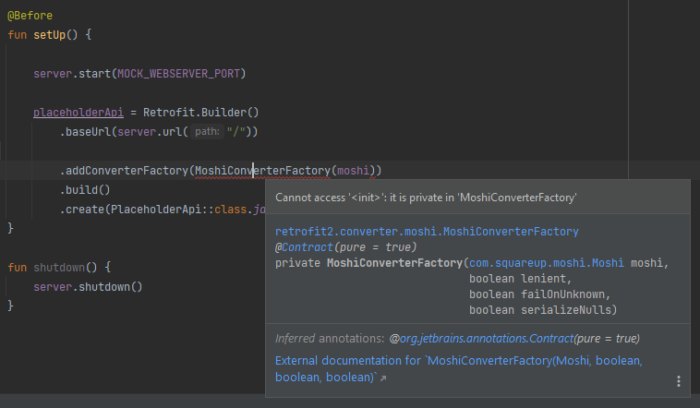
    You are creating an instance of a class such as MoshiConverterFactory, but you get an error that says Cannot access '<init>': it is private in 'MoshiConverterFactory'

    The solution:

    Use the .create() method of the MoshiConverterFactory, like so:

    .addConverterFactory(MoshiConverterFactory.create(moshi))

  • Android Kotlin: ‘getter for position int’ is deprecated. deprecated in java


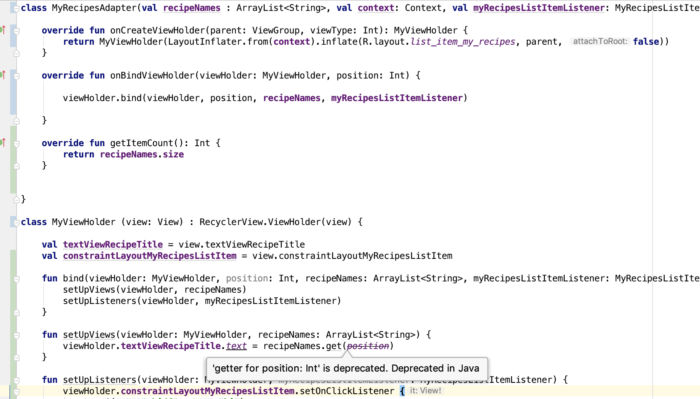
    Today I encountered a deprecation warning as I’m coding the app: 'getter for position int' is deprecated. deprecated in java

    And I was like, whoa, this wasn’t deprecated a couple of months back when I last touched Android code… this is how long I’ve missed out! ๐Ÿ˜‚๐Ÿ˜‚๐Ÿ˜‚ I haven’t touched any app code for a while, until this week. I am easing back into Android app development, and this time it’s for my personal use but hoping to share on Google Play Store for free… just in case it may help others.

    The following RecyclerView Adapter code needs polishing ๐Ÿ˜‚, but for the sake of showing you the deprecation warning, here’s a screenshot:

    android getter for position int is deprecated. deprecated in java

    The deprecation warning is inside the ViewHolder class inside my RecyclerView Adapter file. By the way, I code in Kotlin now for Android apps.

    I worked with a developer before who liked suppressing deprecation errors like this, but I advised him that it’s better to address the issue than suppress it because it will haunt him in the future! ๐Ÿคฃ I still believe in that up to now, so I searched for a solution.

    This is the problematic line, and ‘position’ is the problematic variable:

    The solution? Simply replace position with adapterPosition.

    And why is it deprecated? I found a note in RecyclerView.java:

    * @deprecated This method is deprecated because its meaning is ambiguous due to the async
    * handling of adapter updates. You should use {@link #getLayoutPosition()} or
    * {@link #getAdapterPosition()} depending on your use case.

    That’s all I have to say about the ‘getter for position int’ is deprecated. deprecated in java warning. Happy coding, you all.

  • Android Kotlin: “overrides nothing” error appears on instantiateItem() function of PagerAdapter

    I just began learning Kotlin for work and one of the first errors I encountered is “overrides nothing” pointing at the overrides of the function instantiateItem() for my PagerAdapter

    The function/method signature was like this:

    override fun instantiateItem(parent: ViewGroup?, position: Int): Any {

    To fix the error, I simply removed the question mark from the arguments so that it looked like:

    override fun instantiateItem(parent: ViewGroup, position: Int): Any {

    Voila! Error gone and the swipe view that needed the PagerAdapter worked.

    Reference: Sudden โ€œoverrides nothingโ€ errors appear, no recent change to Kotlin build version