Others, if any will be required after inspection/evaluation
Where to apply for Locational Clearance
The office that receives Locational Clearance application is at the 2nd floor of the “old building” of Makati City Hall.
Some online resources say that it’s at the 5th floor — even the city hall staff inside the elevator today said it’s at the 5th, but we went there today (Jan. 15, 2020) and found that it had been moved to the 2nd floor.
My own experience in applying for a Locational Clearance
When I visited the office that files Locational Clearance, I went straight to the counter labeled as “Receiving”.
The staff checked the required documents that I brought with me. He compiled my vicinity/location map, barangay business clearance and plate photocopy, contract of lease photocopy, and DTI business name registration certificate photocopy. Please do bring the original ones too, even if he didn’t include the originals in the compilation, he inspected them.
I missed one requirement: Occupancy Permit or Certificate of Occupancy. I thought it was the same as the contract of lease, but nope. This is what a Certificate of Occupancy looks like:
Sample “certificate of occupancy” as shown when I was applying for Locational Clearance in Makati City Hall
The city hall staff handed me the compiled documents and told me I should photocopy the filled out application form, then have 3 copies ready for the notary. The application form must be notarized before he files the Locational Clearance application. For the notary, I’ll need cedula, the compiled documents, plus the certificate of occupancy that I’m still missing.
I will try to head straight to a nearby notary public once I get my certificate of occupancy to save on the number of visits to Makati City Hall.
//2021 Update: I did not push through with this. I stopped renting a place for my shop due to our pandemic situation. If I ever process documents such as this again, I’ll try to write about it! I hope you are all doing fine in this difficult time. Stay safe and socially distant, everyone. 😷
I visited the barangay hall at Bangkal to apply for business clearance. Let me share in this blog entry what it was like.
Please note that this is for a new sole proprietorship business.
Requirements to apply for business clearance at Barangay Bangkal, Makati
Filled out green form, “business clearance application and data sheet”
DTI certificate of business name registration with application form, or SEC REG with articles of inc. and by laws
Contract of lease or certificate of title
Payment (300 for the plate and a variable value depending on the capital; Read on for approximate costs)
After inquiring about the business clearance requirements, I asked for a green form that I could fill out at home.
This is what the green application form of Bangkal’s barangay hall looks like:
Business clearance application process at Bangkal’s Barangay Hall
These are the simple steps to take during application for a business clearance from the barangay hall:
Assessment of documents
Payment
Printing and Release
Assessment of documents for business clearance from the barangay hall
I asked around the barangay hall where I should head to for business clearance application. They pointed me to a desk with a label “barangay clearance”.
The lady in the desk assessed my documents and began filling out the bottom-left portion of my green form. My barangay clearance fee was 650 pesos, based on the capital amount that I declared. The business plate costed me 300 pesos. As a newbie business person, I’m not sure if I also need to renew the plate yearly. Then there’s this 100 pesos “inspection fee” — what inspection did I pay for? Their inspection of my docs? Yeah, I know I should have asked them earlier. They gave me a number for queuing at the last step of the application, as well as the total amount to be paid. The total amount that I was charged was 1050 pesos. Oops, I only brought 500! 🤣I asked for the closest ATM in the area and they pointed me to the BDO ATM at Evangelista St., which was less than 5 minutes away from the barangay hall.
Payment for business clearance at Bangkal Barangay Hall
There weren’t too many people in the queue for the barangay hall’s cashier, fortunately. I was surprised to see a staff of a supermarket that I frequently visit paying for their barangay clearance renewal. I *accidentally* saw that they were charged 2020 pesos for the renewal. My eyes were very active at that time so I also accidentally saw that another guy was charged a total of 1050 pesos, same as mine, but with a different breakdown. His clearance fee was 850, business plate was 100, and inspection fee was 100. Why is his business plate only 100? Is it because he’s already renewing? Anyway, I made sure that I got my official receipt before leaving the cashier.
Printing and Release of business clearance at Bangkal Barangay Hall
If there was a long wait during my application for a business clearance, this was when it happened though it wasn’t so bad because I was just sitting down, awkwardly, with other people in the queue. Awkward isn’t so bad because I’m used to it. Who arranged those chairs so close to one another?! 🤣The lady in the printing and release desk asked for my queue number and documents, as well as the official receipt from the cashier.
After a while she handed me my business plate. I rejoiced deep inside while keeping my poker face on. It’s the first time I ever held one! Luh, ang babaw.
The next thing handed to me was a “Barangay Business Registration and Clearance” document, signed by the barangay captain. Speaking of barangay captain, his name is Mario and the official Facebook page of Barangay Bangkal seems to have a lot of Super Mario pictures. 😂
Ahhh! Finally I am another step closer to my goal of paying tax for my small business. Makes me wonder where tax really goes because I’m not happy with our country anymore…
Before leaving the barangay hall…
Before you leave the barangay hall, make sure you received the following:
Official Receipt
Business Plate
“Barangay Business Registration and Clearance” document
Thank you Bangkal Barangay Hall for the approachable staff and painless process!
I just got my business name certificate from DTI today! The best thing about it is that I went through the entire process online, even the payment part. 😉
You may register a business name with DTI online by using the BNRS (Business Name Registration System). I cannot say that it was a smooth transaction — it was very frustrating so many times because they are currently upgrading their system (sometimes it works, sometimes it’s broken), but in the end, after a few days of trying again, I finally finished the business name registration process with DTI.
Please be aware that this guide was written on Sept. 27, 2019 and there may have been changes on the BNRS that I do not know of, making the info here inconsistent from the actual process. The BNRS is still under frequent upgrades. There’s often an update when I visit the website.
Steps to register your business name registration with DTI online
Propose a business name
Pay for business name registration
Download business certificate, undertaking document, and official receipt
The process to register business name with DTI online
Before I was able to fill out my business information, accessing the BNRS (business name registration system) was a pain. Then website was often down, and I tried accessing it every day, until it was stable and let me fill out my info.
Fill out Owner’s Info
First, the BNRS will ask for the Owner’s Information. Fill it out with your personal information.
I chose Regional because it’s the largest scope I’ll be covering with my business in the next 5 years.
Business name proposal for registration with DTI
In the same page, below the Business Scope section, you’ll have to enter the business name to be registered with DTI online.
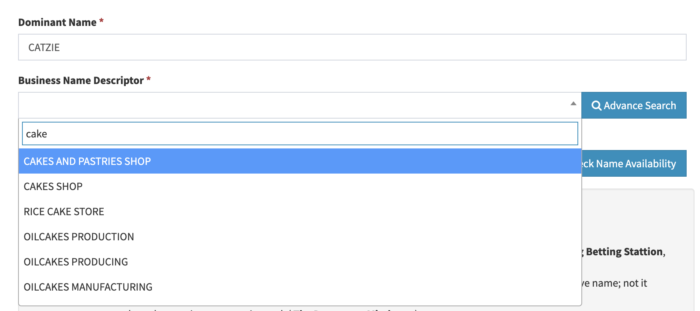
Provide a Dominant Name which serves like your business name’s “proper noun”. In the screenshot below it’s CATZIE. Then, select a Business Name Descriptor, which should describe the type of business you’re running.
The screenshots from here onward will only serve as an example, the name of the business I actually registered is different.
DTI business name registration system: selection of business name descriptor
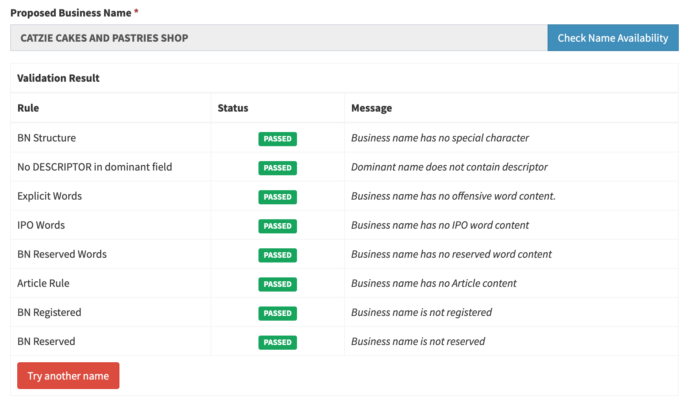
After selecting the descriptor, the BNRS will display a Proposed Business Name. They will combine the dominant name + descriptor. Click the Check Name Availability button to see if it’s not taken yet, and to validate if such name is allowed. An example is shown in the screenshot below:
Passing the validation of proposed business name in the DTI business name registration system
Business name proposal guidelines:
I am cens*ring some of the words, lest my blog gets a bad marking from Google! Loko yaang DTI, b**bs massage and spa daw?! I only copied the following from the official DTI website:
It is the applicant’s responsibility to ensure that the proposed business name is:
not and will not be used for business that is illegal, offensive, scandalous, or contrary to propriety ( Pop’s Juet*ng Bet*ing Station, B**bs Massage and Spa);
not the same or nearly the same as an existing registered business, company, partnership, corporation, cooperative name; not it infringes on any trademark, service mark and tradename (Anne Dok’s Lechon, Jolibee, Starbax Cafe);
not composed nearly generic or geograpic words( The Drugstore, Mindanao);
not a name which by law or regulation cannot be appropriated (OTOP, Intelligence, State College);
not used to designate or distinguish, or suggestive of quality of any class of goods, articles, merchandise, or service (Best Taho Factory, A-1 Auto Repair Shop);
not used by the government in its governmental functions (NBI Private Investigation Services, DTI Trading);
not a name or abbreviation of any nation, inter-governmental or international organization (Philippine Manpower Pooling Agency, UNSECO Marketing, WHO Health Services); and
is not deceptive, misleading or which misrepresent the name of business (“GOLD Construction Services” where nature of business is recruitment).
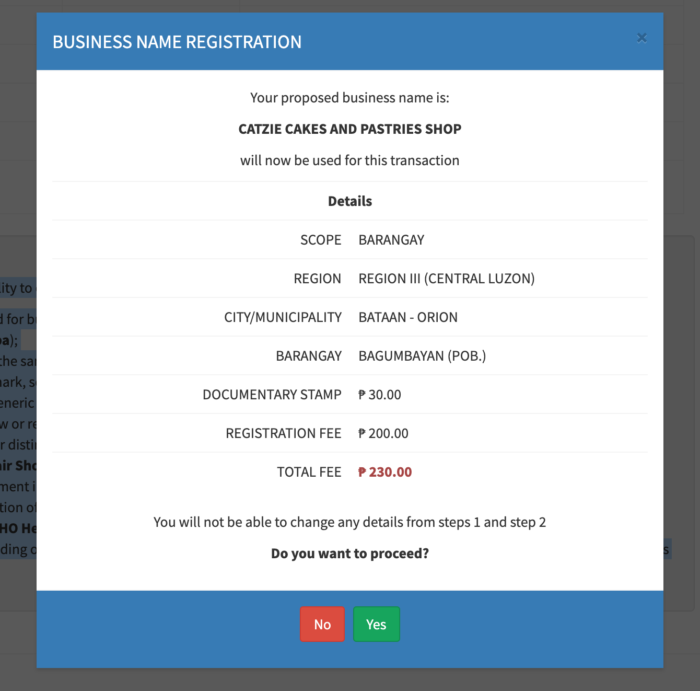
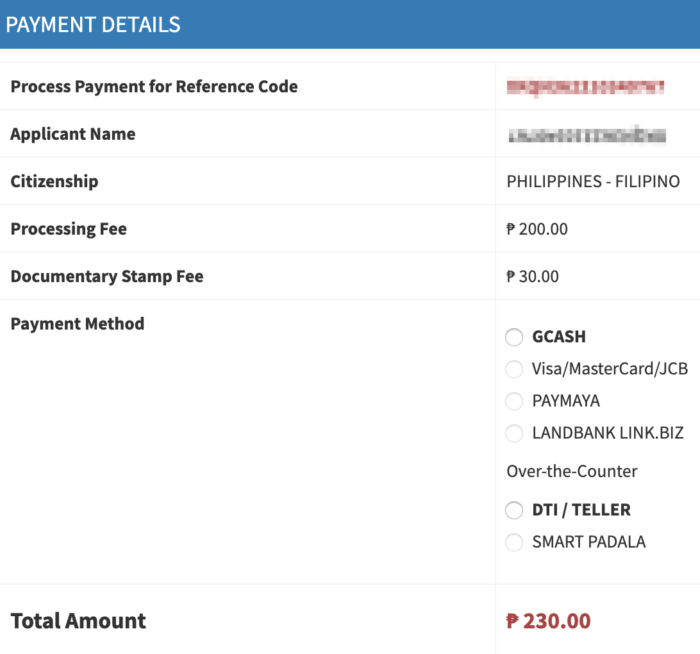
The total fee for business name registration on Barangay level will be 230 PhP. The extra 30 PhP is for the Documentary Stamp. If everything seems to be in order, click the Yes button.
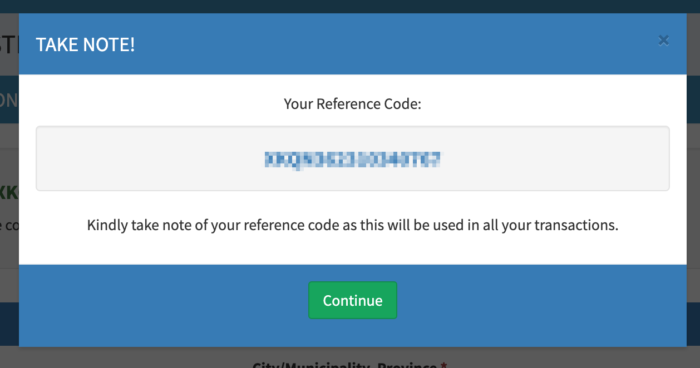
Keep your Reference Code somewhere safe!
Save the reference code and do not lose it! You’ll need this to pay for your business name register with DTI. What I did was copy the code and pasted it in my phone’s notes app. Do not lose your phone either! hehe.
Close this dialog box and then click the Next button at the bottom of the page.
“Undertaking”
Click the Download button at the bottom of the Undertaking page. Print and sign it. I am a newbie in business stuff and I’m not sure what this is for yet, but I’ll print and sign it just in case.
Payment
Business name registration – online payment trouble (RESOLVED)
The payment part made me pull my hair in frustration. I was expecting that I could pay right away via GCash like what everyone else on the Internet says. But look at the screenshot below, there’s no payment option that I could select under Online Payment!
BNRS Payment before the recent upgrade
The DTI Facebook page is responsive to messages, so I told them about this problem. They suggested that I pay for my business name registration over-the-counter because their GCash payment method was not working back then, and there’s no advisory on when it’s going to be back up. I felt really bad about going to a DTI teller to pay because there’s already an online option that exists, but it’s just not working! If you Google how to pay for online DTI business name registration, the web pages will tell you that it’s done through GCash.
I could not wait for the GCash payment method to be fixed because my business name was only reserved for 5 days, according to an email from BNRS. Against my will, I decided that I’ll pay for my business name at the Government Service Express (GSE) at MOA.
BUT!
But on the day before my planned trip to Government Service Express at MOA, I wanted to download the Undertaking document from the BNRS so I checked the website. There was a pop-up announcing that there’s been a recent upgrade of the system. I took a peek at my pending business name registration, thinking what if I could finally select GCash to pay for it online. And it was there! I was finally able to select GCash as my payment method, and it worked. Phew! I cried tears of joy on that day.
Payment options after the system upgrade
DTI BNRS Payment options for your business name registration (GCash, credit card, PayMaya, or Landbank Link.Biz for online payment)
Online payment for business registration with DTI
You may pay for your business name registration with DTI online through the following channels:
GCASH
Visa/MasterCard/JCB
PAYMAYA
LANDBANK LINK.BIZ
Over-the-counter payment for business registration with DTI
You may also pay over the counter through the following:
I chose GCash to pay for my online business registration.
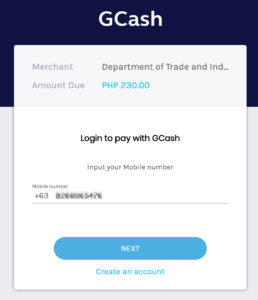
Pay for business name registration with DTI online via GCash
Enter your GCash number.
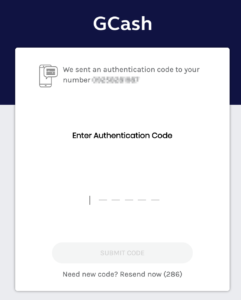
GCash will send you an authentication code. As soon as you receive it, enter it on the website. If you don’t enter it fast enough, the system will time out and you’ll have to start all over again!
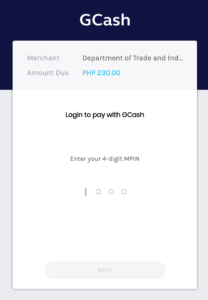
Enter your 4-digit GCash pin then click NEXT.
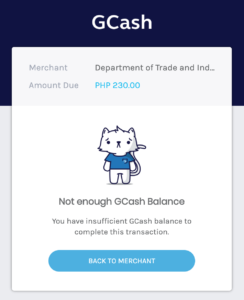
Make sure you have enough balance on your GCash! Or else, you’ll be shown the following screen:
What to download after registering your business name with DTI online
After successful payment, you will be able to download the following documents from the BNRS of DTI:
Official Receipt
Business Name Certificate
Undertaking / [Sole Proprietorship] Application Form (I got the BNR Form No. 01-2018; Also I applied for Sole Proprietorship so that’s how my application form is labeled)
The receipt looks like this:
Official receipt for the registered business name
My undertaking document’s heading looks like this:
Heading of the Undertaking / Sole Proprietorship Application Form
Aaaand my actual business name certificate looks like this:
Sample business name registration certificate from DTI
Your newly registered business name should now appear in the results if you search for it in the BNRS!
Contact DTI
Got a problem or question? It’s best that you contact DTI directly! 🙂
I run a small baked-per-order goods business and many of my customers wanted to pay in GCash so granted them their wish to make payment more convenient. Prior to this, we used to accept bank transfer/deposit only, but when my husband showed me that he could cash-out money from his GCash account by sending it to his bank account, I knew we could make the business work with GCash because I’ll just transfer payments from the business’ GCash account to the business’ bank account. I created a GCash account and began accepting payments through it.
Then I found out that in order to send to banks, I need to get “verified”. And so I went through the full verification process: Uploaded a picture of my government-issued ID, a selfie, and my personal details. The GCash app said that it should only take 30 minutes to get verified.
For 30 minutes I waited, and received no SMS, email, or app notification from GCash. Ok, cool, maybe it’s just a bit delayed! I waited an hour more; still none. I waited one day, two days…. still no feedback on my GCash full verification status!
This is what my Get Verified screen looks like in the GCash app:
GCash app – upgrade in progress in Get Verified screen
You’ll see that it says “Upgrade in progress” in my GCash app’s Get Verified screen. That message just sits there 24/7 and never changes.
I tried to ask for help from GCash Care on Facebook Messenger, and all it does is make a chat bot get my hopes up that they will help me, but I never seem to be chatting with an actual customer service person.
We tried calling the GCash hotline 2882 but we couldn’t get any customer service staff to answer even when we waited for over 30 minutes.
The last thing I tried was write an email to [email protected] but same as GCash Care on Facebook Messenger, all the responses that I received were automatic responses.
GCash caused my stress level to soar up so bad, worrying that they might deduct money from my account due to inactivity and all our business’ earnings will be taken by GCash. Why do I worry about this? Because that periodic deduction is why I didn’t push through with using GCash before. I want to be able keep an account inactive for a long time without getting charged. I think the big problem is they don’t send out warning before charging! They send a notification AFTER CHARGING.
I wrote a rant post about this on my Facebook just to let off some steam, and a former colleague suggested that I just try to cash-out my money at Villarica Pawnshop. I will probably try that soon and hope it works, because I don’t wanna lose our money. It’s just extremely disappointing. I decided that we let our business’ customers pay via GCash because I thought I will be able to transfer money directly from GCash to the business’ bank account, but it’s not happening because no one at GCash can help me out with the full verification of my account.