Tag: mobile

  • How to change app name in Android Studio

    How to change app name in Android Studio

    I’m trying to learn how to build a simple app in Android just to satisfy my curiosity. This will also be a very handy skill because I use Android phones often, and there are times that the apps I download from Google Play Store lack features that I need.

    This will be a very simple guide on how to change app name in Android Studio, something that most beginners in Android development probably want to know.

    It is assumed in this guide that you have prior knowledge in coding.

    The app name that I’m referring to is the one that says “My Application”, as marked on the image below:
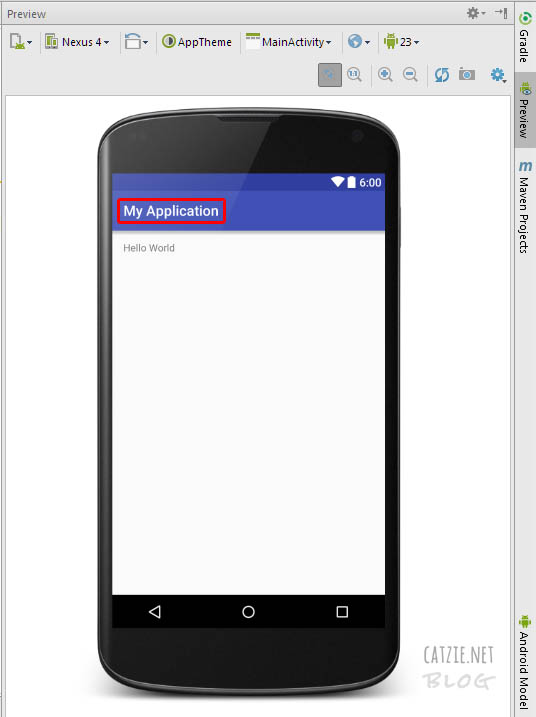
    How to change app name in Android Studio

    To change that, go to your Project and find the app folder. Under app, find AndroidManifest.xml and edit android:label="My Application", replacing “My Application” with the name you’d like to use.

    Refer to the image below:
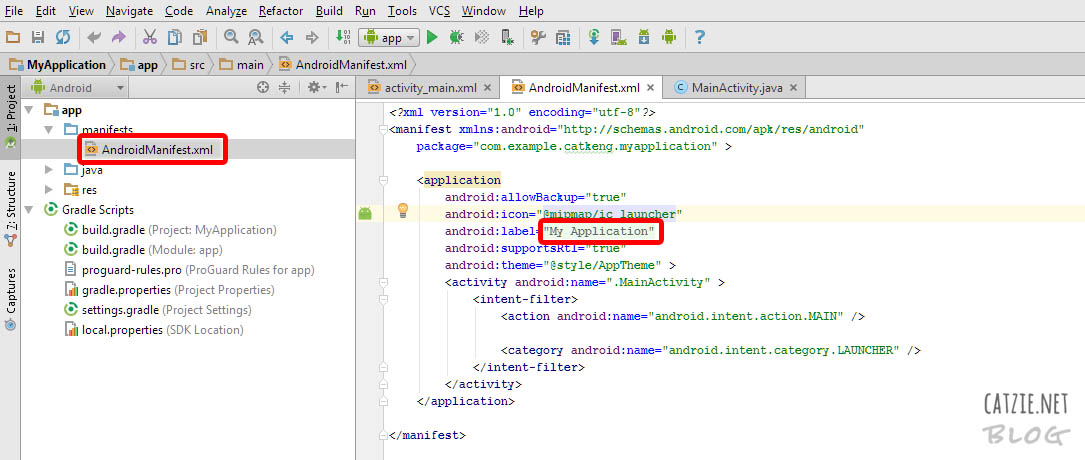
    android-studio-android-manifest

    Your changed app name should be reflected in the live preview now, if you have it activated. If you don’t have live preview yet, check this out: Where is Android Studio layout preview?

    Updates…

    How to rename project folders of Android Studio

    You may also want to change the name of your Android app’s folder. Check this folder, it’s probably where your Android project folder is located — C:\Users\catkeng\AndroidStudioProjects\

    How to rename package in Android Studio

    Right-click on your package name in the Project tree. It’s probably under app->java. Then choose “Refactor”, then choose “Rename”. Take note that you’ll see “Rename package” and “Rename folders” button here — you might need to go back to this screen later to click “Rename folders”. For now, click the “Rename package” button. Type the new name that you want to use, then click “Refactor”. If that hasn’t changed all package name instances for you, follow the same steps until you can click “Rename folders” button too. That should do it!

  • Mobile Prefixes in the Philippines (Sun, Smart, Talk ‘N Text, Globe, TM)

    Mobile Prefixes in the Philippines (Sun, Smart, Talk ‘N Text, Globe, TM)

    When someone texts us and we need to reply, or when we need to call someone, but we’re not sure if they are using the same mobile network provider, we hesitate to do so. Possibly because of charges or higher charges.

    Use the tool below to lookup the mobile network provider of a mobile prefix. You can type “0922” or “Sun” to search for data.

    I made the tool using HTML and JavaScript. Pretty simple.

    mobile prefixes philippines
    Reset

    Mobile Network Provider Mobile Prefixes in the Philippines
    Loading…

    I’ll try to update the “mobile prefixes in the Philippines” list when I can. 🙂

  • Playing Inotia 3 – Children of Carnia

    UPDATE: I just published an Inotia 3 page where all my posts related to the game are listed.

    Video games keep me sane during busy days. Those all-work-no-fun days drive me crazy! But since video games also consume my energy, I try to limit my play time too.

    Inotia 3 – Children of Carnia is a game I’ve recently been playing during my break times on Android. Gotta love Android for so many great apps that are availed to us for free! The game is also available on Apple products, but I’m not sure if they cost anything or not.

    I recommend this game if you love RPG games like I do. Music, graphics, and game system are good. The story is something I’m still not sure about. I grew up playing RPG games (Loving the series of Suikoden and Final Fantasy), and this game makes me feel soooo excited.


    This game is a story-driven RPG game where you can choose among six classes: (more…)