Category: Dev Diary

  • Remove room database on app uninstall // Android Dev Diary

    The problem:

    Installing on an Android device that has an old version of an app I’m developing triggers an error:

    Room Database Migration: java.lang.IllegalStateException: Migration didn't properly handle

    Problem persists despite uninstalling the Android app and deleting all app data.

    The solution:

    Very simple. I set allowBackup to false in my AndroidManifest.xml file like so:

    android:allowBackup="false"

    Then I reinstalled the app on the Android device. Error was still triggered on first install, but after one more round of uninstall and reinstall, the error finally went away!

    Side Note / Quick Life Update:

    I have been working on an app, with me as its first user. I tentatively call it “bodymonitor”. It should let me log foods I ate, meds/supplements I took, and body sensations. My brain does not do a good job of monitoring these things so I shall get an app to help me do it. There are existing apps out there that do more or less the same thing, but I want one that caters to my specific needs. Doesn’t hurt to practice Android app development as I make the app, too!

    This weekend I’ll undergo endoscopy again, but this time it’s called a “flexible nasopharyngolaryngoscopy” which will pass through the nose instead of the mouth, to be done under local anesthesia. From the sound of it I don’t expect to be put to sleep, which makes me less anxious, but still anxious. XD It’s gonna be done because of my throat issues.
  • Get Navigation Component destinations in back stack // Android Kotlin Dev Diary

    It’s simple to get the list of destinations that’s currently in your back stack. The only thing you need is a reference to the Navigation Component’s NavController.

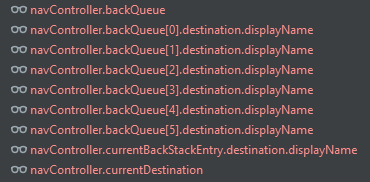
    The NavController object has a backQueue property that you can inspect.

    backQueue is an array, and each item’s destination property is what you’re probably looking for!

    To show my current Navigation’s back stack, I use Android Studio’s Debugger, and create watches such as the following:

    Screenshot taking when no frames were available, and thus the texts are red…

    I haven’t literally tried, but logging them programmatically like so should work too:

    for(item in navController.backQueue){
        Log.d("MyNavigationBackStack", "item.destination.displayName: ${item.destination.displayName}")
    }
    Log.d("MyNavigationBackStack", "navController.backQueue: ${navController.backQueue}")
    Log.d("MyNavigationBackStack", "navController.currentBackStackEntry.destination.displayName: ${navController.currentBackStackEntry.destination.displayName}")
    Log.d("MyNavigationBackStack", "navController.currentDestination: ${navController.currentDestination}")

    Lemme know if these work, or if you have relevant tips that haven’t been mentioned!

  • A working shared ViewModel between parent and child Fragments //Android Kotlin Dev Diary

    I initially had a problem with the shared ViewModel because the child fragments were creating a new instance from the one held by the parent fragment.

    The ViewModel instantiations below work for me:

    CreateLogFragment.kt (parent)

    CreateLogFoodFragment.kt (child)

    CreateLogNotesFragment.kt (another child)

    by activityViewModels turned things around!

  • Two NavHosts with their own NavControllers and NavGraphs (Navigation Component) //Android Kotlin Dev Diary

    I am trying to make a single-activity app because I’d like to easily share data across screen using, ideally one, or as few as possible ViewModels.

    NavGraph 1

    Host: Layout file of MainActivity

    Destination(s): CreateLogFragment

    NavGraph 2

    Host: Layout file of CreateLogFragment

    Destination(s): CreateLogFoodFragment, CreateLogNotesFragment

    (CreateLogFragment has a BottomNavigationBar that switches between CreateLogFoodFragment and CreateLogNotesFragment)

    The problem was that NavGraph 2 was not getting the correct NavHost and NavController in the CreateLogFragment class.

    And the solution is to retrieve the NavHost in CreateLogFragment like so:

    override fun onViewCreated(view: View, savedInstanceState: Bundle?) {
    super.onViewCreated(view, savedInstanceState)

        val navHostFragment = childFragmentManager.findFragmentById(R.id.nav_host_create_log) as NavHostFragment
        val navController = navHostFragment.navController
    
        // Setup Bottom Nav
        val bottomNav: BottomNavigationView = binding.bottomNav
        bottomNav.setupWithNavController(navController)
    }

    I’d like to write a full tutorial on how to do this but I’m not sure if I could spare some time. If you’ve been reading my recent posts you’ll notice that I’m not able to put it so much effort in explaining everything. These days I’m always in a hurry to finish stuff. But I’ll still try!!

  • val vs. const //Kotlin Android Dev Diary

    Let’s start off by introducing val.

    To define a variable in Kotlin, you may use var or val:

    varval
    has a mutable value (changeable)has an immutable value (read-only)

    So we use val for immutable values, so what is the const keyword and what’s its difference from val?

    constval
    has an immutable value (read-only)has an immutable value (read-only)
    initialized at compile time onlyvalue may be assigned during runtime

    Other rules for const in Kotlin:

    • must be a top-level property or placed within a companion object
    • value must be a primitive type (can never have function or any class constructor as its value)
    • no custom getter
  • Dao Error: Not sure how to handle query method’s return type //Android Kotlin Dev Diary

    As I brush up on my Room database knowlege I came upon the following error while building my app:

    WordDao.java:21: error: Not sure how to handle query method's return type (java.lang.Object). DELETE query methods must either return void or int (the number of deleted rows).

    The solution:

    Set Kotlin version to 1.6.10 then Room to 2.4.2 (Or use more recent compatible versions) in my top-level build.gradle file.

    Reference: Android Room Kotlin throws Delete Query error

  • Error: Type mismatch. Required: ActivityMainBinding. Found: ViewDataBinding! //Android Kotlin Dev Diary

    The problem is that this line of code is producing an error:

            binding = DataBindingUtil.setContentView(this, R.layout.activity_main)
    

    And the error says:

    Type mismatch.
    Required:
    ActivityMainBinding
    Found:
    ViewDataBinding!

    The solution is to add a <layout> tag in the layout file that you are inflating!