It seems that simply using android:layout_height="wrap_content" on your RecyclerView won’t make its height automatically expand when new items are added in it.
Tag: RecyclerView
-
Make a RecyclerView expand its height when new item is added //Android Dev Diary
-
Android Kotlin: ‘getter for position int’ is deprecated. deprecated in java
Today I encountered a deprecation warning as I’m coding the app:'getter for position int' is deprecated. deprecated in javaAnd I was like, whoa, this wasn’t deprecated a couple of months back when I last touched Android code… this is how long I’ve missed out! 😂😂😂 I haven’t touched any app code for a while, until this week. I am easing back into Android app development, and this time it’s for my personal use but hoping to share on Google Play Store for free… just in case it may help others.
The following RecyclerView Adapter code needs polishing 😂, but for the sake of showing you the deprecation warning, here’s a screenshot:
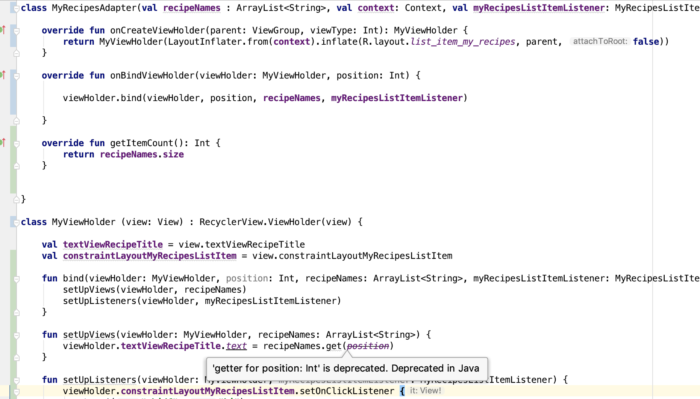
The deprecation warning is inside the ViewHolder class inside my RecyclerView Adapter file. By the way, I code in Kotlin now for Android apps.
I worked with a developer before who liked suppressing deprecation errors like this, but I advised him that it’s better to address the issue than suppress it because it will haunt him in the future! 🤣 I still believe in that up to now, so I searched for a solution.
This is the problematic line, and ‘position’ is the problematic variable:
1viewHolder.textViewRecipeTitle.text = recipeNames.get(position)The solution? Simply replace
positionwithadapterPosition.And why is it deprecated? I found a note in RecyclerView.java:
* @deprecated This method is deprecated because its meaning is ambiguous due to the async
* handling of adapter updates. You should use {@link #getLayoutPosition()} or
* {@link #getAdapterPosition()} depending on your use case.That’s all I have to say about the ‘getter for position int’ is deprecated. deprecated in java warning. Happy coding, you all.
-
Android RecyclerView notifyItemChanged() IllegalStateException “Cannot call this method while RecyclerView is computing a layout or scrolling”
If your Android app is crashing with error IllegalStateException “Cannot call this method while RecyclerView is computing a layout or scrolling”, you may try placing yournotifyitemchangedinside aRunnable.Assuming you have a call to
notifyItemChanged()inside onBindViewHolder() that is making your app crash with IllegalStateException, you may try something like this:123456789myRecyclerView.post(new Runnable() {@Overridepublic void run() {myArrayList.remove(position);myArrayList.add(something);recyclerViewMainScreenHeader.getAdapter().<code>notifyItemChanged</code>();}});