UPDATE: If you get the error Linker Error: Unable to open include file ‘C0S.OBJ’ while running your c program (or c++), please try copying the C0S.OBJ from the OBJ folder into the main folder of the compiler. The downloadable c/c++ compiler archive has been updated with this fix.
Note: The procedures on this post were tested on a computer running Windows XP and another which is running Windows 7 (both 32-bit and 64-bit). PLEASE make sure you follow the instructions carefully and copy the sample C program codes correctly before saying that what you downloaded doesn’t work. Thanks, and good luck. 🙂
Note for users of Windows 7 64-bit: You need to use DOSBox to emulate a 32-bit system because this compiler is not compatible with 64-bit. Install DOSBox, and mount your C: drive, or whichever drive you installed Turbo C in.
The download page for Turbo C++ 3.0 was one of the most popular pages in poochycat.com, my previous domain which had already expired.
(The rest of this post must be viewed to find the download links and installation instructions for turbo c++ 3.0 windows 7 free download)
The Download Link:
 Turbo C++ Compiler version 3.0 (Download from MediaFire) (unknown, 855 hits)
That’s the C program compiler I used to use during my early college terms.
Installation Instructions
Last Updated: November 2011
- Download the archive from the link(s) provided somewhere at the top of this post.
- Unzip it and place the contents of the archive into a folder inside your Drive C. (e.g., C:tcpp3)
- Please observe:
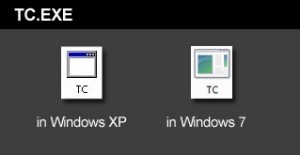
The above is the TC.EXE file that you MUST run.
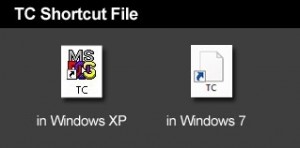
The above is the TC Shortcut file, don’t use it.The compiler is the file named TC.EXE. Don’t confuse it with the TC shortcut! Simply double click on that and the compiler will run.
- Just before you type your C program code, please make sure you have the correct path for the INCLUDE Directory and LIBRARY Directory. You can check by clicking on Options -> Directories…
- The path for the INCLUDE Directory must be C:YourFolderINCLUDE. For example, C:tcpp3INCLUDE. The file you downloaded uses tcpp3 as folder name, which is why I’m using the same folder name in my example. Please make sure you specify the correct path to the INCLUDE folder, this is crucial, or else it you would get errors. The INCLUDE folder should directly under tcpp3 folder, and tcpp3 folder is directly under your drive C folder.
- And the path for the LIBRARY Directory must be C:YourFolderLIB, for example C:tcpp3LIB. Again, check if you have the correct path to the LIB folder.
- Remember to change the YourFolder into the name of the folder you are using for your Turbo C++.
- You can now test a C program code. First, select File from the menu and choose new. Copy the sample codes at the end of this blog entry.
- After copying the codes, select Run from the menu, and choose Run. There should be an output of Hello World on the screen. The codes worked for me, please copy them carefully.
Hello World sample code for testing in C language
#include <stdio.h>

#include <conio.h>

int main(){

clrscr();

printf("Hello world!");

getch();

return 0;

}
Hello World sample code for testing in C++ language
#include

main(){

cout << "Hello World!";

return 0;

}

thanks for being free
thank u
yaar time bahut lagta hain …
anyways thanks a lot …………
yaaron yeh to ek bahut kaam ka blog hain…….
tumhara baap
Help me to make a turbo c program.Tnx!
hi hellow
wer is the “archive from the link(s) provided somewhere at the top of this post”,,,i cant find it utall.pls anyone help me,i need it urgent
not working
Hi, are you using Windows XP or not?
what if Im using vista? I cant run the program. unable to open stdio.h and conio.h
can u give me a trouble shooter 4 that. pls help!
Regarding the “unable to open…” error, have you checked if the directory paths specified under OPTIONS -> DIRECTORIES are exactly the same paths where your compiler’s INCLUDE and LIB folder reside?
I often encountered such error in the past, later finding out that the directory paths do not match.
when i press ctrlf9 it shows “unable to open cos.obj” what cud be the prob…
You may want to check this page. I hope it helps.
i want a software
How if i press ctrlf9 it shows “unable to open cos.obj” can you help me? PLEASE!!!
YES!!! I know now the solution to “unable to open cos.obj” Just simply click “FILE”, then click Change Directories, click “OBJ” and click it again twice to be sure and OK. I hope it may help.Thanks Poochycat!!! lol.
Hey, that was nice. Good luck. 🙂
Thanks catzie ….you are really sexy and helpful. Appreciate your help.
it is really nice
i
have downloaded the c lang version 3.0
but every time i execute a program i m getting a message like
unable to open stdio.h and conio.h
can u give me a trouble shooter 4 that
I think you haven’t set the directories correctly if that’s the error that shows up. 🙂
Which code you r talking about here????
thanks a lot
tnx
thank you very much you’ve been a very big help thank you
i cant find tc.exe…..wot should i do…and it opens in winzip….
i cant find tc.exe…wot should i do…and it opens in winzip…
You should first extract the folder using winzip, and then look for tc.exe in the extracted folder 😀
it says publisher unknown
it shows error dat it is unable to open include files….even though i have made changes in directories
hi..im a 1st yr student in IT..ive downloaded your c++..but the include file cant run a program..what shoul i do,so my program accepts the include file??
Can you give the error message it shows?
I cant see the install.exe?
i cant install it. how is that?
but i already downloaded and unzip it?
what will i do now?
Please run the TC.exe file, as stated in the instructions. 🙂
when i run the program it says “unable to open include file ‘IOSTREAM.H’ ” how can i fix that? help plssss! tnx in advance..
I assume you already read every line in the instructions. Don’t the 5th and 6th instructions help? From my experience, that kind of error appears when I don’t set the include directories correctly.
i cant edit files. cause i can only open the tc.exe file. how is that?
OK!! i Got it all!! tnx for the time and help! i figured it out now!
ahah!
tnx! im a 1st year comp sci student! tnx ate! ahaha!
Good luck. 🙂
Good day Catz. Got a run around finding your new site just to get another copy of the compiler. lols. I was wondering, do you or does anybody here know how to do a dynamic read on a file? I have been successful at reading the file sequentially but I was looking at how to read dynamically (for people who might get confused, it is like reading a specific section of the file) If anyone might have an idea, feel free to send me an e-mail if you have time. ([email protected]) Thanks
kollam ,allathe enth parayaan
wew … thanks a lot!!!
The Best place to get C++ !! I love it.
Come here to get Turbo C++ IDE 3.0. A best compiler to start for students.
thnks buddy…
tomorrow is my exam and i have no c++ program
i try ur link and its work…
thank you so much guy!!!!!!!!!!!!!!!!!
Trying to compile from the dos prompt from my personal directory other than the turbo c directory. I’m getting the imfamous “Unable to open file ‘c0s.obj’ – this is the same error most people are getting for not setting up the directories properly. From the Turbo C editor, compiling works great. From the dos prompt, I’m close, but not quite their yet? Any suggestions anyone?
Correction, I can now compile from a dos prompt – just can’t MAKE now. Still looking for help on this. Remember, my source is in my own personal directory, so my path at the dos prompt is the same.
thx bhaiya, for graphics i need tc, but it showed me cos.obj unopenable…
hi.
The Download Link:
Turbo C++ Compiler version 3.0 (On MediaFire) (2820)
Is this install turbo c++?
i need it. i am mongolian. pleasa help me
Yes, that’s the installer of Turbo C++ 🙂
thanks very much
i need program’s example.
please give me.
You’re welcome. I have two examples at the end of the article, one for C and the other for C++
🙂
hi
i see the example.
i need different example.
please
Sorry that’s all I could provide for now. You might want to check cprogramming.com for good examples of C and C++
🙂 good luck
hey tell me one thing actually. i m running t.c on 64-bit o.s.
using dos box o.k .it is working properly until and unless i don`t compile my program but when i m compiling my program it is prompting an error like unable to include stdio.h something like that i know this is because i m setting wrong directory but my question is wt will be the directory in that case while running t,c with the help of dos box.this fucking sit humiliating me please help me out
hi
i cant see cprogramming.com .
is this http://www.cprogramming.com ?
Both links work for me. 😮
Not working for me too…
says “Found illegal operations”…
plz help…
When does that error message appear?
I tried running codes on the same compiler just a while ago, but I didn’t encounter any error.
thank you very much……..
its really very helpful…..
need help..when i double click the TC it says “the system file is not suitable for running MS-DOS and microsoft windos application..”what should i do??
I suggest that you search Google for that error message. There are many results that might help you.
I’m suggesting this because I myself do not know the solution. 🙂
thank you 🙂
Best
thanks for sharing….it runs on C.. why not the example on C++ does’nt? what is the problem?i copied the example exactly..thanks
I can only think of one solution. If you haven’t, please try saving your code as a .cpp file instead of .c
it doesn’t work in my windows 7 home premium-64 bit 🙁
i can’t open the tc.exe file maybe because of compatibiliy issues
Thank Boss its working fine ! : )
mine not working on windows 7 64 bit
it said:
is not compatible with the version of Windows you’re running. Check your computer’s system information to see whether you need a x86 (32-bit) or x64 (64-bit) version of the program, and then co
ntact the software publisher.
ate ang ganda mo naman ehehhee..cute pa heheh wag serious^_~V
i try to run the tc file but all it gives is “divide overflow”
i am new to all dis and need help urgently!
plz help!
mam it will run for vista
RUNNING WINDOW7 HOME PREMIUM. ON DOUBLE CLICKING TC FILE, GET THE INCOMPATIBLE MESSAGE.ANY OTHER METHOD OF RUNNING IT?
when irun the program it is not showing output screen,plse help
When i click TC.exe it shows that “C:tcpp3TC.PIF
C:PROGRA~1SymantecS32EVNT!.DLL.An installable Virtual Device Driver failed DLL initialization.”
what s it…how can i clear it
i installed it but unable to execute it its does not work shows a lot of errors that cant work with stdio and conio and other stuff please i even checked the path directory but it wont work ?(i use windows home premium)
there is another way of writin the program in c++
#include
#include
void main()
{
cout<<"hello world"
}
(this does not work in windows 7
it is not working after i double clicked tc.exe
ya same here did not work
is itn’t fuckn?
me, too. can you send me a working link. or somthing i really need it. for my school work. the thing with the coordinates like
gotxy(3, 2);
cprintf(“xxx”);
hai how r u
wen i install turbo and run the program is shows an erroe named”TV.lib” file is unable to open
Still not working,, it only pop up and quickly gone…
same here
I run the program TC.exe but it just showed me an empty black screen until I close it.
Try this in C++
main()
{
clrscr();
cout<<"Your Name :"
}
same here…. its not workin……
it doesn’t work at all..i can’t run the program to change the path directory.tss!
hey i m not able to install it plz help.after clicking tc.exe wat 2 do
After clicking tc.exe a window ll appear …press “Run”..dats t…
graphics out put is not worked in tc4 &tc3 some programm does not run plz reply me at :[email protected]
try
#include
#include
main()
{
clrscr();
cout<<"hello world";
This version has Fucked up
easy to learn
#include
#include
void main()
{
printf(“sravan”);
}
working fine 4 me.. thnx
very good working both c & c++ in my win7
aslamoalyqum asif bhai… i want some help to u for this S/W…
how to install this S/W 4 proper working… plz send me instalation detail on mail id [email protected]
8899403703
allah hafiz
thankssssssssssssssssssssssssssssssssssssssss a lot………………
very good site
it not installing properly
Hi! I dont know how can i installed Turbo c. Please help me.
this hopefully worked for me…!!!
thanx a lot *person*..!
yes! finally it works.
ossom its really very interesting
gumagana naman ehhhh
it has installed but is not accepting the header files even after setting the correct path in the directory option….
please help me fast..
yup, magrurun xa kapag marunong ka
Allow me to quote what SANJHOE said in English:
I have to agree with this guy. You should be able to do it correctly if you read all the notes and instructions thoroughly.
I’m getting a c0s.obj problem, the one predicted above. Tried to solve it acc. to the instructions, but no luck. Any helpful advice?
when i run the sample program it show me error of”unable to open include files and prototype error”
pls help me to solve the errors
It shows message that ‘pif’ file TC cant be run…It shows only black background just with courser blinking on it and nothing else…plz guide me…
plz help me to compile and run my c++ program .its gives errors of
“unable to open include stdio.h”
“unable to open include conio.h”
“unable to open include iosteam.h” and many other header files even i given the path in include and source directory but not in output and source directory if it is compulsory to give path both in it plz tell me what it is??..
hoe can i show the output of my programs.
i can’t compile i don’t have any errors within my codes..
working good on me….
it has installed but is not accepting the header files even after setting the correct path in the directory option….
please help me fast. I have windows vista 32 bit and intel centrino processor.
#include
#include
clrscr() {
printf(“Hello World”);
getch();
}
#include
void main()
{
printf(“hello world”);
}
the simplest way that i know
Thank You vey Much!!!!!!
Working Very Nicely……:)
not downloading yr……….plz do somthin………….
same here
thanks a lot dude . thanks u
It says, “Unable to open include file ‘STDIO.H’ and ‘CONIO.H’ everytime I code! :'((((
My directories are correct, But it doesn’t read STDIO AND CONIO!! :'( PLEASE HELP. IM CRYING HERE :'(
it is not working . when i clicked on the tc.exe a black screen and then it stops pls give accurate instructions
very nice!!!
After installing an error is coming ” unable to open include file and even when these files are present in the pc. i seek help, pls help
each and every time an error arises that ” unable to open include iostream.h and conio.h “file inspite of their presence in the folder. pls help
Wow its wonderful
it will not work with stdio coz it is a c++,….not c
um. hello. borland turbo c++ has a stdio.h. duh!
it’s not working in my pc …..
hi……………………………………………………………………………………………..
hey thanksssssssssss its working properly thankuuuu very much for helping me out.
how it works? pls help..
Hey man thank you so much for letting me to download this
how to download dis?
dude its not working
when i go to run a program then errors are occured…as like as stdio.h file could not found,conio.h file could not found…
Its working.
Thanks
Dude its nt wrkng
hey, thanks for the detailed instructions. But it doesn’t install successfully.shows a number of errors on trying to run the TC.exe file,with the options like ignore,cancel. The dialog box is headed with 16-bit dos error.Please help
just click the ignore
hi friend how i download a program turbo C++ TC plz send some instructions.
its noooooooooooooooot working need help
After extracting the file, while copying it to c drive, plz change the folder name from tcp3 to TC in c drive, once done you wont get any error like unable to open stdio.h, conio.h, etc……….
Change folder name from tcpp3 to TC
It doesn’t work. This message appeared. “this screen does not support fullscreen mode. Choose close to terminate the application.” What should I do. Pls help.. My whole classmate will benefit here.Pls help!
I never encountered this problem so I’m not sure what to do. Maybe try running the compiler in compatibility mode? Or trying running it in a different screen resolution (try Alt + enter)?
GOOD WORK & THANX
thanks a ton!!! couldn’t have done it without you!!!!
catzie this is the error appeared when i try to run the program,
1. unable to open include file “stdio.h”
2. unable to open include file “conio.h”
4. function “clrscr” should have a prototype
5. function “printf” should have a prototype
6. function “getch” should have a prototype
pls help..thank you
just simply change your folder name tcpp3 to TC then you wont get error
these appeared when i try to run your example program
#include
#include
int main(){
clrscr();
printf(“Hello world!”);
getch();
return 0;
}
main file: NONAME00.CCP
compiling: EDITOR ->NONAME00.CCP
LINES COMPILED: 6
WARNINGS:0
ERRORS: 5
AVAILABLE MEMORY: 1901K
what thus it mean? pls help
Catzie
Hi i already used the turbo C++ thanks just one more question pls. what should i do if the error is function ‘clrscr’ should have a prototype? and function ‘getch’ should have a prototype?
pls help disregard my two previous question i already used the c++
header file use kr joy error out ho jayegi
u just type clrscr();
and getch();
bkit ayaw maopen ng tc?
pahelp!
linker error :unable to open file ‘GRAPHICS.LIB’
what i do?plz help me
its not working
Can someone please help me solve twp C++ errors in my program?
Here it is:
#include
#include
#include
#include
#include
#include
struct customer
{
char name[20];
char address[40];
int phno;
};
class dominos
{
customer r;
public:
void getdata();
void print();
unsigned long int getno()
{
return(r.phno);}
void modify();
}s;
void dominos::modify()
{
cout<<"Enter new details:";
char na[20],add[40];
long int pno;
cout <<"tNew name : (enter '.' to retain old one) t";
gets (na);
cout << "tNew address : (enter '.'to retain old one) t";
gets(add);
cout <> pno;
if(strcmp(na,”.”) !=0)
strcpy(r.name,na);
if(strcmp(add,”.”)!=0)
strcpy(r.address,add);
if(pno !=0)
r.phno=pno;
}
void start();
void mainmenu();
void getdata();
void add();
void search();
void menu();
void system();
void order();
void display();
void print();
void delet(long);
void modif(long);
void count();
void mainmenu()
{
clrscr();
int ch;
do
{
cout << "1. To add a new customer." << endl;
cout << "2. To search a customer." << endl;
cout << "3. To display the records." << endl;
cout << "4. To take order." << endl;
cout << "5. To count the records." << endl;
cout << "6. To exit" << endl;
cout << "Enter your choice(1/2/3/4/5/6):" <> ch;
switch(ch)
{
case 1: add();
break;
case 2: search(); break;
case 3: display(); break;
case 4: menu();
char ch;
cout<> ch;
if ((ch==’y’) || (ch==’Y’))
order();
else
cout << "Thank you for visiting.";
break;
case 5: count(); break;
case 6: exit(0); break;
}
while(ch!=6);
cout << "Record not found.";
getch();
}
void dominos :: getdata()
{
gotoxy(20,7);
cout << "Enter name of customer:";
gets(r.name);
gotoxy(20,9);
cout << "Enter address of customer:";
gets(r.address);
gotoxy(20,11);
gotoxy(20,13);
cout <> r.phno;
}
void add()
{
char ch; static int c=0;
ofstream fo(“customer.dat”, ios::app);
do
{
clrscr();
s.getdata();
fo. write ((char*) &s, sizeof(s)); c++;
cout << c << "Customer details added." << "n";
cout <> ch;
}
while (( ch==’y’) || (ch ==’Y’));
fo.close();
count();
getch();
clrscr();
}
void menu()
{
clrscr();
cout << "Menu" << "n" << "n" << "n" <<"n";
cout << "Pizza name:- cost(rs.)"<<"n"<<"n";
cout << "1 Veggie Crunch(veg) 350" << "n";
cout << "2 Veggie Lovers(veg) 425" << "n";
cout << "3 Country Feast(veg) 450" << "n";
cout << "4 Veggie Supreme(veg) 470" << "n";
cout << "5 Exotica(veg) 470" << "n";
cout << "6 Fiery Chicken(non veg) 350" << "n";
cout << "7 Peproni(non veg) 485" << "/n";
cout << "8 Chicken Supreme(non veg) 485" << "/n" << "/n";
}
void order()
{
int count=0, vat=0, totbill=0, choice;
char more,confirm;
x:
cout <<"Which pizza would you like to order?" <> choice;
switch(choice)
{
case 1: count=count+350; break;
case 2: count=count+425; break;
case 3: count=count+450; break;
case 4: count=count+470; break;
case 5: count=count+470; break;
case 6: count=count+350; break;
case 7: count=count+485; break;
case 8: count=count+485; break;
}
cout << "Do you want to order more(y/n)?" <> more;
if (more==’y’)
goto x;
vat=0.125*count;
totbill=count+vat;
cout << "Total bill amount=Rs." << totbill << "n";
cout <> confirm;
if ((confirm==’y’) || (confirm==’Y’))
{
cout <<"Your total amount is Rs." << count << "n" << "n";
cout << "Value added tax(vat) Rs." << vat << "n" <<"n";
cout << "Your total bill amount with taxes is Rs." << totbill << "n"<< "n";
cout << "Your order shall be delivered to you in about 30 minutes." << "n" <<"n";
cout << "Thank you for calling domino’s. . . . . .good times start with great pizzas." << "n" <<"n";
getch();
}
if ((confirm=='n')||(confirm=='N'))
menu();
}
void system()
{
start();
mainmenu();
}
void display()
{
clrscr();int c=0;
ifstream fi("customer.dat",ios::in);
fi.seekg(0,ios::beg);
while(!fi.eof())
{
fi.read ((char*) &s, sizeof(s));
cout << c << ":";
s.print();
c++;
cout<< "n" << "n";
}
fi.close();
getch();
}
void dominos::print()
{
cout<<"Customer name :-"<<r.name<<"n"<<"Address:-"<<r.address<<"n"<<"Phone number:-"<<r.phno<<"n";
}
void main()
{
clrscr();
system();
}
void delet(long pos)
{
ifstream fio("customer.dat",ios::in);
ofstream fot("temp.dat",ios::out);
long po;
fio.seekg(0);
while(!fio.eof())
{
fio.read((char*)&s,sizeof (s));
po=fio.tellg();
if(po == pos)
continue;
else
fot.write((char*)&s,sizeof (s));
}
fio.close();
fot.close();
remove("customer.dat");
rename("temp.dat","customer.dat"); fflush(0);
}
void modif(long pos)
{
cout << pos << endl;
fstream fio("customer.dat",ios::out || ios::app); fflush(0);
fio.seekp(0,ios::beg);
s.modify();
fio.seekp(pos,ios::beg);
fio.write((char*)&s,sizeof (s));
getch();
}
void start()
{ gotoxy(10,2);
cout <<" xxx " ;
gotoxy(10,3);
cout << " xxxx " ;
gotoxy(10,4);
cout <<" xxxxxxxx " ;
gotoxy(10,5);
cout <<" xxxxxxxxxxxx " ;
gotoxy(10,6);
cout <<" xxxxxxxxxxxxxxxx " ;
gotoxy(10,7);
cout <<" xxxxxxxxxxxxxxxxxxxx " ;
gotoxy(10,8);
cout <<" xxxxxxxxxxxxxxxxxxxxxxxx " ;
gotoxy(10,9);
cout <<" xxxxxxxxxxxxxxxxxxxxxxxxxxxx ";
gotoxy(10,10);
cout <<" xxxxxxxxxxxxxxxxxxxxxxxxxxxxxxxx ";
gotoxy(10,11);
cout <<" xxxxxxxxxxxxxxxxxxxxxxxx ";
gotoxy(10,12);
cout <<" xx xxxxxxxxxxxxxxxxxxxxxx xx ";
gotoxy(10,13);
cout <<" xx xx ";
gotoxy(10,14);
cout <<" xxxxx xx xxxx xxxx xxx ";
gotoxy(10,15);
cout <<" xx x xx x x xx xx ";
gotoxy(10,16);
cout <<" xx x xx x x xxxxxxx ";
gotoxy(10,17);
cout <<" xx xx x x xx xx ";
gotoxy(10,18);
cout <<" xx xx xxxx xxxxxx xx ";
gotoxy(10,19);
cout <<" xx xx xx xx xxxxxx ";
gotoxy(10,20);
cout <<" xx xx xx xx xxxxxx ";
gotoxy(10,21);
cout <<" xxxxxxx xx xx xx ";
gotoxy(10,22);
cout <<" xx xx xx xx xx ";
gotoxy(10,23);
cout <<" xx xx xxxxxxxx xx ";
gotoxy(10,24);
cout <<" xx ";
gotoxy(10,25);
cout <<" xx xx ";
gotoxy(10,26);
cout <<" xx xx ";
gotoxy(10,28);
cout <<" xxxxxxxxxxxxxxxxxxxxxxxxxxxxxxxxx" ;
gotoxy(10,29);
cout <<" xxxxxxxxxxxxxxxxxxxxxxxxxxxxxxxxx" ;
gotoxy(10,30);
cout <<"n"<<"n";
cout <<" branch manager:-"<<"n";
cout <<" sushant"<<"n";
cout <<" (press enter to continue)";
getch();
}
void search()
{
clrscr(); fflush(0);
unsigned long int cphno;
long pos;
char ch;
int modchoice;
char found='n';
ifstream fi("customer.dat", ios::in);
cout <> cphno;
while(!fi.eof())
{
fi.read((char*) &s, sizeof(s));
if(s.getno()==cphno)
{
s.print();
found=’y’;
pos=fi.tellg(); cout <<"recrd fount at" << pos << endl;
cout << "n Do you want the modify the record (y/n)?" <> ch;
if (ch==’y’ || ch==’Y’)
{
cout << "n Enter your choice for modification:-"<<"n";
cout <<"1 Modify" << "n";
cout <> modchoice;
switch(modchoice)
{
case 1:modif (pos); break;
case 2:delet(pos); break;
default: cout << "invalid choice.";
}
}
break;
}
}
fi.close();
if(found=='n');
};
void count()
{
clrscr();
int count=0;
ifstream fi("customer.dat" , ios::in);
fi.seekg(0,ios::beg);
while(!fi.eof())
{
fi.read((char*) &s,sizeof (s));
count++;}
cout<<"n total no of records in file is :"<<count;
fi.close();
getch();
};
}
please give me the software of c language because i will use the the programming with c
when i run tc.Exe
it displays an error message that not compatible in win &
its depends which version you install at which os
please tell me your system configuration
when i run tc.Exe
it displays an error message that not compatible in win 7
I have Windows XP Pro. Just for fun,
I tried my old version of Turbo C++
version 1.0… in the Safe Mode and
it seemed to be working. I didn’t
test it thorougly though. Anyway, it doesn’t work in the normal mode;
I just get some stupid comment.
My guess is that some old
dos-programmes can be run in the
Safe Mode in XP Pro.
What do you think of it?
Lari G.
[email protected]
plzz help…..i tried with naming d folder as TC also….bt still same error
1. unable to open include file “stdio.h”
2. unable to open include file “conio.h”
4. function “clrscr” should have a prototype
5. function “printf” should have a prototype
6. function “getch” should have a prototype
pls help..thank you
qa bakwaas hai…! its showing “Attempt to access invalid address”
hey niggas..even 4 me it dinot work..but ive got the solution..
rename ur TC to TC.EXE
n ul c it workin..big mama..
I need a help please anyone solve me
catzie this is the error appeared when i try to run the program,
1. unable to open include file “stdio.h”
2. unable to open include file “conio.h”
4. function “clrscr” should have a prototype
5. function “printf” should have a prototype
6. function “getch” should have a prototype
reply me immediately
this is ridiculous.it always give 26 errors while running
same prob
pls if anyone can help me to get out of this problem
hi what to do
it is giving error unble to find cos.obj
please reply
hehe
it works now
thank u so much
shikha, can you pls tell me how you resolve the errrors? i have problem like as what you posted the errors.
The path for the INCLUDE Directory must be C:YourFolderINCLUDE.
LIBRARY Directory must be C:YourFolderLIB
shikha, can you pls tell me how you resolve those errrors in your Tc? i have problem like as what you posted those errors too..
guys plz help me how to make program in Turbo C. we can choose the following program, Grading System, Hotel Reservation System, Payroll System, Patient System,just make it simple as very simple. it should be 2-3 file handling to search the name etc…
hey pls help me out nt able 2 download turbo c++
hey pls help me out nt able 2 download turbo c++
how 2 download turbo c++;
help me
i have downloaded c++ 3.o .i m operating windows 7. its giving me error that this version is not compatible with 32-64 bit. i have also dos-box but it is not opening in full size .
plz give me solution as early as possible
C:TCTC.PIF
invalid program file name,please check your pif file.choose close to terminate the application
this is d error i am getting wen i install dis file :(((
plz help me soon
hey thanks a lot..i love working with turbo c…as compared to vc++ 🙂
Thanks!!
gr8
Thanks you very much:)
linker error
unable to open file ‘GRAPHICS.LIB’.
what shud i do???plz help
now its working..i just unblock the graphics file from its properties.
I cannot run my work,, unable to open Graphics.lib!! [please help!
while i run the program nothing is displayed on the screen
heyyyy thanks…its working properly…i finally got that…thanks
thanks
Thanks dude..
i can not have this on my computer without you..
thanks a lot..
please give me staler a turbo c i need him thank you po!
I think 4.5V better than this
thank you!
c-programming
thnx it is really helpful
Hi there,
I ran the tc.exe in XP SP3 and the compiler window is extremely small. How do I scale the compiler to fit my 1920×1200 screen? I don’t want to use dos box. thank you very much
Guy
click Alt+Enter
I’m a C++ beginner and try to run the following code copied from downloaded from Google, but just errors. Can someone help me to figure out?
/* my second program in C++
with more comments */
#include
using namespace std;
int main ()
{
cout << "Hello World! "; // prints Hello
World!
cout << "I'm a C++ program"; // prints I'm a
C++ program
return 0;
}
remove this line of code “using namespace std;”
and the “#imclude” should be #include stdio.h.
You should write this:-
#include
#include
using namespace std;
void main ()
{
cout << "Hello World! "; // prints Hello
World!
cout << "I'm a C++ program"; // prints I'm a
C++ program
getch();
}
if you use int main();
then for geting output you should go to the "windows" option which is in top white line.
HI SHAHID AFRIDI IS BEST CRICKETER
thx rfamDev. but it said “unable to open include file ‘stdio.h’
it is showing error in
#include
#inxlude
hii… am not able to open the file TC in my windows 7 32 bit
when i tired to click that TC file it just blinks and then it is disepearing what should i do??? plz hellp me ma’m
whats a method of install turbo c ++ how we can install
thia tcpp3 is not working with windows 7
Wow! Its working Catzie…thank you so much 🙂
I tried two versions of Turbo C++ 3 before this and both didn’t work, so I’m really glad to finally have a working compiler! 😀
m unable to open OBJ folder in Emulated turbo C++ 3.0
how to copy COS.OBJ from OBJ folder to main comipler folder……….
there is no OBJ folder in my Turbo C++ 3.0
The TC.exe is not working on my windows 7 ultimate 64-bit.
ya …. i too have windows 7 ultimate 64 bit… TC.exe is not working !! do u have any solution???
thans too
really i use linux at all but my fried has porbem concerned to conio.h so this good complier i have used before 5 years
hiiiiii…..i am also not able to open TC in my window xp….when i click on TC to open it, it get disappear….plz reply me..help me……….
where can I dL version 4.5?
hi … i cant open my TC.EXE in my window xp .. pls help me ASAP 🙂
I am able to run turbo C.
But not C++.
I want to practice C++ programs.
So, can anybody help me how to run C++ using these files?
What a nice program it so very nice i like this
i want to download a turbo c
bt i dnt know how to download it!
i want to learn in turbo c….
pls. help me
hello!!..
actually i downloaded everything!!.. my download was process z cmplt bt after tat whn i open th folder in tat turbo c++ it opens fr 5secs and blinks and juss com back.. my system os is windows xp.. plz help me..
thanx
I just downloaded TC ++ I can’t run it.When I click the shortcut the monitor screen will be full black.
Turbo C
I want to have a Turbo C++ to program my assign.
Good
hi to all i need your help can you help me to answer my assignment. this is the question..
Write a program that will accept two numbers and display the highest
N1 N2
depending on your compiler…..
#include
#int main()
{
int N1, N2;
cout <> N1;
cout <> N2;
if (N1>N2)
cout << "nThe higher number is: ";
cout << N1;
if (N1<N2)
cout << "nThe higher number is: ";
cout << N2;
if (N1==N2)
cout << "nThe two numbers are equal";
return o;
}
Note: It can be much more simplified, you can do that on your own. cheers
when i run the program with the compiler and view the output, nothing shows! I previously used this compiler on a windows xp system and it worked just fine. I’m currently using a windows 7 system, does this new development have anything to do with this change? Please help.
I solved the problem already! Thanks
can u tel me hw the prob was solved…even i too hav a same prob…!!!
thank you It really works.
hey…i’m using windows 7…my programms r compil’d n build but they wil nt run…soo no output….plz help..!!
thanks
my program is turbo c v3.0 not compile pleas help
Thanx your instruction helped me a lot
i downloaded turbo c++ recently
i executed one program but there is no result it is saying it will not include stdio.h what i want to do
change d diectories as mentioned above..
IT’S VERY HELPFUL
very……….
helpful;”……………$#@
thank you.it’s correct………………………..
thanks
thanks a lotttt…!!!
please coment it
/*———————————–*
* fILE PROGRAM : LIST1.C *
* Program daftar berantai(link list)*
* menampilakn data *
*———————————–*/
#include
#include
#include
#include
#define PANJANG_NOMOR 5
#define PANJANG_NAMA 20
struct simpul_mahasiswa
{char nomor[PANJANG_NOMOR + 1];
char nama[PANJANG_NAMA + 1];
struct simpul_mahsiswa*lanjutan;
};
struct simpul_mahasiswa*ptr_kepala=NULL;/*Ujung Link List*/
void pemasukan_data(void);
void masukan_string(char *keterangan, char *masukan,
int panjang_maks);
void tampilkan_data(void);
/*————-PROGRAM UTAMA————–*/
main()
{
pemasukan_data();
tampilkan_data();
}
/*————-AKHIR PROGRAM UTAMA——–*/
void pemasukan_data(void)
{
char jawaban;
struct simpul_mahasiswa*ptr_baru;
do
{
ptr_baru = (struct simpul_mahasiswa*)
malloc(sizeof(struct simpul_mahasiswa));
if(ptr_baru)
{
masukan_string(“Nomor mahasiswa : “, ptr_baru->nomor,
PANJANG_NOMOR);
masukan_string(“Nama mahasiswa :”,ptr_baru->nama,
PANJANG_NAMA);
ptr_baru->lanjutan = ptr_kepala;
ptr_kepala = ptr_baru;
printf(“Masukkan Data Lagi (Y/T)?”);
do
jawaban = toupper(getch();)
while (!(jawaban=’Y’ || jawaban=’T’));
printf(“%cn”, jawaban);
}
else
{
puts(“Memori tak cukup!”);
break; / *keluar dari do-while */
}
}
while (jawaban=’Y’);
}
void masukan_string(char*keterangan, char*masukan,
int panjang_maks)
{
char st[256];
do
{
printf(keterangan); /*tampilkan keterangan*/
gets(st); /*baca string dari keuboard*/
if (strlen(st)>panjang_maks)
printf(“Terlalu panjang.Maksimum %d karaktern”,
panjang_maks);
}
while (strlen(st)> panjang_maks);
strcpy(masukan,st);/*salin string st ke masukan*/
}
void tampilan_data(void)
{
struct simpul_mahasiswa*ptr_sementara;
puts(“nisi daftar berantain”);
ptr_sementara=ptr_kepala;
while (ptr_sementara)
{
printf(“%s %sn”, ptr_sementara->nomor,
ptr_sementara->nama);
ptr_sementara = ptr_sementara ->lanjutan;
}
yar !! This Compiler is not working in Wind 8 .
PLease help
thank you It really work
thanx very much..
using tc ++ v 3.0 on win xp sp 3.
gave me errors 5 errors when i compiled a program.
how to fix this prob.any help would be highly appreciated .
regards.
plz contact me i am in a problem my brother wants a C programming software if u can help contact me plz plz plz…..([email protected])
Turbo C++ Download is great thanks.
THANX………